
Apple Pay vs PayPal: A Merchant's Comparison of Fees, Disputes and Setup
Apple Pay vs PayPal for merchants: what each costs per sale, who handles disputes, who can pay with them, and how to add Apple Pay through PayPal.


Article summary
TL;DR
Apple Pay is a wallet that sits on top of your card processor: Apple charges merchants nothing, you pay your processor's card rate, and disputes follow the card rules. PayPal is its own payment service: it charges its own rate, 3.49% + 49¢ for PayPal Checkout in the US, and runs its own disputes and Seller Protection.
- Apple Pay isn't a processor. The payment runs through Stripe, Adyen, Braintree or whoever processes your cards, at their card rate.
- PayPal is a processor. A PayPal Checkout payment costs 3.49% + 49¢ in the US; Stripe's standard card rate is 2.9% + 30¢.
- Apple Pay disputes are card chargebacks. PayPal account payments go through PayPal's own disputes, with a $15 or $30 fee and Seller Protection on eligible claims.
- Apple Pay is authenticated on the device with Face ID, Touch ID or a passcode. PayPal relies on the buyer's PayPal login.
- You don't have to choose: most checkouts show both, and PayPal itself can process Apple Pay.
 ChatGPT
 Claude
 Perplexity
 Grok
GrokOn this page
Apple Pay and PayPal both put a fast button above your card form, but they aren't the same kind of product. Apple Pay is a wallet that hands your processor a card. PayPal is a payment service with its own accounts, prices and dispute rules. That difference decides what you pay, who settles a dispute and how much setup each button takes.
Apple Pay vs PayPal at a glance
| Apple Pay | PayPal | |
|---|---|---|
| What it is | A wallet on the customer's Apple device | A payment service with buyer and seller accounts |
| Who processes the payment | Your card processor (Stripe, Adyen, Braintree, PayPal…) | PayPal |
| Fee to the merchant | NoApple fee; your processor's card rate | PayPal's rate: 3.49% + 49¢ for PayPal Checkout (US) |
| Disputes | Card chargebacks, through your processor | PayPal disputes, or card chargebacks for card payments |
| Seller protection | None from Apple; card network rules apply | PayPal Seller Protection on eligible claims |
| Authentication | Face ID, Touch ID or passcode on the device | The buyer's PayPal login |
| Who can pay | Apple device owners with a supported card | Anyone with a PayPal account, plus guest checkout |
| Setup on your site | Through your processor; domain registration for embedded forms | PayPal buttons or SDK |
Sources: Stripe, Braintree, PayPal and Apple documentation, October 2026.1Stripe Docs, Apple Pay4Braintree Developer Docs, Apple Pay overview5PayPal, Merchant and business fees (US), updated October 1, 202610Apple, Apple Pay
Verdict
Apple Pay is the cheaper button when you already process cards, because Apple adds nothing on top. PayPal costs more per sale but brings buyers who want to pay with their PayPal account, on any device. Offer both if your processor supports it.
How each one works
When a customer pays with Apple Pay, the card stored in their Apple Wallet goes to your processor as a device token, and the payment then runs like a card payment. Apple's developer page puts it plainly: you don't receive the customer's actual card number, and any card used in Apple Pay is offered by the card issuer, not by Apple.11Apple Developer, Apple Pay At Stripe, Apple Pay is listed as a wallet with standard payout timing, refunds and dispute support like any card.1Stripe Docs, Apple Pay
PayPal works the other way. The buyer logs into PayPal, picks a funding source (balance, bank or card), and PayPal itself takes the payment and pays you out. It's an account-based system with its own fee table and its own dispute process.5PayPal, Merchant and business fees (US), updated October 1, 2026
Fig. 1Same $100 order, two payment paths
Apple Pay
- Your checkoutCustomer taps Apple Pay
- authenticates inApple WalletFace ID, card sent as a device token
- sends the token toYour processorStripe, Adyen, Braintree…
Paid at your processor's card rate, disputes follow card rules
PayPal
- Your checkoutCustomer clicks PayPal
- redirects or opensPayPal loginBalance, bank or card
- settles throughPayPalTakes the payment, pays you out
Paid at PayPal's rate, disputes run through PayPal
Apple Pay rides your processor. PayPal is the processor.
This is why "Apple Pay vs PayPal" isn't an either-or choice at the processor level. PayPal can even be the processor behind your Apple Pay button, as covered below. Both are among the alternative payment methods most stores add next to cards. Our glossary has more on the digital wallet and Apple Pay entries.
Apple Pay vs PayPal fees for merchants
Apple doesn't charge businesses to accept Apple Pay. Stripe says so in its guide, adds that Stripe users pay no extra fee for Apple Pay, and that the per-transaction rate is the same as for other card payments.3Stripe, How to accept Apple Pay from customers Braintree, PayPal's own card processor, writes the same: no additional fees for Apple Pay, priced like your other card transactions.4Braintree Developer Docs, Apple Pay overview As reported by Stripe, Apple earns its revenue from Apple Pay by charging card issuers, not merchants.3Stripe, How to accept Apple Pay from customers
PayPal charges its own rates. Here's the US fee page, last updated October 1, 2026:5PayPal, Merchant and business fees (US), updated October 1, 2026
| PayPal payment type (US) | Rate |
|---|---|
| PayPal Checkout, PayPal Guest Checkout, Pay with Venmo | 3.49% + 49¢ |
| Standard credit and debit card payments | 2.99% + 49¢ |
| Apple Pay or other wallets on PayPal invoices and payment links | 2.99% + 49¢ |
| Advanced credit and debit card payments | 2.89% + 29¢ |
| PayPal Pay Later | 4.99% + 49¢ |
| Buyer in another country | +1.50% |
For comparison, Stripe's standard US rate for a domestic card, which also applies to Apple Pay, is 2.9% + 30¢.13Stripe, Pricing (United States) On a $100 order:
$3.20
Apple Pay through Stripe, standard US card rate
$3.48
Apple Pay on a PayPal invoice or payment link
$3.98
PayPal Checkout, US buyer
$5.48
PayPal Checkout, buyer abroad (+1.50%)
Calculated from Stripe's and PayPal's standard US pricing. Negotiated rates change all four.5PayPal, Merchant and business fees (US), updated October 1, 202613Stripe, Pricing (United States)
What the fee table doesn't say
PayPal's fee page names Apple Pay only for invoices and payment links. For Apple Pay inside a PayPal checkout integration, ask PayPal which rate applies to your account before you build. On every processor, the fee on the original payment usually stays with them when you refund. The full breakdown by processor is in what a transaction fee is.
Disputes, chargebacks and seller protection
This is where the two differ most for the merchant.
Apple Pay payments are card payments. At Stripe, users can still dispute a payment after paying with Apple Pay, and the dispute process is the same as for card payments.2Stripe Docs, Apple Pay liability shift, disputes, and refunds Braintree says chargebacks, retrievals and pre-arbitrations on Apple Pay transactions behave the same way as your card disputes.4Braintree Developer Docs, Apple Pay overview So your processor's chargeback fee applies, and the dispute counts in your card network ratios.
PayPal account payments go through PayPal. PayPal may charge a dispute fee when a buyer files a dispute or a chargeback on a payment made through the buyer's PayPal account or a PayPal checkout solution: $15 standard, $30 for sellers with high dispute volume. Card payments PayPal processes outside a PayPal account or guest checkout carry a $20 chargeback fee instead.5PayPal, Merchant and business fees (US), updated October 1, 2026
| Apple Pay (through Stripe or Braintree) | PayPal account payment | |
|---|---|---|
| Who decides | The card issuer | PayPal for PayPal disputes; the issuer for card chargebacks |
| Fee (US) | Your processor's chargeback fee | $15 or $30 dispute fee |
| Fraud liability | Can shift to the issuer with device authentication | Covered by Seller Protection on eligible unauthorized claims |
| "Item not received" | Respond with tracking and delivery proof | Seller Protection if you meet its requirements |
| "Not as described" | Respond with evidence | Not covered by Seller Protection |
Sources: Stripe Docs, Braintree Docs, PayPal fees and Seller Protection program.2Stripe Docs, Apple Pay liability shift, disputes, and refunds4Braintree Developer Docs, Apple Pay overview5PayPal, Merchant and business fees (US), updated October 1, 20266PayPal, Seller Protection Program, updated January 26, 2026
What PayPal Seller Protection actually covers
When it applies, Seller Protection lets you keep the full purchase amount. It covers two claims: unauthorized transactions that happened in a PayPal-hosted environment, and items not received. It also applies when a card-funded payment is reversed by a successful chargeback because the buyer didn't authorize it.6PayPal, Seller Protection Program, updated January 26, 2026 The conditions are strict:
- Account locationYour PayPal primary address must be in the US (for this US program)Check the program for your country
- Shipping addressShip to the address on the Transaction Details page; a redirected parcel loses protectionDon't use buyer-arranged shipping
- ProofOnline tracking, date, a recipient address matching the transaction; for item not received, a delivered statusPick carriers that confirm delivery, abroad too
- Unauthorized claimShipped within 2 days of PayPal's notice, payment marked eligibleCheck eligibility on each transaction
- Not as describedNot eligible, whether filed with PayPal or with the card issuerAnswer with product evidence
- Item not received filed with the card issuerNot eligible for card-funded paymentsRespond to the chargeback with delivery proof
Intangible goods have extra requirements: PayPal must mark the transaction eligible for unauthorized claims, and you need a record showing the item was sent or accessed. PayPal also excludes some categories, including gift cards and other cash equivalents, gambling and donations.6PayPal, Seller Protection Program, updated January 26, 2026 Whatever the channel, a refund before a dispute is usually cheaper than fighting one: see chargeback vs refund.
Authentication and fraud
Apple Pay is authenticated before the payment reaches you. Every transaction on an iPhone or iPad requires Face ID, Touch ID or a passcode, and Apple Watch asks for its passcode each time it's taken off the wrist.11Apple Developer, Apple Pay At Stripe, Apple Pay supports liability shift globally for the major networks; for Visa, it's limited to devices on iOS 16.2 and above, or to cards issued in Europe on older versions.2Stripe Docs, Apple Pay liability shift, disputes, and refunds
PayPal relies on the buyer's account login and its own risk checks. PayPal's Seller Protection covers unauthorized-transaction claims only when they happen in a PayPal-hosted environment and the payment is marked eligible.6PayPal, Seller Protection Program, updated January 26, 2026
Apple Pay
Device biometrics or passcode on each payment. A device token instead of the card number. Liability shift possible.
PayPal
The buyer's PayPal login and PayPal's own risk checks. Fraud coverage comes from Seller Protection, under its conditions.
Your card form
3-D Secure when you or the issuer request it. In the EEA and UK, Strong Customer Authentication applies unless an exemption does.
More on how wallets fit with 3-D Secure and SCA in our guide to payment authentication, and on device tokens in tokenization.
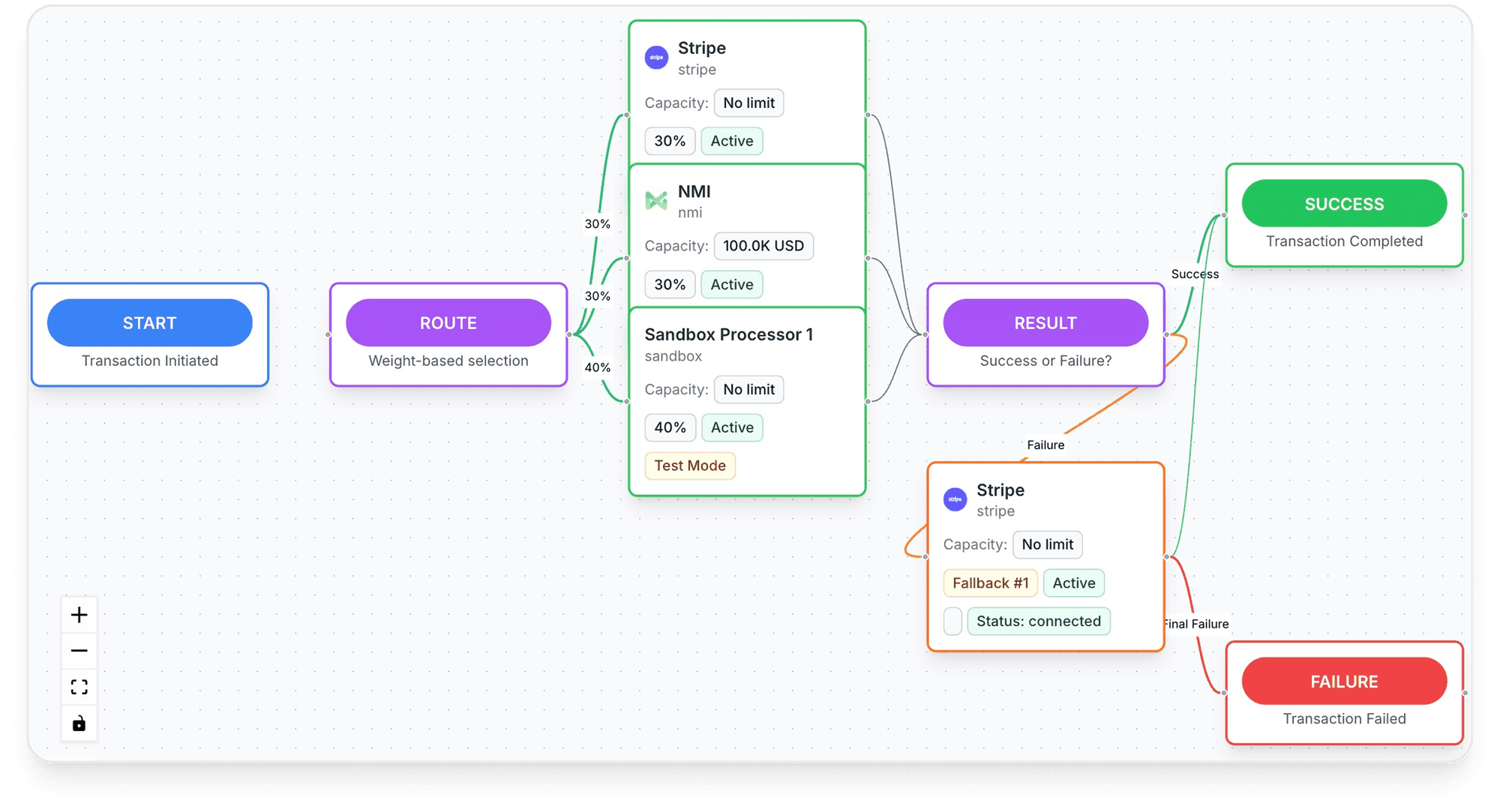
Inside Tagada
See every payment's route, processor by processor
Set the order your processors are tried in, per store, per country or per product.
Who can pay with each
Apple Pay works on iPhone, Apple Watch, Mac, iPad and Apple Vision Pro.10Apple, Apple Pay Apple keeps the list of countries and regions where cards can be added, covering North America, most of Europe and markets across Asia-Pacific, Latin America, the Middle East and Africa.12Apple Support, Countries and regions that support Apple Pay If the device or browser isn't supported, Stripe simply doesn't show the button, so your card form must still work on its own.1Stripe Docs, Apple Pay
PayPal works in any browser on any device, as long as the buyer has a PayPal account or uses guest checkout. Guest checkout is priced like PayPal Checkout, 3.49% + 49¢ in the US.5PayPal, Merchant and business fees (US), updated October 1, 2026 One limit to keep in mind: outside the US, guest checkout and standard card payments aren't covered by Seller Protection for sellers registered in a list of countries that includes France, Spain, Italy, the Netherlands, Australia and Singapore.6PayPal, Seller Protection Program, updated January 26, 2026
How to add each to your checkout
- Check your processor. Apple Pay is turned on through the processor that handles your cards. Apple's developer site points merchants to a list of payment providers that support it.11Apple Developer, Apple Pay
- Pick the checkout type. At Stripe, Apple Pay works on Payment Links and hosted Checkout with no extra configuration.1Stripe Docs, Apple Pay
- Register your domains for embedded forms. With Stripe Elements or embedded Checkout, register every domain and subdomain that shows the button, in test and live. Stripe handles Apple's merchant validation for you.1Stripe Docs, Apple Pay
- Open the sheet on the click. Apple requires a user gesture to open the payment sheet: trigger it directly from the button.1Stripe Docs, Apple Pay
- Add PayPal next to it. PayPal is added with its own buttons or SDK and its own account. If your processor doesn't offer PayPal, it runs as a separate payment provider.
Apple Pay is added through your processor, not signed up for with Apple directly.
Wallet buttons belong above the card fields, not below them. The layout side is covered in our guide to the online payment form.
PayPal Apple Pay integration in 2026
PayPal can process Apple Pay itself. Its developer guide, updated September 14, 2026, sets these conditions:8PayPal Developer, Apple Pay integration, updated September 14, 20269PayPal Developer, Save Apple Pay with the JavaScript SDK, updated October 1, 2026
| Requirement | What PayPal's docs say |
|---|---|
| Account | A business account approved by PayPal for Apple Pay |
| Buyer | In a region where Apple Pay is supported, on a device that supports it |
| Devices | iOS 12.1 or later, macOS 10.14.1 or later |
| Browsers | Safari; the latest Apple Pay SDK also lets customers pay from other browsers |
| Domains | Verify every domain that shows the button, sandbox and live; Apple rejects payments from unverified domains |
| Payments | One-time payments with the buyer present in the main guide |
| Recurring | A separate flow saves Apple Pay in PayPal's vault to charge later without the buyer present |
| Countries | A list of supported countries and currencies in the guide |
Good to know
PayPal's save-Apple-Pay guide notes that, under Apple's guidelines, Apple Pay can't be used as a payment method for returning buyers in that flow. Read it before you design a subscription checkout around it.9PayPal Developer, Save Apple Pay with the JavaScript SDK, updated October 1, 2026
PayPal's Apple Pay guide doesn't say which fee table or dispute rules apply to these payments. Ask PayPal whether they're treated as card payments, with the $20 chargeback fee, or as PayPal payments, before you compare them with Apple Pay on another processor.
Subscriptions and saved payments
Both can charge renewals, with different mechanics. At Stripe, Apple Pay supports recurring payments, and Stripe recommends Apple Pay merchant tokens for merchant-initiated charges: they link your business to the customer's Wallet and keep working when the customer moves to a new device.1Stripe Docs, Apple Pay At PayPal, a buyer can save Apple Pay or their PayPal account so you can charge later; PayPal creates a customer ID after the first successful payment.9PayPal Developer, Save Apple Pay with the JavaScript SDK, updated October 1, 2026
The difference is who holds the stored credential. A token issued through Stripe stays with your Stripe account, and a payment method saved in PayPal's vault stays at PayPal. Plan for that before you pick where renewals run.
Is Apple Pay better than PayPal for shoppers?
Some searches for "Apple Pay vs PayPal" come from shoppers. The short version from the official pages:
Apple Pay for the shopper
- Apple charges no fee to pay in stores, online or in apps; the card issuer may apply its usual fees10Apple, Apple Pay
- The card number isn't stored on Apple's servers or shared with merchants10Apple, Apple Pay
- Protection comes from the card issuer: a card chargeback
PayPal for the shopper
- Works on any device, and you can pay from a PayPal balance or a bank account
- Purchase Protection for items not received or significantly not as described7PayPal, Purchase Protection Program, updated January 26, 2026
- Item not received: open within 180 days of paying. Not as described: within 30 days of delivery, or 180 days of paying, whichever comes first7PayPal, Purchase Protection Program, updated January 26, 2026
For the merchant, the shopper's choice sets the rules: a card chargeback for Apple Pay, a PayPal dispute for PayPal.
Which one should your checkout offer?
| Your situation | What to show |
|---|---|
| Mostly mobile traffic, many iPhone users | Apple Pay first, then PayPal, then the card form |
| Buyers who ask for PayPal by name | PayPal button visible from the cart |
| Thin margins on small orders | Apple Pay on your card processor; check PayPal's cost per order |
| Many international buyers | Both; budget PayPal's +1.50% for buyers abroad |
| Digital or intangible products | Read Seller Protection's extra requirements before relying on it |
| Subscriptions | Store renewal credentials where renewals run: Stripe merchant tokens or PayPal's vault |
Verdict
Show Apple Pay to every buyer whose device supports it: it costs you your card rate and nothing more. Keep PayPal for the buyers who look for it, and know which of its fees and protections apply to your account.
How Tagada helps
Apple Pay in the Tagada checkout
The Tagada checkout supports Apple Pay and Google Pay, with one-click upsells, order bumps and A/B tests. Payments route across Stripe, Adyen and TagadaPay with one logic, with a cascade when one declines, and native 3DS2 covers card payments. The card vault moves customers between merchant accounts without collecting their cards again, so running subscriptions keep charging. See pricing for plans. Tagada follows Visa and Mastercard rules and the laws that apply to payments.
Frequently asked questions
Is Apple Pay better than PayPal?
Does Apple charge merchants a fee for Apple Pay?
What are the Apple Pay vs PayPal fees for a $100 order?
Can you accept Apple Pay through PayPal?
Is Apple Pay safer than PayPal?
Can a customer file a chargeback on an Apple Pay payment?
Sources
Checked October 14, 2026- Stripe Docs, Apple Pay
- Stripe Docs, Apple Pay liability shift, disputes, and refunds
- Stripe, How to accept Apple Pay from customers
- Braintree Developer Docs, Apple Pay overview
- PayPal, Merchant and business fees (US), updated October 1, 2026
- PayPal, Seller Protection Program, updated January 26, 2026
- PayPal, Purchase Protection Program, updated January 26, 2026
- PayPal Developer, Apple Pay integration, updated September 14, 2026
- PayPal Developer, Save Apple Pay with the JavaScript SDK, updated October 1, 2026
- Apple, Apple Pay
- Apple Developer, Apple Pay
- Apple Support, Countries and regions that support Apple Pay
- Stripe, Pricing (United States)
TagadaPay
Want Apple Pay at checkout without betting on one processor?
Tell us what you sell and how you sell it. Each application is underwritten, and approval is not guaranteed.
- 01Tell us what you sell and how
- 02Underwriting reviews your business
- 03Process through TagadaPay alongside your other processors