
Checkout Flow: Each Step, and What the Payment Does Behind It
Checkout flow step by step, cart to post-purchase, with what the payment does at each: tokens, 3DS, authorization, declines, capture and webhooks.

Article summary
TL;DR
A checkout flow is the sequence a buyer goes through from cart to confirmation: cart, contact details, shipping, payment, review, confirmation, then post-purchase. Behind the screens, the card is tokenized, authenticated with 3D Secure when the issuer asks, authorized, captured now or later, and a webhook tells your server to create the order.
- Seven steps on screen: cart, contact, shipping, payment, review, confirmation, post-purchase. Single-page and express checkouts merge them, they don't remove them.
- The card number should never touch your server: a hosted field turns it into a token, and the token is what you charge.
- The issuer decides whether 3D Secure is frictionless or a challenge. A successful 3DS makes liability shift likely, never guaranteed.
- A decline sends the buyer back to the payment step. The advice code tells you whether to ask for another card, retry, or fix the data.
- Create the order from the payment webhook, not from the thank-you page: the buyer may never load it.
 ChatGPT
 Claude
 Perplexity
 Grok
GrokOn this page
A checkout flow is what the buyer sees between the cart and the thank-you page. It is also what the payment does at the same time: a token, an authentication, an authorization, a capture and a webhook. Most guides describe only the first half. This one shows both, step by step, then the variants (single-page, express, guest) and how to test your own.
What is a checkout flow?
A checkout flow is the sequence of screens a buyer goes through to pay for a cart, from the cart page to the order confirmation. Most stores follow the same seven steps, whether they show them on one page or several.
Fig. 1The seven steps of an ecommerce checkout flow
- CartItems, quantities, discount
- ContactEmail, guest or sign-in
- ShippingAddress and method, final total
- PaymentCard, wallet or other method
- ReviewLast check, Place order
- ConfirmationOrder number, email
- Post-purchaseUpsell, tracking, account
single-page merges steps 2 to 5, it doesn't remove them
The flow ends when the order exists in your system and the buyer knows it. A charge that went through without an order behind it, or an order without a confirmed payment, is a broken flow even if the screens looked fine.
The checkout flow, step by step
| Step | What the buyer does | What happens on the payment side | What can go wrong |
|---|---|---|---|
| 1. Cart | Checks items, quantities, applies a code | The amount is known; a payment object can be created | Surprise costs later make the cart total meaningless |
| 2. Contact | Enters an email, signs in or continues as guest | A customer record exists only if they sign in or you create one | NoEmail means no receipt and no recovery message |
| 3. Shipping | Enters the address, picks a method | Taxes and shipping fix the final amount to authorize | The total changes after the card is entered |
| 4. Payment | Enters a card or taps a wallet | Tokenization, 3D Secure if the issuer asks, authorization | Decline, failed authentication, timeout |
| 5. Review | Checks the summary, clicks Place order | Confirmation of the payment, or authorization only | Double click, duplicate charge |
| 6. Confirmation | Sees the order number, gets an email | Webhook received, order created, capture now or later | Order not created if you rely on the redirect |
| 7. Post-purchase | Accepts an offer, creates an account, tracks the parcel | A new charge on the stored card, if consent was given | Charging a card you had no right to reuse |
The rest of this guide takes each step in that order. The screen design of each step (fields, layout, trust cues) is covered in our guide to checkout page design, and the list of fixes ranked by impact in ecommerce checkout optimization.
Step 1: the cart fixes what you will charge
The cart is where the buyer commits to an amount. On the payment side, it's the earliest point where you can prepare the payment. Stripe recommends creating the payment object as soon as you know the amount, so that every attempt is recorded, including the ones that fail.1Stripe Docs, How Payment Intents and Setup Intents work
That's also the argument for showing shipping, taxes and fees as early as you can. Every change to the total after the cart is a change to the amount you will ask the issuer to approve.
Step 2: contact details, guest or account
The email comes first because everything after depends on it: the receipt, the shipping updates, and the message you send if the buyer leaves before paying. Asking for it first also means you have it even when the payment fails.
The account question is the second decision. A guest checkout lets the buyer pay without a password; an account lets them reuse a saved address and card next time. You can offer the account after the purchase, once the order is placed. The trade-offs are covered in checkout as guest.
Guest
Email, address and payment. No password. Nothing is saved for next time unless the buyer ticks a box to save the card.
Sign-in
Address and saved cards filled in. Faster for returning buyers, a wall for new ones if it's required.
Account after purchase
The order is placed as a guest, then the confirmation page offers to create an account with the data already given.
Step 3: shipping sets the final amount
The shipping step turns a cart total into an amount to charge: address, method, taxes. Once the buyer reaches the payment step, the total should not move.
This matters for the payment too. Visa's rules expect a merchant to authorize the final amount when it's known, and reserve estimated authorizations for specific cases such as hotels and car rentals.6Visa Core Rules and Visa Product and Service Rules, April 18, 2026 An order total that changes after authorization means either a second authorization, a partial capture, or a refund.
Step 4: payment, and what happens behind the button
The buyer sees one form and one button. Behind it, four things happen in a few seconds.
Fig. 2What happens when the buyer clicks Pay
approved declined or closed routing step
- Payment formCard typed in a hosted field
- tokenizesProcessorReturns a token, not the number
- authenticatesIssuer (3DS)Frictionless or challenge
- authorizesIssuer (authorization)Approved or declinedApproved
the card number never touches your server
Tokenization: the card number stays out of your systems
With a hosted payment field or a hosted checkout, the card details go straight from the buyer's browser to the processor, which returns a reference you can use to charge. Stripe describes these integrations as a way to "securely collect and transmit payment information directly to Stripe without it passing through your servers, reducing your PCI obligations".11Stripe Docs, Integration security guide What comes back (card brand, last four digits, expiry date) is outside PCI scope and can be stored.11Stripe Docs, Integration security guide If your checkout handles raw card numbers, you take on the full set of PCI DSS controls instead. The difference between a token and encrypted data is explained in tokenization vs encryption.
Authentication: 3D Secure, frictionless or challenge
3D Secure is the protocol issuers use to check that the buyer is the cardholder. EMVCo, which manages the standard, describes it as a protocol that "enables consumer authentication" for card-not-present purchases, using data about "the transaction, payment method and device".3EMVCo, EMV 3-D Secure The issuer decides how the buyer is authenticated: "issuers can consider risk and regulatory factors in deciding how the customer will be authenticated".3EMVCo, EMV 3-D Secure
Frictionless flow
- Device and order dataSent to the issuer
- risk checkIssuer approvesNo screen for the buyer
The buyer clicks Pay and the payment goes on
Challenge flow
- Device and order dataSent to the issuer
- risk checkIssuer asks for proofOne-time code, app, fingerprint
One more screen: code, banking app or biometrics
At Stripe, 3DS runs automatically when a regulation requires it (Strong Customer Authentication in Europe), when an issuer asks for it with a soft decline, or when a fraud rule requests it. You can request a frictionless or a challenge flow, but "the issuer determines the ultimate authentication flow".2Stripe Docs, Authenticate with 3D Secure If authentication fails, the payment goes back to the payment step and the buyer has to try again or use another method.2Stripe Docs, Authenticate with 3D Secure Wallet payments and charges made while the customer is away (off-session) don't go through 3DS.2Stripe Docs, Authenticate with 3D Secure
3DS doesn't guarantee anything
Stripe is explicit: a successful 3DS authentication makes liability shift for fraud disputes likely, but "it isn't guaranteed for any specific payment or dispute". Disputes for other reasons, such as product not received, follow the normal process.2Stripe Docs, Authenticate with 3D Secure The full picture is in our guide to payment authentication.
Authorization: the issuer says yes or no
Once authentication is done (or skipped), the processor sends the authorization request. The issuer's systems look at spending habits, balance and card data (expiry date, address, CVC) and approve or decline.4Stripe Docs, Card declines On approval, the money is reserved on the card. Whether it's taken now or later depends on your capture setting, covered after step 5.
What happens when the payment is declined
A decline is the only checkout error most buyers can't fix by retyping a field. Stripe notes that issuers "categorize most declines as generic", and only discuss the exact reason with their cardholder.4Stripe Docs, Card declines The page has to tell the buyer what to do without knowing why.
Each decline comes with an advice code that tells you what the issuer expects next.4Stripe Docs, Card declines
- confirm_card_dataSome card data is wrong: number, expiry, CVC or addressHighlight the payment fields, keep the rest of the form filled
- try_again_laterThe decline may be temporaryLet the buyer retry, then suggest another card or a wallet
- do_not_try_againDon't use this card for this purchaseAsk for another payment method. Don't retry the same card
- 3DS failedThe buyer didn't pass the issuer's checkOffer to retry authentication or pay another way
When the buyer is in the checkout, Stripe's advice is to "prompt them to try their payment method again or ask for a new payment method".4Stripe Docs, Card declines Two limits apply to retries. Card networks cap how many times a single charge can be reattempted. At Visa, a decline the issuer marks as Category 1 (it will never approve) must not be retried on that card, and other declines allow up to 20 attempts in 30 days.6Visa Core Rules and Visa Product and Service Rules, April 18, 2026 Stripe recommends a maximum of eight retries, since issuers can read more as fraud.4Stripe Docs, Card declines And Visa forbids changing the data of an authorization request (acquirer country, MCC, POS codes, ECI) to get a declined payment through on a new attempt.6Visa Core Rules and Visa Product and Service Rules, April 18, 2026
Practical rule
After a decline, keep the cart, the address and the shipping choice. Show one plain sentence ("Your bank declined this payment. Check the card details or use another card.") and put the wallet buttons right next to it. Never show the raw decline code to the buyer.
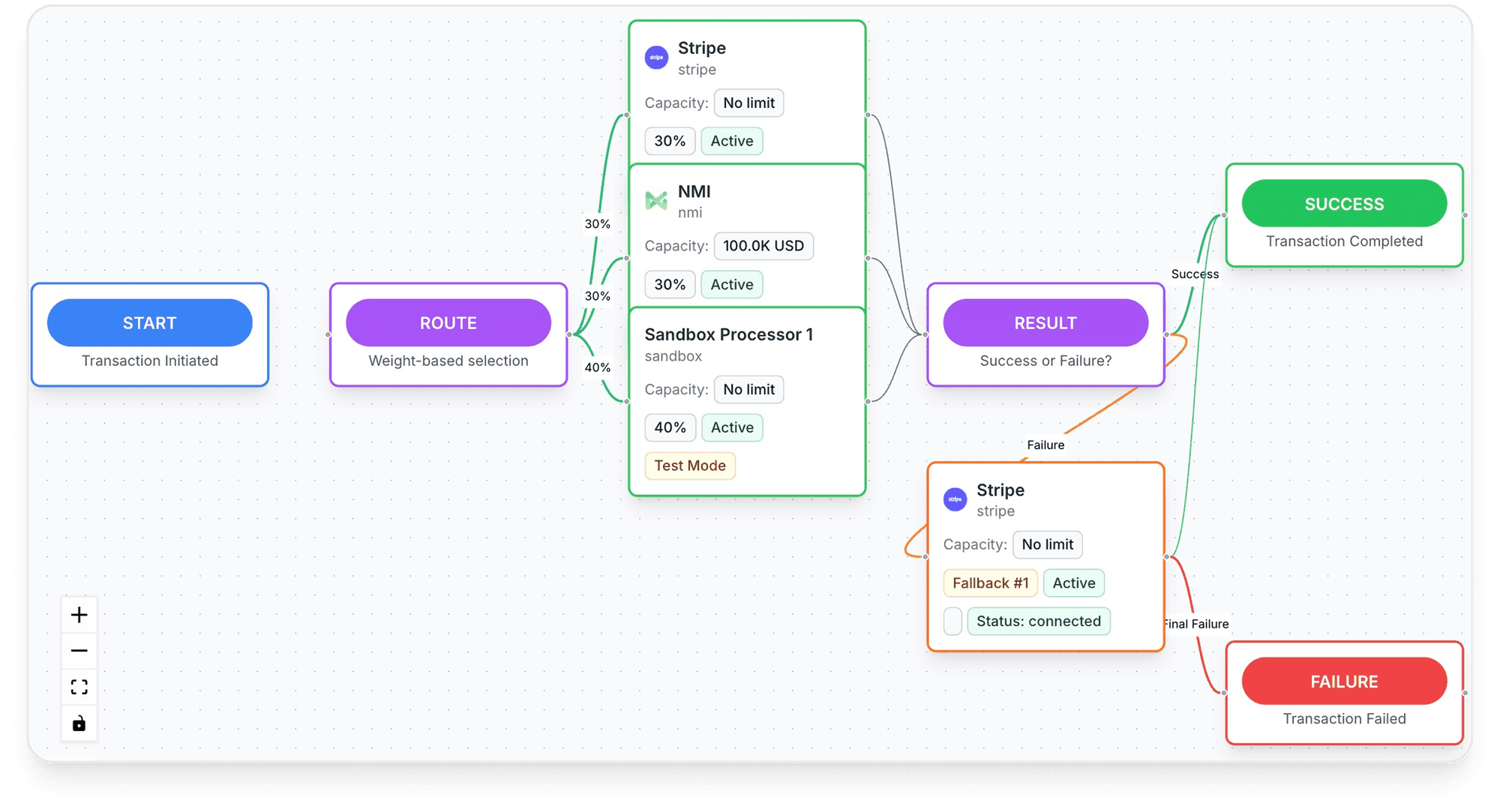
Routing a retryable decline to a second processor is a separate decision, with its own rules. It's covered in dynamic payment routing, and the metric that tracks it in payment acceptance rate.
Inside Tagada
See every payment's route, processor by processor
Set the order your processors are tried in, per store, per country or per product.
Step 5: review and place the order
In a multi-step checkout, the review screen shows the whole order one last time: items, address, shipping method, total, and the payment method chosen. In a single-page checkout, the summary sits next to the form and the Pay button does both. Shopify's checkout is one page by default, with a three-page layout as an option.13Shopify Help Center, Checkout styles Which to choose is covered in one page checkout.
Whatever the layout, two things matter on the payment side. The button should be disabled after the first click, so a second click doesn't send a second payment. And the amount shown must be the amount charged.
Capture: now or later
An approved authorization reserves the money. Capture is what takes it. By default, most processors do both at once. You can also authorize at checkout and capture later, which Stripe calls manual capture: the payment waits in a requires_capture state until you capture it.5Stripe Docs, Place a hold on a payment method
| Capture at checkout | Capture at shipping | |
|---|---|---|
| When it fits | Digital goods, stock on hand, shipping within a day or two | Pre-orders, made-to-order, orders often edited or canceled |
| If the order is canceled | A refund | A cancel: nothing is charged |
| Time limit | None | Online card authorization: 7 days at Stripe for most networks; Visa allows 10 days for a customer-initiated payment |
| Partial shipment | Refund the difference | Capture less: Stripe releases the rest |
| Risk | Refund costs and customer confusion if the order changes | The authorization expires before you ship |
Sources: Stripe, Place a hold on a payment method; Visa Core Rules, table 5-12.5Stripe Docs, Place a hold on a payment method6Visa Core Rules and Visa Product and Service Rules, April 18, 2026
If the authorization expires before you capture, the funds are released and the payment is canceled at Stripe.5Stripe Docs, Place a hold on a payment method The validity windows by network and the edge cases are in our guide to the pre-authorization hold.
Step 6: confirmation, created by the webhook
The confirmation page is what the buyer sees. The order should not depend on it. Stripe puts it plainly: you "can't rely on triggering fulfillment only from your checkout landing page, because it's not guaranteed customers visit that page". A buyer can pay and lose their connection before the page loads.7Stripe Docs, Fulfill orders (Checkout Sessions)
- The processor sends an event. At Stripe,
checkout.session.completedwhen the session is paid. Delayed methods such as bank debits sendcheckout.session.async_payment_succeededlater, or a failure event.7Stripe Docs, Fulfill orders (Checkout Sessions) - Your server verifies it. Check the webhook signature before acting on it.11Stripe Docs, Integration security guide
- You create the order once. The same event can arrive more than once, even at the same time: your order function must handle being called twice with the same payment.7Stripe Docs, Fulfill orders (Checkout Sessions)
- The landing page reads the same function. When the buyer does reach the thank-you page, run the same fulfillment check so the page shows the order right away.7Stripe Docs, Fulfill orders (Checkout Sessions)
- You confirm by email. The confirmation email is the buyer's proof that the order exists.
Source: Stripe Docs, Fulfill orders. The same logic applies to any processor that sends webhooks.
For subscriptions and delayed payment methods, webhooks aren't optional: the payment status changes after the checkout is over.7Stripe Docs, Fulfill orders (Checkout Sessions) If a webhook delivery fails, Stripe retries it several times.7Stripe Docs, Fulfill orders (Checkout Sessions)
Step 7: post-purchase upsell, email and statement
One-click upsell after checkout
A post-purchase offer is shown after the order is confirmed and before the thank-you page. The buyer adds a product without typing their card again, because the offer charges the card stored at checkout.
Shopify's documentation shows the conditions that apply on its platform: the page appears "after the order is confirmed, but before the Thank you page", the card "must be vaulted before the post-purchase offer is displayed", and offers are not surfaced when the buyer paid with a wallet or an installment service (Apple Pay, Google Pay, Klarna, Affirm and others). A buyer can accept up to three offers per checkout, and fulfillment waits until they reach the order status page or one hour passes.9Shopify Dev Docs, Post-purchase product offers
A stored card needs consent
Charging a saved card means the buyer agreed to it. Stripe's checklist before saving or charging a payment method: terms that say how the card will be used, use limited to that purpose, explicit consent (for example a "Save my payment method for future use" checkbox) and a record of the agreement.8Stripe Docs, Save a customer's payment method when they use it for a payment Our guide to saved payment methods covers the card network side, and 1-click upsell the offer itself.
The confirmation email and the name on the statement
The confirmation email and the bank statement are the two places the buyer checks after paying. They should match. A statement descriptor at Stripe is 5 to 22 Latin characters, must reflect your trading name, and can combine a fixed prefix of 2 to 10 characters with a dynamic suffix per order.10Stripe Docs, Statement descriptors Stripe notes that "clear and accurate statement descriptors can reduce chargebacks and disputes".10Stripe Docs, Statement descriptors
Fig. 3What the confirmation email should carry
- Amount charged
- $64.00 · Visa ending 4242
- Name on your statement
- NORTHLINE* ORDER 10482
- Post-purchase add-on
- $18.00 · charged to the same card, no new card entry
- Delivery
- Standard, 3 to 5 business days, tracking link to follow
- Help
- Reply to this email or visit the returns page
Illustrative record.
the buyer checks this against the bank app
What else belongs in that email is covered in payment confirmation email.
Checkout flow variants
The seven steps stay the same. What changes is how many screens they take and who fills them in.
| Variant | How the steps change | What changes on the payment side | Read more |
|---|---|---|---|
| Multi-step | One screen per step, review screen at the end | Authorization at the review step | One page checkout |
| Single-page | Contact, shipping, payment and review on one screen | Same payment, fewer page loads to lose the buyer | One page checkout |
| Express (wallets) | Contact, shipping and payment filled from the wallet in one tap | The wallet passes a token; no 3DS step at Stripe | Alternative payment methods |
| Guest | NoSign-in step | NoStored card unless the buyer opts in | Checkout as guest |
| Returning customer | Address and saved card filled in | Payment with a stored credential, CVC sometimes asked again | Saved payment method |
Express buttons can sit on the product page, the cart or the checkout. Stripe's Express Checkout Element, for example, shows Link, Apple Pay, Google Pay, PayPal, Klarna and Amazon Pay buttons, sorted by relevance to the buyer, and a button only appears if the buyer's device and currency support it.12Stripe Docs, Express Checkout Element Always keep a card form for the buyers who see no wallet.
How to map and test your own checkout flow
Map the flow from the payment events, not from the screens. A funnel that stops at "payment step viewed" can't tell a slow form from a declined card.
Events worth logging
- Checkout started, with device and country
- Payment attempted, with method and processor
- 3DS shown, and its result
- Payment declined, with decline and advice codes
- Order created from the webhook
Common blind spots
- Counting retries as new attempts, which inflates declines
- Firing "purchase" on the thank-you page, which misses buyers who never load it
- Mixing countries or card types when comparing processors
- Testing a design change and a routing change at the same time
To A/B test a checkout change, split traffic per session and measure completed orders per checkout started. To compare processors, compare authorization rates on similar traffic and count unique attempts: Stripe suggests excluding failed retries to get a clean view of authorization rates.4Stripe Docs, Card declines
Tagada's checkout flow
How Tagada helps
A checkout with upsells, 3DS2 and a cascade on decline
Tagada's checkout runs order bumps before payment and one-click upsells after it, with Apple Pay and Google Pay and A/B tests. TagadaPay runs native 3DS2 with device intelligence and a rules engine. Payments route across Stripe, Adyen and TagadaPay with one logic, with a cascade on decline, and the card vault moves customers between merchant accounts without collecting their cards again. It runs standalone or with Shopify, WooCommerce or a headless store. See pricing for plans. Tagada follows Visa and Mastercard rules and the laws that apply to payments.
Frequently asked questions
What are the steps of an ecommerce checkout flow?
How do payment declines impact checkout UX?
What happens after the customer clicks Pay?
Should I capture the payment at checkout or at shipping?
Can I offer a one-click upsell after checkout without asking for the card again?
How can merchants A/B test checkout flows and payment routing?
Sources
Checked October 14, 2026- Stripe Docs, How Payment Intents and Setup Intents work
- Stripe Docs, Authenticate with 3D Secure
- EMVCo, EMV 3-D Secure
- Stripe Docs, Card declines
- Stripe Docs, Place a hold on a payment method
- Visa Core Rules and Visa Product and Service Rules, April 18, 2026
- Stripe Docs, Fulfill orders (Checkout Sessions)
- Stripe Docs, Save a customer's payment method when they use it for a payment
- Shopify Dev Docs, Post-purchase product offers
- Stripe Docs, Statement descriptors
- Stripe Docs, Integration security guide
- Stripe Docs, Express Checkout Element
- Shopify Help Center, Checkout styles
TagadaPay
A checkout with upsells, 3DS2 and a second processor behind it
Tell us what you sell and how you sell it. Each application is underwritten, and approval is not guaranteed.
- 01Tell us what you sell and how
- 02Underwriting reviews your business
- 03Process through TagadaPay alongside your other processors