
A subscription payment clears in the processor, the customer reaches the thank-you page, and revenue lands in the ledger. Your analytics dashboard still shows no purchase because a browser blocked a script, consent changed during checkout, or the user closed the tab during a payment-provider redirect. For a low-value test order, that's frustrating. For a high-risk merchant managing rebills, refunds, and processor routing, it can distort decisions about cash flow, acquisition, and payment performance.
Server-side tracking with Google Tag Manager, usually called sGTM, addresses that gap by moving event processing into a server container you control. It doesn't make attribution perfect, eliminate consent obligations, or guarantee a conversion-rate increase. It does give your team a controlled place to validate, minimize, enrich, deduplicate, and route payment events before selected destinations receive them.
Why Client-Side Tracking Is Failing Merchants
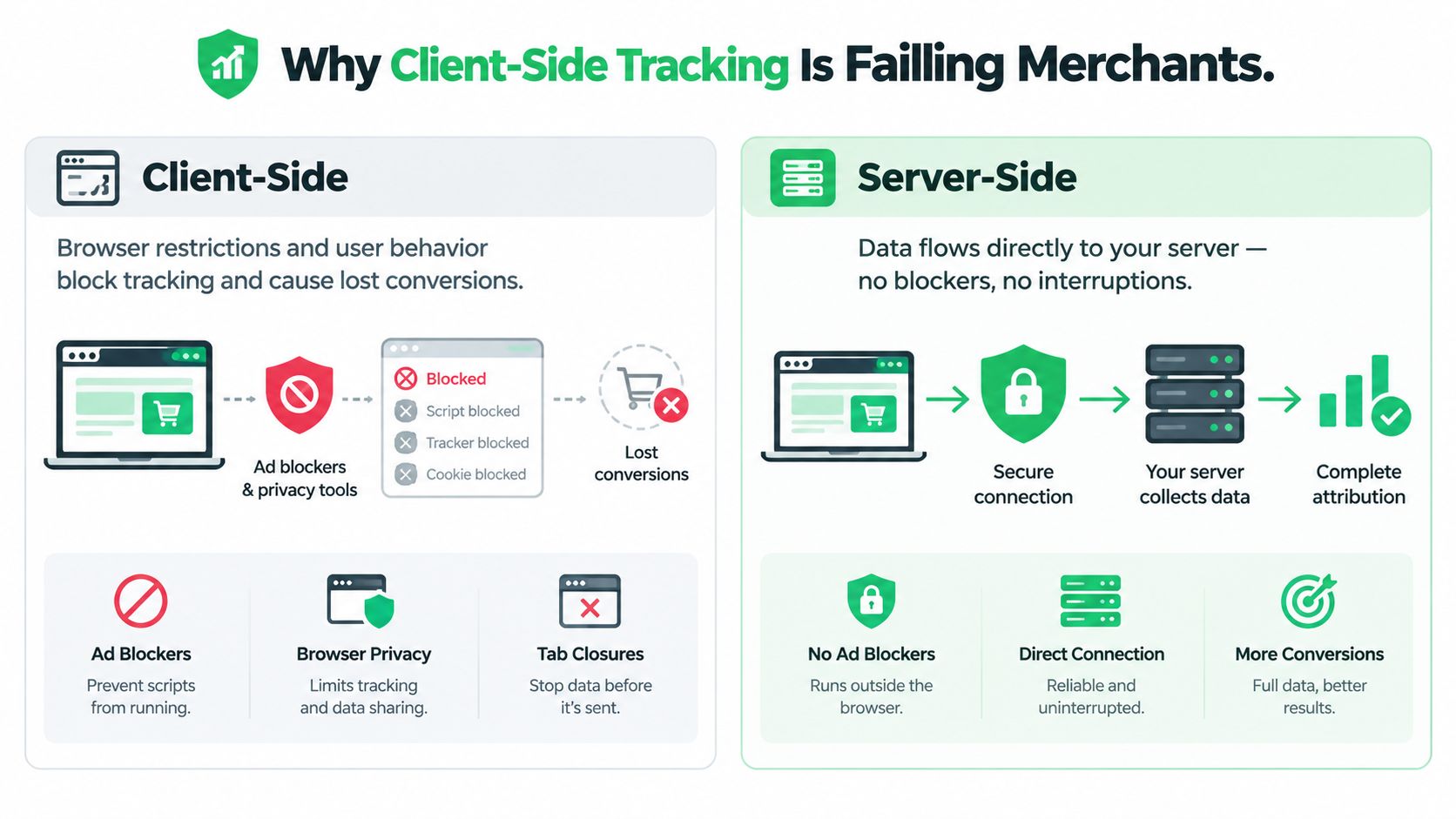
Client-side tracking depends on the customer's browser completing a long chain of tasks. The page must load the tag, the tag must execute, consent must permit the request, the browser must allow the destination, and the user must remain present long enough for the event to leave the page. A payment can succeed even when one of those conditions fails.
That creates a dangerous reporting split. The payment processor records an approved transaction, while Google Analytics or an advertising platform receives no purchase event. Subscription businesses feel this most sharply because renewals and failed-payment recovery often happen away from the original storefront session. A browser-based pixel isn't an authoritative payment ledger.
Google describes server-side tagging as moving measurement instrumentation out of a website or app into a server-side container running on Google Cloud Platform or another environment. User activity is processed on a server controlled by the implementer instead of directly in the browser, as documented in Google's server-side Tag Manager overview.
The browser remains useful, but it shouldn't own revenue truth
The practical architecture is hybrid. A lightweight web container captures consent-aware interactions, while the server receives the event and decides what happens next. This preserves browser context such as session and client identifiers without asking the browser to contact every advertising and analytics vendor independently.
For ecommerce teams evaluating server side tracking for eCommerce brands, the important distinction is control. Client-side tags can expose vendor-specific logic and send raw payloads directly from the page. sGTM lets the merchant screen the request, remove unnecessary fields, and route only approved data.
Revenue rule: Treat the payment ledger and processor response as the source of truth. Treat browser tracking as an input that needs validation.
A first-party collection endpoint can also reduce dependence on third-party requests and browser execution. That doesn't guarantee delivery, and it doesn't justify bypassing consent. It does provide a more stable event-processing layer for confirmed purchases, refunds, and subscription state changes.
Teams planning the migration should first document how their current setup behaves during redirects, one-click upsells, payment retries, and rebills. The comparison of server-side and client-side tracking is useful for mapping those failure points before changing production measurement.
Architecting Your First Server Container
A sound sGTM deployment starts with the request path, not with a collection of tags. The browser or app sends an event to a configured server container URL. A server-side Client recognizes and parses the incoming format, then server tags transform and transmit the approved event to destinations.
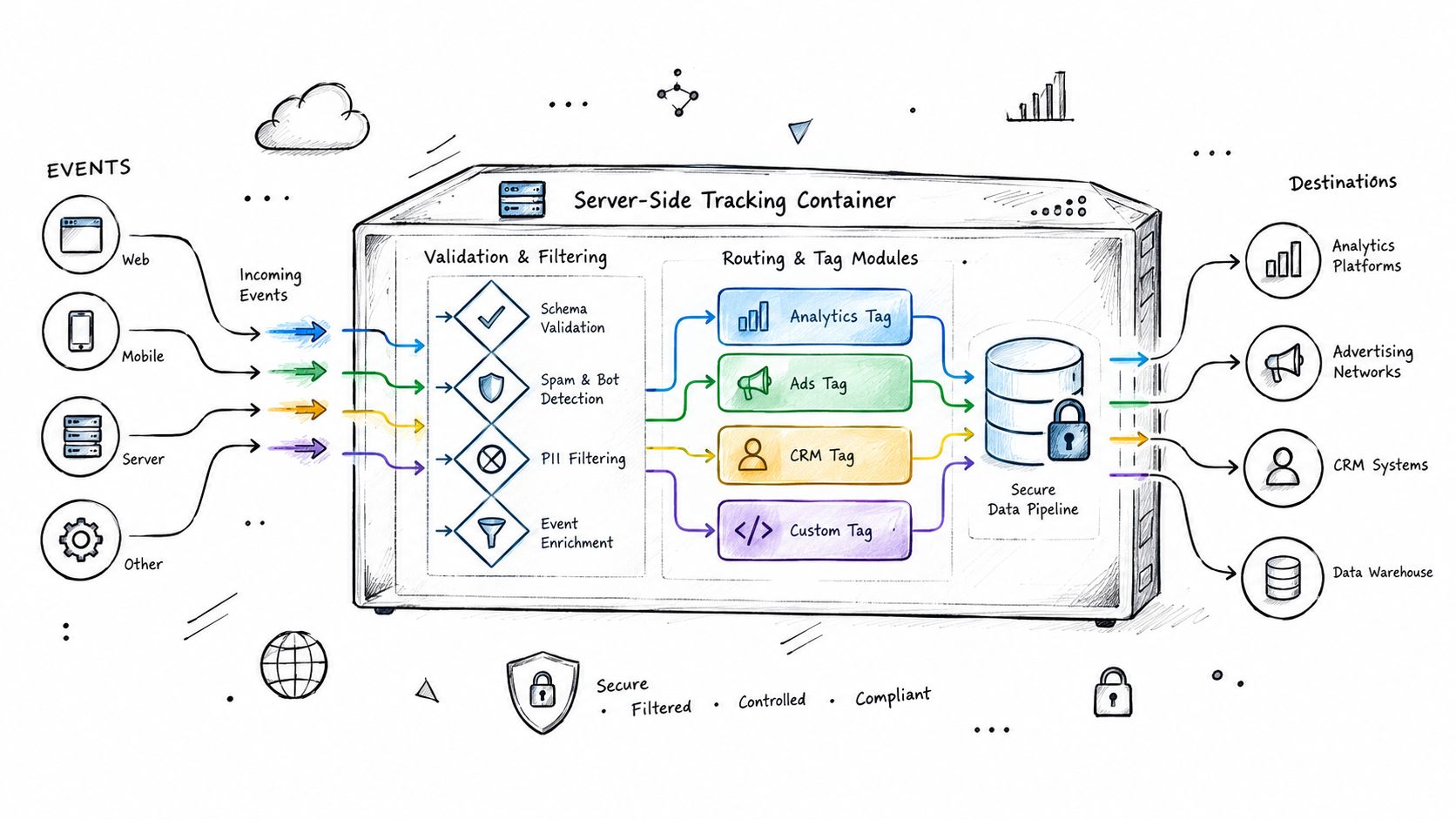
Google's architecture uses a two-stage flow. A Client in the server container receives incoming event data, and server tags decide how that data is processed or transmitted, as described in Google's server-side Tag Manager documentation.
Build the pipeline in a controlled order
Keep the web container lightweight. Capture interaction events and consent state, but avoid loading a separate browser script for every destination. The browser should provide the event context, not carry the full distribution workload.
Set
server_container_url. Configure the Google tag or Google Analytics setup to send requests to a first-party or branded collection endpoint. This is the handoff point between browser collection and server processing.Configure the Client. The Client acts as the adapter for incoming requests. It identifies the format, parses the payload, and exposes the event to server-side variables, triggers, and tags.
Validate before forwarding. Check event names, consent signals, identifiers, currency, value, transaction ID, and required commerce fields. Reject or quarantine malformed purchase events instead of allowing incomplete revenue data downstream.
Apply transformations. Remove unnecessary personal information, normalize naming, and enrich events with trusted backend fields where appropriate. Server-side JavaScript is sandboxed, and permissions and policies restrict what custom tags can do.
Route selected destinations. Send the normalized event to GA4, Google Ads, Floodlight, or other approved endpoints. One incoming event can support multiple downstream requests without exposing every vendor to the original browser context.
Compare before publishing. Run the web container, server container, payment ledger, and destination reports in parallel. Don't judge the migration by whether a preview request appears successful. Judge it by transaction-level reconciliation.
Cloud Run is one hosting option, but the container can run on Google Cloud Platform or another supported environment. Hosting choice affects operations, regional routing, logging, scaling, and cost, so production design should include ownership for uptime and observability.
A first-party endpoint matters because the collection request is associated with the merchant's domain rather than being sent directly to each vendor. It isn't a privacy loophole, and it won't make every browser restriction disappear. It does create a clearer boundary where the merchant can decide what data leaves the environment.
For a practical implementation sequence, the server-side tracking setup guide can sit alongside Google's documentation during planning. Test the endpoint, inspect incoming requests in GTM Preview, verify downstream responses, then publish only after the same event behaves correctly across success, retry, cancellation, and duplicate-request paths.
<iframe width="100%" style="aspect-ratio: 16 / 9;" src="https://www.youtube.com/embed/vm8u4BckuRI" frameborder="0" allow="autoplay; encrypted-media" allowfullscreen></iframe>
Routing Payment and Subscription Events
A purchase event shouldn't mean “the customer reached the confirmation page.” It should mean the payment service provider confirmed a successful transaction, the merchant has an authoritative order state, and the event contains enough information for every downstream system to identify it consistently.
Google's recommended pipeline begins with a lightweight web container, a configured server_container_url, a server Client, and validation of event names, schemas, consent signals, identifiers, and commerce fields, as set out in the server-side Tag Manager API guidance.
Define an event contract
Create a single commerce schema before building destination tags. At minimum, decide how the system represents:
- Purchase: A confirmed transaction ID, value, currency, item or offer context, processor status, and consent state.
- Refund: The original transaction ID, refunded amount, currency, refund timestamp, and reason or processor status when available.
- Renewal: Subscription ID, billing-cycle state, successful payment status, value, currency, and the relationship to the original customer or order.
- Failed payment: Attempt ID, subscription ID, failure state, retry status, and whether the customer remains active.
- Chargeback or dispute: The linked transaction ID, processor state, and the internal action taken on the subscription or order.
The schema should distinguish an attempted payment from a successful payment. A declined card, a pending bank transfer, and a confirmed capture aren't interchangeable marketing conversions.
Normalize once, route many times
The server container is the right place to standardize field names and apply business rules before delivery. If one processor reports a transaction value as a decimal string and another returns a numeric field, normalize both into the same internal representation before sending the event to GA4 or an advertising platform.
Use a stable transaction or event identifier across browser and server paths. If the browser sends a purchase and the backend sends the confirmed purchase, both requests need a common identifier so destinations can deduplicate them. The server should also tolerate retries without creating a second conversion.
For subscription businesses, don't trigger a renewal from a customer visiting an account page. Emit it from the payment or subscription system after the processor confirms the rebill. Backend webhooks, order status, and tracking should meet here. A customer can close the page, change devices, or never return to the storefront, but the merchant still needs the renewal represented accurately.
A workflow resource such as Shopify support automation can help teams think through operational events around orders and customer communication. The tracking design still needs its own contract, consent logic, and reconciliation process.
Use the GA4 ecommerce event reference for Tagada implementations to align event naming and commerce parameters, then test each event against the actual processor response. Server-side routing improves control, but it doesn't repair an unreliable payment state model.
Privacy Controls and Compliance in sGTM
Server-side tracking is a governance layer, not a compliance certificate. Moving collection from the browser to a merchant-controlled server can improve data control, but it also concentrates responsibility. The server now becomes the place where payment, subscription, identity, and consent signals may meet.
Google identifies consent and data minimization as controls available within the server container. Requests can be evaluated, user data can be anonymized, event parameters can be validated, and individual HTTP requests can be blocked before selected marketing partners receive them, as explained in Google's server-side tagging fundamentals.

Consent must travel with the event
A browser consent signal can be missing, withdrawn, or region-specific by the time a payment webhook arrives. Your server should have a defined policy for each event class instead of assuming that every backend event can be forwarded automatically.
Ask four questions for every destination:
- What is the lawful basis? Document whether the event needs consent, contractual necessity, fraud prevention, or another approved basis.
- What data is necessary? Keep payment confirmation, currency, value, and transaction identifiers separate from unnecessary personal information.
- What happens after withdrawal? Define how later events are blocked, limited, or associated with deletion workflows.
- Who receives the event? Vendor-specific consent rules should be enforced before routing, not after transmission.
The compliance risk can increase when teams centralize data without centralizing controls. A server that forwards every identifier to every vendor is easier to operate than a governed pipeline, but it creates a wider blast radius when configuration or access controls fail.
Payment monitoring adds another reason to preserve clean transaction identity. One published summary of Visa and Mastercard program thresholds describes a high-risk threshold involving 100 chargebacks and a 1% chargeback-to-sales-transaction ratio (Moneris' chargeback risk thresholds guide). sGTM doesn't alter card-network rules. It can help teams reconcile processor events, refunds, rebills, and disputes against the correct transaction denominator.
Integrating Server-Side Data with Payment Workflows
A customer may complete checkout, follow a processor redirect, and still leave the order in a pending state. Subscription merchants face the same uncertainty during retries, delayed webhooks, rebills, refunds, and chargebacks. Model these transitions as a payment state machine so tracking reflects the ledger state that affects revenue.
Google's server-side model sends website or app events through a merchant-controlled server container. With server_container_url, the container can validate, parse, anonymize, or block requests before forwarding approved data to analytics and advertising platforms, as described in Google's server-side tagging introduction.
Tie tracking to the payment state machine
Create event rules for each lifecycle state: checkout initiated, payment pending, payment captured, payment failed, refund issued, subscription renewed, rebill failed, and chargeback received. A return URL can move an order into a review queue, while a verified webhook can move it to captured. Keep those transitions separate so a redirect, retry, or delayed notification cannot prematurely trigger revenue reporting.
Define retry handling at the state-machine level. A failed authorization should remain an operational event until a later attempt reaches a confirmed state. Repeated webhook deliveries should update the existing state safely, with downstream systems receiving the intended lifecycle change once.
Emit the renewal event directly from the subscription system when the processor confirms the rebill. Send the associated subscription status, currency, value, order reference, and consent decision to the server container, then apply destination-specific rules before forwarding. Use the GA4 ecommerce event reference for Tagada implementations to align event names before connecting them to processor states.
Tagada can emit backend-originated postbacks and forward confirmed purchase events to Google's Measurement Protocol. A web container can continue supplying session and attribution context. For merchants automating customer and order workflows, Shopify support automation can complement these payment-state integrations.
Troubleshooting Reconciliation and Deduplication
The most reliable sGTM teams don't ask whether the tag fired. They ask whether the same transaction moved correctly through every layer. A green response in GTM Preview proves that a request was handled, not that the event was accepted by the destination or matched to the payment ledger.
Google identifies request consolidation and centralized governance as the main engineering advantages, not a guaranteed conversion-rate uplift. In a client-only design, one browser event can contact multiple vendors. With sGTM, the client can send one HTTP request to the server container, which then creates vendor-specific requests, as explained in Google's server-side data delivery guidance.
Reconcile four versions of the event
Track these layers separately:
- Browser-originated events: What the web container attempted to send.
- Server-received events: What the Client parsed at the collection endpoint.
- Valid events: What passed schema, identifier, and consent checks.
- Destination-accepted events: What GA4, Google Ads, or another platform accepted.
Compare the layers by browser, region, consent state, device, and event type. A total count can hide a failure that affects only Safari users, a payment redirect, or a particular processor.
Common defects have recognizable signatures:
- Duplicate purchases: The browser and backend both send a purchase without a shared stable identifier.
- Missing sessions: Measurement Protocol events arrive without the client-side identifiers or
session_idneeded for session attribution. - Inflated renewals: A webhook retry creates another conversion because the pipeline lacks idempotency.
- Unmatched refunds: The refund doesn't carry the original transaction ID, so revenue reports remain overstated.
- Unexpected “not set” attribution: The server receives the event but lacks the session context required by the analytics platform.
Use GTM Preview and server logs for functional checks, then monitor production latency, HTTP errors, rejected payloads, and destination response codes. For subscription commerce, reconcile daily against the payment ledger, including paid transaction IDs, refunds, renewals, and chargebacks. Accurate deduplication is a revenue-control process, not a dashboard cleanup task.
Comparing Client-Side and Server-Side Strategies
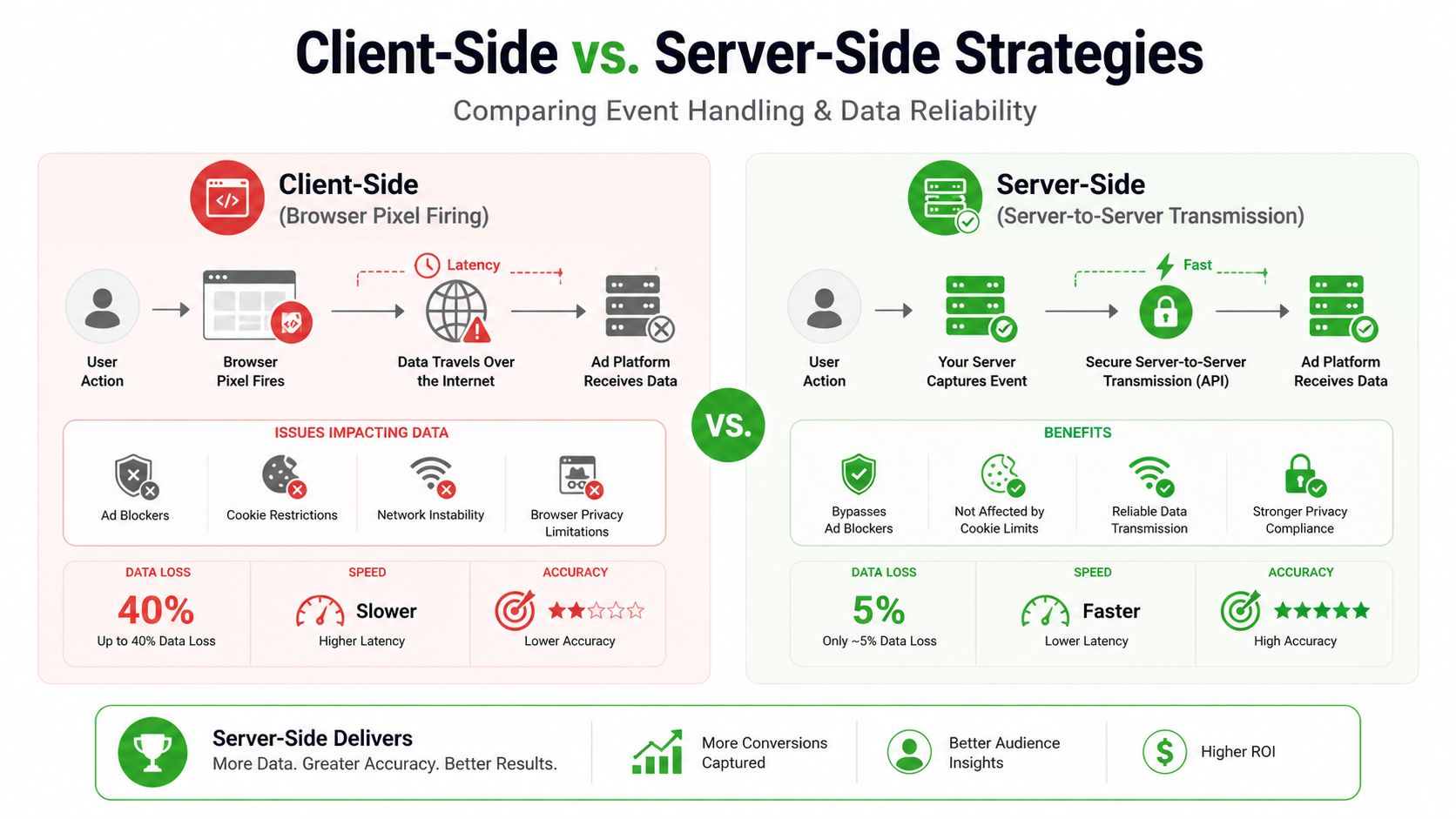
Client-side tagging remains useful for browser interactions, consent collection, and session context. Server-side tagging becomes more valuable when the event depends on processor truth, needs transformation, or must be distributed to several approved destinations.
The right design is usually not browser versus server. It is a deliberate split between interaction capture and authoritative event processing.
| Dimension | Client-Side (Browser) | Server-Side (sGTM) |
|---|---|---|
| Execution | Tags run in the customer's browser | Events are processed in a merchant-controlled server container |
| Payment confirmation | Often depends on page or redirect completion | Can use processor-confirmed backend events |
| Data control | Each vendor may receive browser-side payloads directly | The merchant can validate, transform, minimize, and route data |
| Consent enforcement | Applied before browser requests leave the page | Rechecked at the central collection and routing layer |
| Attribution context | Strong access to browser and session signals | Requires identifiers to be passed consistently |
| Operational burden | Simpler to launch, harder to govern at scale | More infrastructure, testing, monitoring, and ownership |
| Best fit | Interaction events and lightweight collection | Purchases, refunds, renewals, retries, and controlled distribution |
The infographic's 40% client-side data loss versus 5% server-side comparison should not be used as a planning benchmark. Those figures aren't part of the verified evidence for this guide, and sGTM doesn't guarantee a fixed loss rate. Measure your own browser, server, valid-event, destination, and ledger outcomes instead.
For merchants whose revenue depends on reliable checkout and subscription state, Tagada combines checkout, payment orchestration, payment webhooks, subscription management, and server-side tracking so backend events can support attribution without relying solely on the customer's browser. Visit Tagada to assess how a controlled payment and tracking layer could fit your processor routing, rebill, and reconciliation workflows.