
AI Tools for Ecommerce: What They Do, Job by Job, and What You Still Check
AI tools for ecommerce sorted by job: content, support, search, ads, fraud and analytics, read on vendors' own pages, with what a person must still check.

Article summary
TL;DR
AI tools for ecommerce do six jobs: write catalog content, answer customers, rank search and recommendations, run ad delivery, score payments for fraud, and predict buyer behavior. Shopify, Stripe, Meta, Google, Visa and Mastercard all document AI in these jobs. In each one, a person still owns the claims, the rules and the final call.
- Sort AI tools by the job they do, not by brand: content, support, search and recommendations, ads, fraud and payments, analytics.
- Generative AI drafts text and images for you to review. Predictive AI scores and ranks in real time, and you set the thresholds it works within.
- Every vendor page we read on October 14, 2026 keeps a person in the loop: Shopify says AI output can contain errors, and Sidekick presents changes for review.
- From August 2, 2026, the EU AI Act requires chatbots to tell people they are talking to an AI, unless it's obvious. In the US, the FTC says there is no AI exemption.
- Fraud AI runs at two levels: your processor (Stripe Radar scores each payment) and the card networks (Visa and Mastercard score transactions for the issuing banks). You only control the first.
 ChatGPT
 Claude
 Perplexity
 Grok
GrokOn this page
Most lists of AI tools for ecommerce rank a dozen apps and stop there. This guide sorts them by the job they do in a store, from the vendors' own help pages and docs, read on October 14, 2026. For each job, it shows what the AI actually does and what a person still has to check. No rankings and no productivity statistics.
What counts as an AI ecommerce tool?
Two kinds of AI sit behind the tools on this page. They behave differently, and they need different kinds of oversight.
Generative AI: it drafts
Writes product descriptions, pages, emails and support replies, edits images. Output waits for your review, then you publish.
Predictive AI: it scores and ranks
Scores a payment for fraud, ranks search results, picks who sees an ad, predicts the next order. Runs live, inside limits you set.
Assistants: they act
Agents like Shopify Sidekick analyze data and make changes in your admin. Sidekick presents changes for your review before applying them.
The practical difference: with generative AI, you check the output before it goes out. With predictive AI, you can't check each decision, so you check the settings, the thresholds and the results over time.
AI ecommerce tools by job
Here are the six jobs, with examples taken only from official vendor pages. The last column is the part no tool does for you.
| Job | Tool type | Examples (official pages) | What a person must check |
|---|---|---|---|
| Catalog and content | Generative text and image | Shopify Magic and Sidekick: product descriptions, store pages, emails, image edits1Shopify Help Center, AI features in the Shopify admin, read October 14, 20262Shopify Help Center, Sidekick, read October 14, 2026 | Every factual claim, sizes and ingredients, Merchant Center attributes for AI text |
| Customer support | Reply suggestions, chatbots, AI agents | Shopify Inbox suggested replies1Shopify Help Center, AI features in the Shopify admin, read October 14, 2026; Gorgias AI Agent4Gorgias, AI Agent product page, read October 14, 2026 | AI disclosure (EU), refund and return answers, handover to a person |
| Search and recommendations | Ranking and recommendation models | Algolia NeuralSearch and AI Ranking9Algolia, AI Search product page, read October 14, 2026; Shopify related products8Shopify Help Center, Product recommendations, read October 14, 2026 | Pinned products and rules, out-of-stock items, margin of what gets pushed |
| Ads | Automated delivery and bidding | Meta Advantage+ sales campaigns10Meta for Business, Meta Advantage+, read October 14, 2026; Google Performance Max11Google Ads Help, About Performance Max campaigns, read October 14, 2026 | Conversion tracking, product feed, brand exclusions, ad claims |
| Fraud and payments | Risk scoring | Stripe Radar13Stripe Docs, How Radar works, read October 14, 2026; Visa Advanced Authorization15Visa, Optimize authorization performance with Visa Protect, read October 14, 2026; Mastercard Decision Intelligence16Mastercard Newsroom, Mastercard supercharges consumer protection with gen AI, February 1, 2024 | Risk setting, custom rules, manual review queue, false declines |
| Analytics and retention | Predictive metrics, assistants | GA4 purchase and churn probability17Google Analytics Help, Predictive metrics, read October 14, 2026; Klaviyo predicted CLV and churn risk18Klaviyo Help Center, Understanding Klaviyo's predictive analytics, updated August 5, 2025; Sidekick2Shopify Help Center, Sidekick, read October 14, 2026 | The tracking behind the numbers, eligibility thresholds, what the prediction triggers |
The sections below take each job in turn.
Catalog and content: Shopify Magic and Sidekick
This is the most documented job. Shopify's help center lists what its AI does in the admin:1Shopify Help Center, AI features in the Shopify admin, read October 14, 2026
- Generate text: product descriptions, online store pages, blog posts, Shopify Messaging emails and theme editor content.
- Images: change an image from a text prompt, or replace its background with a color.
- Products: suggest a product category and category metafields from the product details.
- Customers: a plain-language description of each customer segment you create.
- Themes: generate a personalized theme from a business description, and theme blocks from a text prompt.
Sidekick, the admin assistant, "can handle tasks" such as analyzing data, managing orders and editing products, and creates content like blog posts, product descriptions and images.2Shopify Help Center, Sidekick, read October 14, 2026 The page also says it "presents changes for your review before applying them."
The same help center states the rule plainly:
AI outputs can contain errors, so review anything a tool creates or changes.
Two checks matter for a product brand. First, the facts: an AI description can invent a material, a size or a benefit that reads well and isn't true. Second, the feed. If those descriptions go to Google Shopping, Merchant Center says descriptions created with generative AI "must be provided using the structured description" attribute, with the value trained_algorithmic_media, and the same applies to titles. AI-generated product images must carry metadata saying so, and you must not strip it.3Google Merchant Center Help, AI-generated content
What AI does in funnel and page builders (ClickFunnels, HighLevel, Systeme.io) is covered task by task in AI funnel builder.
Customer support: chatbots and AI agents
Support AI comes in three strengths:
- Reply suggestions. Shopify Inbox gives "AI-generated instant answer suggestions and suggested replies" for customer conversations.1Shopify Help Center, AI features in the Shopify admin, read October 14, 2026 A person still sends the message.
- Chatbots that answer common questions alone, then pass the rest to a person.
- AI agents connected to your store data. Gorgias describes its AI Agent as "built specifically for ecommerce to sell, support, and engage customers 24/7", with integrations for Shopify and BigCommerce.4Gorgias, AI Agent product page, read October 14, 2026
The more the bot can do on its own (cancel an order, promise a refund), the more its answers become your commitments. Two sets of rules apply.
EU AI Act, Article 50. From August 2, 2026, AI systems "intended to interact directly with natural persons" must be designed so that people are "informed that they are interacting with an AI system", unless it's obvious to a reasonably well-informed person.5Regulation (EU) 2024/1689 (AI Act), Articles 50 and 113 The information must be given "in a clear and distinguishable manner at the latest at the time of the first interaction". The duty falls on the provider of the system. If you install a vendor's bot, check that it says it's an AI. If you build your own, the duty is yours.
FTC. In the US, Section 5 of the FTC Act bans "unfair or deceptive acts or practices in or affecting commerce", whoever or whatever wrote the sentence.715 U.S.C. § 45, FTC Act Section 5 (Cornell LII) When it announced Operation AI Comply in September 2024, the FTC's chair said: "there is no AI exemption from the laws on the books."6FTC, FTC Announces Crackdown on Deceptive AI Claims and Schemes (Operation AI Comply), September 25, 2024 One of the five cases targeted Rytr, an AI writing tool whose generated reviews "almost certainly would be false" for the users who published them.
- Answers product questionsIts claims are your claims (FTC Section 5)Feed it your approved product facts only
- Talks to EU shoppersMust say it's an AI from the first message (AI Act art. 50)Check the opening message in every language
- Promises a refund or a delivery dateA commitment the customer can hold you toLimit it to your written policy, or hand over
- Writes or requests reviewsFake or AI-written reviews are a target of FTC actionNever let it draft testimonials
- Can't answerThe customer may turn to the bank insteadClear handover to a person, with the order history
The last line matters more than it looks. A customer who can't reach anyone about a missing order often files a dispute instead. The link between support and disputes is in chargeback prevention.
Search and recommendations
Here the AI ranks rather than writes. You rarely see a single decision, so you judge it by what it pushes and what it hides.
Shopify product recommendations come in two types. Related products ("similar to a selected product") are generated automatically for each product. Complementary products ("often bought in addition") are ones you select manually in the Search & Discovery app.8Shopify Help Center, Product recommendations, read October 14, 2026 You can't edit the generated list, but you can add your own picks, show both, or hide the generated ones product by product.
Fig. 1Where Shopify's related-product recommendations come from
 Purchase historyNeeds previous sales to assess buying behavior
- Product descriptionOnly for merchants with an English storefront
- Related collectionsFallback when the other two aren't available
- Your manual picksUp to 10 related and 10 complementary per product
Three sources, then your overrides.
Algolia, a search provider many stores plug in, describes NeuralSearch as "hybrid vector and keyword-powered search", and AI Ranking that "uses real interaction data to refine relevance". It also lets you "set rules to promote or demote specific items" and curate results for campaigns.9Algolia, AI Search product page, read October 14, 2026
What to check: that rules you write (pinned products, hidden items) still apply, that out-of-stock items don't lead a page, and that the model doesn't push low-margin products because they sell. A ranking tuned on clicks optimizes for clicks. More on how recommendation systems work in what is a recommendation engine.
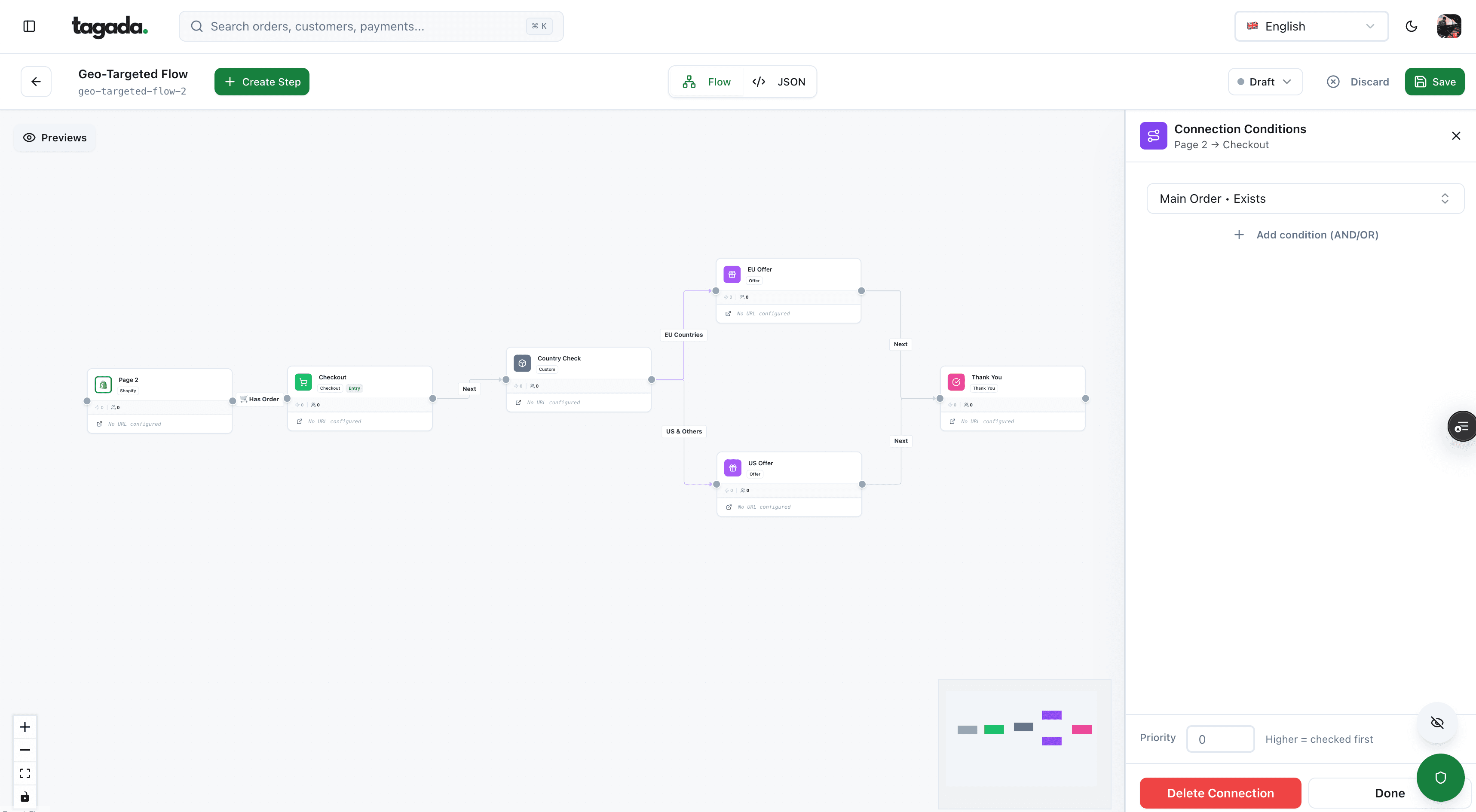
Inside Tagada
Build the funnel once, route every customer to the right offer
Checkout, upsells and subscriptions on one flow, with conditions per country, order or customer.
Ads: Meta Advantage+ and Google Performance Max
Ad platforms now run most of the delivery with AI. Your inputs decide what it optimizes toward.
Meta describes Advantage+ as "a suite of products that can help you enhance and optimize campaign performance through industry-leading AI and automation", designed to "automatically apply AI across your campaign's audience, placement and budget". Advantage+ sales campaigns were "formerly known as Advantage+ shopping campaigns".10Meta for Business, Meta Advantage+, read October 14, 2026
Google calls Performance Max "a goal-based campaign type" that combines your assets and settings with Google AI, across "all Google Ads inventory, including YouTube, Display, Search, Discover, Gmail, and Maps, from a single campaign".11Google Ads Help, About Performance Max campaigns, read October 14, 2026
| What the AI decides | What you provide and control | |
|---|---|---|
| Meta Advantage+ | Audience, placements and budget across the campaign10Meta for Business, Meta Advantage+, read October 14, 2026 | Creative, product catalog, the conversion event you optimize for |
| Google Performance Max | Which inventory and which combination of assets serves11Google Ads Help, About Performance Max campaigns, read October 14, 2026 | Assets, data feeds, conversion goals with an optional ROAS or CPA target, audience signals, brand exclusions and negative keywords |
Both systems learn from the conversions you send them. If the purchase event fires twice, or only half the orders are reported, the AI optimizes toward the wrong signal. That's why server-side tracking matters before you hand the budget to automation: see what is server-side tracking.
Two other checks. Meta labels ad images "created or edited using third-party AI tools" with "AI info", apart from minor edits.12Meta, How AI-generated images in ads are identified and labeled And an AI-written ad claim is still your claim under FTC rules, as above. The ad and shopping platform rules for AI-made content are detailed in AI funnel builder.
Fraud and payments: AI that scores every transaction
Fraud scoring is one of the oldest uses of machine learning in ecommerce. It runs at two levels, and only one of them is yours to tune.
Fig. 2Two layers of AI score a card payment
approved declined or closed routing step
- CheckoutCustomer pays
- screened by
 Processor fraud modelStripe Radar scores 0–99, blocks or allows per your setting
 - sent to

 Network risk scoreVisa VAA, Mastercard Decision Intelligence
 - scored forIssuing bankApproves, declines or flagsApproved
You tune the first. The bank decides at the second.
At the processor: Stripe Radar
Stripe's plan comparison describes its entry plan, Radar Lite, as "AI-based fraud prevention for payments and card testing".13Stripe Docs, How Radar works, read October 14, 2026 The risk settings page adds: "Risk controls use AI to protect your account." Concretely:14Stripe Docs, Risk settings and risk controls, read October 14, 2026
- Radar assigns each payment scores between 0 and 99, such as a fraudulent dispute score, and an overall risk level: Normal, Elevated or Highest. Stripe notes that "Elevated" "doesn't mean the payment is fraudulent" and that normal risk "doesn't guarantee that the payment is legitimate".
- You pick a risk setting: maximize protection, balance risk and revenue, or maximize revenue. "Each risk control uses individualized machine learning", and the Dashboard shows the estimated fraud blocked and payments accepted, based on your last four months.
- Adaptive 3DS: "Stripe runs machine learning in the background to authenticate medium-risk payments."
- Dynamic risk thresholds: Stripe "continuously monitors for fraud trends using machine learning" and temporarily blocks more payments when your account is under fraud pressure.
The plan matters. Per Stripe's comparison table, risk scores, custom rules with backtesting and manual reviews come with Radar Plus and Pro, not Lite or Standard. Standard, Plus and Pro charge a fee for each screened transaction.13Stripe Docs, How Radar works, read October 14, 2026
The trade-off you own
A fraud model never removes the choice, it moves it to a setting. Block more and you lose good customers to false declines. Block less and fraud disputes count toward card network monitoring programs. Stripe frames its own risk settings exactly that way: protection on one side, revenue on the other.
At the card networks: Visa and Mastercard
Visa describes Visa Protect as a "suite of AI-powered fraud prevention solutions" for banks. "The VAA risk score helps issuers better detect fraud at the time of authorization", and Visa Advanced Authorization "evaluates up to 400 unique attributes per transaction".15Visa, Optimize authorization performance with Visa Protect, read October 14, 2026 Mastercard says its Decision Intelligence "helps banks score and safely approve 143 billion transactions a year", and that the Pro version, announced February 1, 2024, works "by assessing the relationships between multiple entities surrounding a transaction".16Mastercard Newsroom, Mastercard supercharges consumer protection with gen AI, February 1, 2024
Both are sold to banks, not merchants. You can't buy or configure them. What you control is the data you send with each payment and how you handle declines: clean billing descriptors, 3DS where it helps, retries that follow the rules. That side is in payment acceptance rate, and the full fraud stack (risk scoring, AVS, 3-D Secure, manual review) in ecommerce fraud prevention.
Analytics and retention: predictive metrics
The third use of AI on store data is prediction: who will buy, who will churn, how much a customer will spend. Two widely used tools publish both the metrics and the minimum data they need.
1,000
Returning users who triggered the condition, and 1,000 who didn't, needed for GA4 predictive metrics
500
Customers with an order needed for Klaviyo predictive analytics
180 days
Order history Klaviyo requires, with orders in the last 30 days
3+ orders
Klaviyo also needs some customers who have ordered at least 3 times
Google Analytics 4 offers purchase probability (a user active in the last 28 days making a key event in the next 7), churn probability and predicted revenue over the next 28 days. It needs purchase events with value and currency parameters, and at least 1,000 returning users on each side of the condition over a seven-day period.17Google Analytics Help, Predictive metrics, read October 14, 2026
Klaviyo computes predicted customer lifetime value ("how much money a particular customer will spend in the next year"), churn risk and the expected date of next order. It requires at least 500 customers who have placed an order, 180 days of order history, and some customers with 3 or more orders.18Klaviyo Help Center, Understanding Klaviyo's predictive analytics, updated August 5, 2025
Shopify shows projections of the amount spent per customer in the customer cohort analysis report, and Sidekick answers questions about your store data in plain language.1Shopify Help Center, AI features in the Shopify admin, read October 14, 20262Shopify Help Center, Sidekick, read October 14, 2026
A new store won't meet these thresholds, and that's useful to know before paying for a predictive feature. Then two checks: is the tracking behind the numbers right (see ecommerce analytics), and what does the prediction trigger? A "high churn risk" flag that sends a discount to customers who would have reordered anyway costs margin.
How to use AI in ecommerce: one job at a time
Adding six AI tools at once makes it impossible to tell which one changed anything. A sequence that works for most brands:
- Pick the job where the problem is. A large catalog with thin descriptions, a support inbox that grows, fraud disputes rising, ads that stopped scaling. Start there, not with the tool everyone mentions.
- Check the data the tool needs. Product facts for content, order history for predictions, clean purchase events for ads, enough transactions for fraud scoring.
- Write what a person checks. Use the last column of the table above. Name the person.
- Set the limits before launch. Approved claims for content, a handover rule for the bot, a risk setting and rules for fraud, a budget cap for ads.
- Measure against a baseline. A period or a group without the tool, on the number the job is meant to move: tickets resolved, disputes, return on ad spend, approved payments.
- Keep a record. Which tool, which setting, who approved. If a claim or a decline is questioned, you'll need it.
One job, one owner, one measure. Then the next job.
Questions to ask before buying an AI ecommerce tool
- Is the AI feature documented on a help page, with a date? A help article with limits beats a homepage promise.
- Does it draft, or does it act? A tool that publishes, refunds or blocks payments on its own needs stricter limits than one that suggests.
- Can you review, override and revert? Shopify's Sidekick presents changes for review; Stripe lets you backtest a threshold before applying it.2Shopify Help Center, Sidekick, read October 14, 202614Stripe Docs, Risk settings and risk controls, read October 14, 2026 Look for the same.
- What data does it need, and how much? GA4 and Klaviyo publish their minimums. Ask every vendor for theirs.
- How is it billed? Per screened transaction, per resolution, per word or included in the plan: the model changes the cost as you grow.
- Who is responsible for what it says? You are. Check that its disclosures meet the EU AI Act if you sell in Europe.
Where Tagada fits
How Tagada helps
Let AI draft the funnel, keep routing and checkout under your rules
TagadaStudio, Tagada's funnel builder, is described on tagada.io as "AI-assisted", with "Built-in AI, or connect your own tools via the MCP protocol."19Tagada, homepage (TagadaStudio section) and pricing page, read October 14, 2026 The checkout includes one-click upsells, order bumps, A/B tests, Apple Pay and Google Pay, with purchases tracked server-side to Meta, Google and TikTok. On the payment side, Tagada routes across Stripe, Adyen and its own processor, TagadaPay, with a cascade on decline, and offers native 3DS2, device intelligence and a rules engine. More in TagadaStudio and what is payment orchestration. Pricing is on the pricing page. Tagada follows Visa and Mastercard rules and the laws that apply to payments.
Whatever stack you pick, the split stays the same: AI drafts, scores and ranks, and a person owns the claims, the thresholds and the final call.
Frequently asked questions
What are the main AI tools for ecommerce?
How can I use AI in my ecommerce business?
What is an AI decision engine for ecommerce?
Does AI improve payment approval rates?
Do I have to tell customers they're talking to an AI chatbot?
Does Tagada use AI?
Sources
Checked October 14, 2026- Shopify Help Center, AI features in the Shopify admin, read October 14, 2026
- Shopify Help Center, Sidekick, read October 14, 2026
- Google Merchant Center Help, AI-generated content
- Gorgias, AI Agent product page, read October 14, 2026
- Regulation (EU) 2024/1689 (AI Act), Articles 50 and 113
- FTC, FTC Announces Crackdown on Deceptive AI Claims and Schemes (Operation AI Comply), September 25, 2024
- 15 U.S.C. § 45, FTC Act Section 5 (Cornell LII)
- Shopify Help Center, Product recommendations, read October 14, 2026
- Algolia, AI Search product page, read October 14, 2026
- Meta for Business, Meta Advantage+, read October 14, 2026
- Google Ads Help, About Performance Max campaigns, read October 14, 2026
- Meta, How AI-generated images in ads are identified and labeled
- Stripe Docs, How Radar works, read October 14, 2026
- Stripe Docs, Risk settings and risk controls, read October 14, 2026
- Visa, Optimize authorization performance with Visa Protect, read October 14, 2026
- Mastercard Newsroom, Mastercard supercharges consumer protection with gen AI, February 1, 2024
- Google Analytics Help, Predictive metrics, read October 14, 2026
- Klaviyo Help Center, Understanding Klaviyo's predictive analytics, updated August 5, 2025
- Tagada, homepage (TagadaStudio section) and pricing page, read October 14, 2026
Tagada
Let AI draft the funnel, keep routing and checkout under your rules
Funnels, one-click upsells, subscription billing and payment routing, on one customer record.
- 01Create your free account
- 02Connect your store or build a checkout
- 03Launch funnels, upsells and subscriptions