
How to Increase Your Ecommerce Conversion Rate, Step by Step
Measure conversion rate the right way, find the funnel step that loses sales, then fix traffic, product pages, speed, offers and payments. Test it cleanly.

Article summary
TL;DR
To increase your ecommerce conversion rate, find the funnel step where buyers drop, then fix that step first. Split the rate by traffic source, device and new or returning visitors, and check each step: product page, cart, checkout, payment. Fix the leak with the most lost buyers, then prove the change with a clean A/B test.
- Conversion rate is orders divided by sessions or by users. Pick one, write it down, and never compare a session rate with a user rate.
- Published averages disagree: Shopify's own page, updated August 2026, quotes 1.4% from Statista and 2.66% from Dynamic Yield. Benchmark against your own past, segment by segment.
- Most fixes depend on the step that leaks: traffic that doesn't match the page, product pages that hide price or shipping, a checkout that asks too much, or a payment that gets declined.
- Fake or bought reviews are illegal in the US since October 21, 2024, under the FTC's rule (16 CFR Part 465). Hiding negative reviews while implying you show them all is too.
- Test one change at a time, size the sample before you start, run full weeks, and judge on paid orders and revenue per visitor.
 ChatGPT
 Claude
 Perplexity
 Grok
GrokOn this page
Most conversion rate advice is a list of 25 tactics. Few of them tell you which one to try first. This guide starts with how to measure the rate, then finds the step of the funnel that loses the most buyers, and only then goes through the fixes: traffic, product pages, speed, checkout, offers and payments, with a testing method at the end.
What is ecommerce conversion rate?
Ecommerce conversion rate is the share of visits that end in an order. The formula:
Conversion rate = orders ÷ sessions × 100
60 orders from 3,000 sessions is a 2% conversion rate. Shopify's own page defines it with orders and sessions, not users.3Shopify, Ecommerce conversion rate: benchmarks and tips, updated August 22, 2026 The choice of denominator matters more than most guides admit:
| Denominator | What it counts | Effect on the rate | GA4 metric |
|---|---|---|---|
| Sessions | Every visit | Lower: a buyer who visits three times counts three times | Session key event rate: "the percentage of sessions in which any key event was triggered" |
| Users | Each person once | Higher than the session rate on the same data | User key event rate: "the percentage of users who triggered any key event" |
| Active users who bought | Buyers among active users | Ignores repeat purchases | Purchaser rate: "the percentage of active users who made 1 or more purchase transactions" |
Definitions quoted from the Google Analytics Data API reference.2Google Analytics Data API, API dimensions and metrics
In GA4, the purchase only feeds these rates if it counts as a key event: Google defines a key event as "an event that measures an action that's particularly important to the success of your business", and you mark it yourself.1Google Analytics Help, [GA4] About key events If other events are marked as key events (a newsletter sign-up, a contact form), the "key event rate" is no longer a purchase rate. Check that list before you read the number.
Practical rule
Write your definition down: orders or purchases, sessions or users, which statuses count (paid only, or also pending), and which tool is the reference. Then never compare two numbers built on different definitions.
Count the order from the system that knows it was paid. A browser pixel can miss purchases (ad blockers, closed tabs, a confirmation page that never loads) and count orders whose payment then fails. Server-side tracking sends the purchase from your backend: see what is server-side tracking. The full event list is in GA4 ecommerce events.
Why "average conversion rate" figures mislead
Search for an average and you'll find many. Shopify's conversion rate page, updated on August 22, 2026, gives two on the same page: 1.4% of global ecommerce visits converted into purchases in Q1 2026, according to Statista, and a global average of 2.66% across more than 400 brands, according to Dynamic Yield.3Shopify, Ecommerce conversion rate: benchmarks and tips, updated August 22, 2026 One is almost twice the other. The category figures it quotes from Dynamic Yield spread even wider:
Averages diverge for reasons that also apply to your own store:
- Different denominators. Visits, sessions, users. The same store gives a different rate with each.
- Different panels. A data provider's clients aren't a random sample of all stores.
- Different mixes. Price point, category, share of mobile traffic, share of returning customers and paid traffic all move the rate more than the design does.
A $400 product shouldn't convert like a $20 refill, and a store with mostly returning customers will beat one living on cold social traffic. Use your own history as the benchmark: the same metric, the same segment, the same period last quarter or last year.
Find the step that loses the most buyers
A sitewide rate tells you something is wrong. It doesn't tell you where. Break the path into steps, each with its own rate, using the standard GA4 ecommerce events: view_item, add_to_cart, begin_checkout, add_payment_info, purchase. GA4 also reports a cart-to-view rate: users who added a product to cart divided by users who viewed it.2Google Analytics Data API, API dimensions and metrics
- Many sessions, few product viewsThe traffic doesn't match the page it lands onPair each ad or campaign with its landing page and read the rate per pair
- Product views, few add to cartsPrice, shipping, proof or product details are missing or unconvincingProduct page section below
- Carts, few checkouts startedSurprise costs, delivery time, a forced accountShipping cost in the cart, guest checkout
- Checkouts, few payment attemptsLong forms, missing payment methods, trust gapsThe checkout guides linked below
- Payment attempts, few paid ordersDeclines, 3D Secure drop-off, errorsPayment acceptance section below
Then fix the step that loses the most buyers in absolute numbers, not the one with the worst-looking percentage. A 50% drop at a step 100 people reach costs less than a 10% drop at a step 10,000 people reach.
Segment before you conclude
The same sitewide rate can hide two very different stores. Read every step by segment:
| Segment | What to compare | Common trap |
|---|---|---|
| Traffic source | Paid social, paid search, organic, email, affiliates | A new campaign brings cheaper, colder traffic: the rate falls, revenue doesn't |
| Device | Mobile, desktop, tablet | A fix tested on desktop only, while mobile shoppers see a different page |
| New vs returning | First visit, returning visitor, existing customer | Returning customers lift the average and hide a weak first-visit experience |
| Country | Your main markets | Shipping costs, delivery times and payment methods change per country |
| Landing page | Product page, collection, homepage, campaign page | A homepage visitor and a product-ad visitor aren't at the same stage |
When the sitewide rate drops, check the mix first. If the share of mobile or cold traffic went up, every segment can be stable and the average can still fall.
Fix traffic quality before the pages
A page can't convert visitors who never wanted the product. Before redesigning anything, look at what the traffic was promised:
- Match the message. The ad, the email or the search result made a promise: a price, an offer, a product. The landing page should show that same thing above the fold.
- Send people to the right depth. A visitor who clicked a product ad wants that product page, not the homepage.
- Read the rate per source and per campaign. A campaign that doubles traffic at half the conversion rate isn't a page problem. Judge it on cost per order.
- Exclude what isn't a shopper. Bots, internal visits and test orders distort both sides of the formula.
Quick check
Sort campaigns by sessions, then add their conversion rate and revenue per session. The campaigns at the bottom with high volume are where landing page work pays first.
Make the product page answer the buying questions
The product page is where most "will I buy?" questions get answered or left open. GSC queries on this topic ask about add-to-cart rate and product data, and both come back to the same thing: the shopper needs complete, honest information near the button.
Full price and shipping
Show the price with any mandatory fees, a shipping estimate and a delivery date on the product page, not only at checkout.
Product data
Variants, sizes, dimensions, materials, ingredients, compatibility. Clean product data also feeds your shopping ads and on-site search.
Proof
Real reviews with the rating near the title and the add-to-cart button, plus photos from buyers when you have them.
Returns and contact
One line on the returns policy and how to reach you, close to the button.
Cost and delivery come first for a reason. In Baymard's survey of US shoppers, among those who abandoned an order for a reason other than "just browsing", 40% cited extra costs (shipping, tax, fees), 20% said delivery was too slow and 13% weren't satisfied with the returns policy.4Baymard Institute, Cart abandonment rate statistics, updated September 22, 2025 Those reasons show up at checkout, but they start on the product page: a buyer who sees the cost early either accepts it or leaves before entering an address.
On mobile, keep the add-to-cart button visible without scrolling back up, and make images zoomable. Check the page on a real phone, not only in a desktop browser.
Reviews: what the FTC rule allows
Reviews help only if they're real. In the US, the FTC's Consumer Reviews and Testimonials Rule (16 CFR Part 465) went into effect on October 21, 2024, and lets courts impose civil penalties for knowing violations.5FTC, The Consumer Reviews and Testimonials Rule: Questions and Answers6FTC, Federal Trade Commission Announces Final Rule Banning Fake Reviews and Testimonials, August 14, 2024
| Practice | Under the FTC rule |
|---|---|
| Writing, buying or selling fake reviews, or reviews that misrepresent the reviewer's experience | Prohibited |
| Paying or rewarding customers for reviews that must be positive (or negative) | Prohibited |
| Offering an incentive for an honest review, with no sentiment required | Allowed |
| Reviews by employees, managers or relatives without a clear disclosure of the relationship | Prohibited |
| Sorting reviews by rating or helpfulness | Allowed |
| Hiding negative reviews while implying the ones shown are all or most of the reviews | Prohibited |
| Using threats or intimidation to get a review removed | Prohibited |
| Buying fake followers or views to look more popular | Prohibited |
Source: FTC rule announcement and questions and answers.6FTC, Federal Trade Commission Announces Final Rule Banning Fake Reviews and Testimonials, August 14, 20245FTC, The Consumer Reviews and Testimonials Rule: Questions and Answers The FTC adds that showing only positive reviews in your marketing isn't covered by the suppression clause, but could still be deceptive under Section 5 of the FTC Act.5FTC, The Consumer Reviews and Testimonials Rule: Questions and Answers Ask every buyer for a review, positive or not, and show them all.
Make pages fast enough
Speed problems hurt every step at once, and they're worse on mobile. Google's Core Web Vitals give "good" thresholds, measured at the 75th percentile of page loads, split between mobile and desktop:7web.dev, Web Vitals
2.5 s
Largest Contentful Paint: main content shown within 2.5 seconds of the page starting to load
200 ms
Interaction to Next Paint: the page responds to taps and clicks in 200 milliseconds or less
0.1
Cumulative Layout Shift: layout shift score of 0.1 or less
Where ecommerce pages usually lose time:
- Product images. Serve them at the size they're displayed, in a modern format, and load images below the fold lazily. Don't lazy-load the main product photo: it's usually the LCP element.
- Third-party scripts. Reviews widgets, chat, heatmaps, A/B testing tools, several ad pixels. Each one costs time. Remove the ones nobody reads.
- Layout shifts. Reserve space for images, banners and review stars, so the add-to-cart button doesn't jump under the thumb.
- Slow interactions. Variant pickers and add-to-cart buttons that wait on heavy scripts fail the INP threshold. Test them on a mid-range phone, not on a desktop.
Measure on real visitors (field data), not only in a lab test on a fast connection.
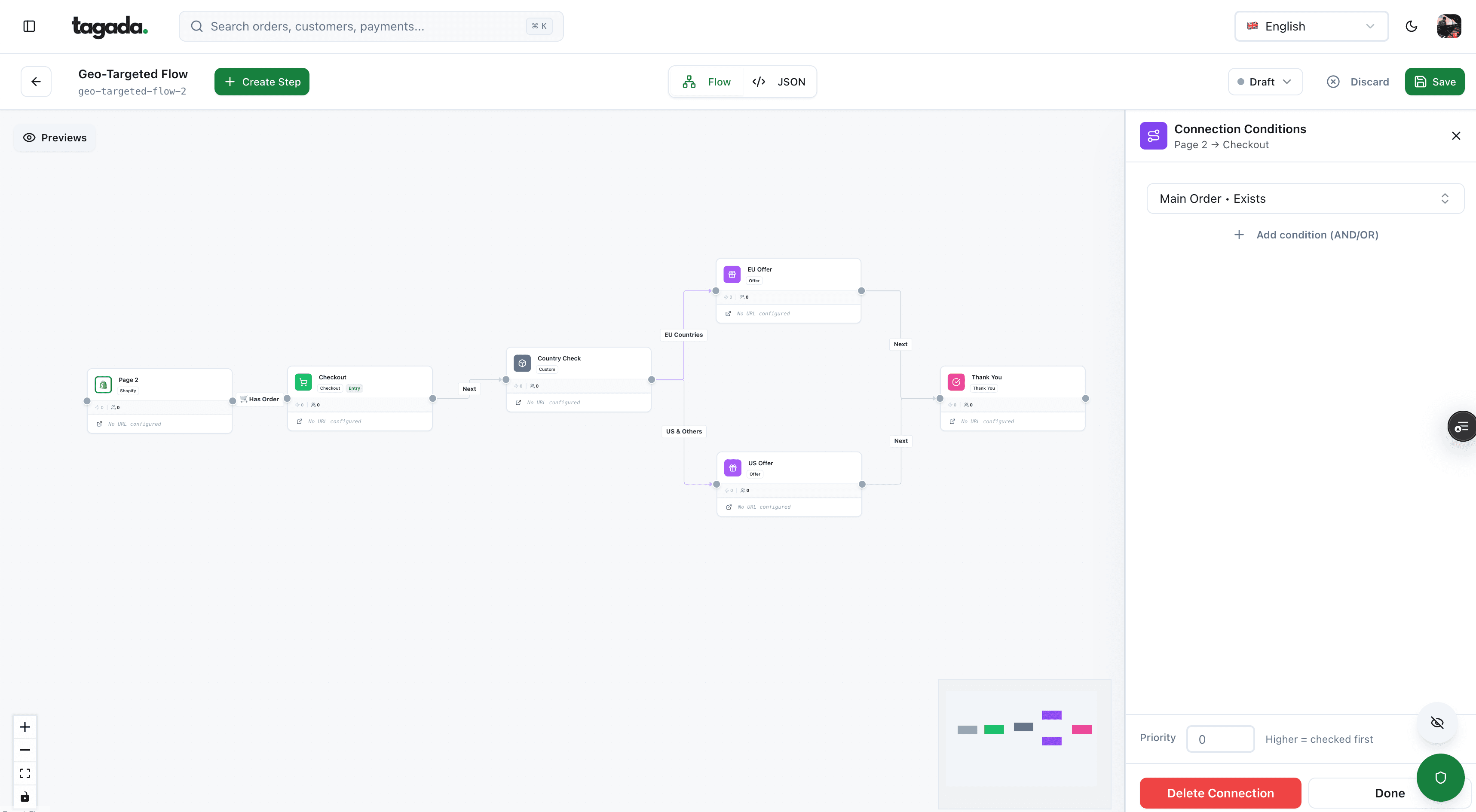
Inside Tagada
Build the funnel once, route every customer to the right offer
Checkout, upsells and subscriptions on one flow, with conditions per country, order or customer.
Checkout: the step with its own playbook
Checkout is where a buyer who decided to buy can still be lost: an extra cost, a forced account, a long form, a missing payment method. It has its own ranked list of fixes in our ecommerce checkout optimization guide. In short:
| Checkout problem | Guide |
|---|---|
| Which steps a checkout needs, and what happens on the payment side | Checkout flow |
| Layout, fields, reassurance at the card field | Checkout page design |
| Forcing an account before payment | Checkout as guest |
| One page or several steps | One-page checkout |
| Measuring drop-off inside checkout | Checkout abandonment rate |
| Reminders and recovery for shoppers who left | How to reduce cart abandonment |
Measure checkout separately from the rest of the site. A checkout that converts well can sit behind product pages that send it too few buyers, and the reverse.
Structure the offer: bundles, tiers and upsells
Conversion rate is one half of revenue per visitor. The other half is order value:
Revenue per session = conversion rate × average order value
That's why offer changes should be judged on revenue per session, not on conversion rate alone. A bundle can lower the rate a little and still raise revenue. Each offer has its place in the path:
Fig. 1Where each offer sits in the purchase
- Product pageBundles and quantity tiers
- CartCross-sell in the cart drawer
- CheckoutOrder bump: one unticked checkbox
- After paymentOne-click upsell, the first order is already paid
Only the last one comes after the payment.
- Bundles and tiers give a reason to buy more at once: see bundle pricing strategy and tiered pricing strategy.
- Cart cross-sells work when the item completes the first one. More in upsell cart drawer.
- An order bump is a small add-on in checkout. In the EU, it must be left unticked: the Consumer Rights Directive forbids default options for extra payments, and a payment added that way must be refunded.8Directive 2011/83/EU on consumer rights, Article 22
- A one-click upsell comes after the first payment, so it can't cost you the first order. It's a new payment, though, and may need its own authentication in some markets: see 1-click upsell.
Watch the step before the offer. If an order bump lowers checkout completion, it costs more than it brings.
Payment acceptance: a declined card is a lost conversion
A buyer who chose a product, filled in the checkout and clicked "Pay" has done everything a conversion rate guide asks for. If the card is declined, the order is still lost. In Baymard's survey, 10% of US shoppers who abandoned for a reason other than "just browsing" cited a declined card, and 9% cited too few payment methods.4Baymard Institute, Cart abandonment rate statistics, updated September 22, 2025
Fig. 2A conversion that dies after the click
approved declined or closed routing step
- CheckoutForm filled, Pay clicked
- submits toProcessorSends the authorization
- asksIssuerDeclined: insufficient fundsDeclined
The funnel says checkout worked. The bank said no.
What to put in place:
- Track payment outcomes as a funnel step. Count payment attempts, authorizations, declines by reason, and 3D Secure challenges abandoned. Method and formulas in payment acceptance rate.
- Tell soft from hard declines. A soft decline (insufficient funds, issuer unavailable) can be retried within card network limits. A hard decline (stolen card, closed account) can't: ask for another method.
- Offer a way out. A wallet, a pay-later option or another card, right in the error message, without emptying the form.
- Have a second route. When a processor is down or times out, a backup processor can take the payment. Rules are in dynamic payment routing.
- Show the methods your buyers use, by country and device: see alternative payment methods.
How to test a change without fooling yourself
Three habits produce "wins" that don't hold up: stopping a test too early, changing several things at once, and measuring clicks instead of orders. A method that avoids them:
- Write the hypothesis. "Showing the delivery date on the product page will raise add-to-cart rate on mobile", tied to the step that leaks.
- Pick one primary metric. Paid orders per session, or revenue per session for offer tests. Add guardrails: payment acceptance, refunds, the next step's rate.
- Size the sample before you start. From your baseline rate and the smallest lift worth detecting.
- Change one thing. If the variant changes the headline, the price display and the button, a win tells you nothing about which one worked.
- Run full weeks. Weekday and weekend traffic behave differently, and paydays and email sends land on specific days. A 10-day test counts some weekdays twice.
- Don't stop on a good-looking day. Checking daily and stopping at the first significant result inflates false wins. Stop at the planned sample size.
- Check the result by segment, then ship and re-measure. A lift that only shows on desktop isn't a sitewide win.
One test, one change, one decision rule written before launch.
How big a sample?
With the standard two-proportion test at 95% confidence and 80% power, detecting a move from 2.0% to 2.2% conversion needs about 80,700 sessions per version. A move from 2.0% to 2.4% needs about 21,100. Smaller lifts need much more traffic. If you can't reach the sample in a few weeks, test bigger changes or test on a step with more traffic.
Low-traffic stores can't test everything. For them, fixing what's clearly broken (a missing shipping cost, a slow image, a confusing error) is faster than testing it. The basics are in what is A/B testing, with worked cases in A/B testing examples.
A working order for the first month
- Week 1: measurement. One written definition, purchases counted server-side, funnel events in place, payment outcomes tracked.
- Week 2: diagnosis. Funnel rates by source, device and new or returning. Pick the step that loses the most buyers.
- Week 3: obvious fixes. Missing price or shipping information, speed problems, broken mobile elements, unclear payment errors.
- Week 4: first test. One hypothesis on the leaking step, sample sized, full weeks.
Each week builds on the one before. Don't jump to tests before the data is right.
Where Tagada fits
How Tagada helps
Upsells, A/B tests and payment routing in one checkout
Tagada's checkout comes with one-click upsells, order bumps, A/B tests, Apple Pay and Google Pay. Purchases are tracked server-side to Meta, Google and TikTok. On the payment side, Tagada routes across Stripe, Adyen and its own processor, TagadaPay, with one logic and a cascade on decline. Pricing is on the pricing page.
Whatever tool you use, the order holds: measure the right thing, find the step that loses the most buyers, fix it, and prove the fix with a clean test.
Frequently asked questions
What is a good ecommerce conversion rate?
How do you calculate ecommerce conversion rate?
How can I increase my add to cart rate?
How long should an A/B test run?
Do upsells lower conversion rate?
Can payment declines lower my conversion rate?
Sources
Checked October 14, 2026- Google Analytics Help, [GA4] About key events
- Google Analytics Data API, API dimensions and metrics
- Shopify, Ecommerce conversion rate: benchmarks and tips, updated August 22, 2026
- Baymard Institute, Cart abandonment rate statistics, updated September 22, 2025
- FTC, The Consumer Reviews and Testimonials Rule: Questions and Answers
- FTC, Federal Trade Commission Announces Final Rule Banning Fake Reviews and Testimonials, August 14, 2024
- web.dev, Web Vitals
- Directive 2011/83/EU on consumer rights, Article 22
Tagada
Upsells, A/B tests and payment routing in one checkout
Funnels, one-click upsells, subscription billing and payment routing, on one customer record.
- 01Create your free account
- 02Connect your store or build a checkout
- 03Launch funnels, upsells and subscriptions