
Ecommerce Shipping Integration: Where Shipping Meets Checkout
How an ecommerce shipping integration works: live rates at checkout, labels, tracking, when to capture payment, and the tracking that wins disputes.

Article summary
TL;DR
An ecommerce shipping integration connects your store to carriers or shipping software: it quotes rates at checkout, sends orders out for labels and brings tracking back to the order. You add one through your platform's settings, a shipping app or a carrier API. On the payment side, capture when the order ships and keep tracking with the full delivery address.
- A shipping integration moves data both ways: orders out to the label tool, tracking numbers back to the order and the customer.
- Three ways in: your platform's built-in shipping, a shipping app that imports orders, or a carrier or multi-carrier API.
- Live rates make the total depend on the address. If the rate call fails, the checkout needs a fallback, or the buyer can't pay.
- Visa's rules say not to deposit a sale until the goods ship, unless the buyer paid in advance. A card authorization usually lasts 7 days.
- For a Visa 'not received' dispute, proof of delivery must show the full delivery address. Tracking with a partial address isn't accepted.
 ChatGPT
 Claude
 Perplexity
 Grok
GrokOn this page
A shipping integration is the link between the order a customer pays for and the parcel a carrier delivers. Most guides stop at labels and carrier APIs. This one also covers the points where shipping touches the checkout and the payment: the rate the buyer sees, the moment you capture the money, and the tracking you'll need if the customer says the package never came.
What is an ecommerce shipping integration?
An ecommerce shipping integration connects your store or order management system to carriers, directly or through shipping software. Data moves in both directions. The order goes out with its address, weight and service level. The rate, the label and the tracking number come back, and delivery events keep coming back until the parcel arrives.
Fig. 1One order, out and back
approved declined or closed routing step
- CheckoutAddress, shipping method, payment
- createsOrderYour store or order management system
- sends the orderShipping softwareRates, label, carrier choice
- buys the labelCarrierPickup, tracking events, deliveryApproved
the tracking number has to come back to the order
The first leg starts before payment: if you show live rates, the checkout asks the carrier, or your shipping software, for a price while the buyer is still typing. The last leg ends after delivery: the tracking number and the "delivered" event get written back to the order, where your notifications, your support team and, if it comes to that, your dispute response will look for them. The order record in the middle is what an order management system keeps; see our guide to order management.
What a shipping integration does
Every integration does some mix of the jobs below. "Shipping data integration" usually means the last three: getting order, tracking and stock data to stay the same in every system.
| Job | When it runs | Who sees it | What breaks without it |
|---|---|---|---|
| Rate quote | At checkout, once the address is complete | The buyer | Flat rates that over- or undercharge |
| Address check | At checkout or before the label | The buyer, then your team | Returned parcels, "not received" claims |
| Label and carrier choice | After the order is placed | Your team or warehouse | Manual copy-paste into carrier sites |
| Tracking sync | When the label is bought, then at each carrier event | The buyer, support | "Where is my order?" tickets, weak dispute evidence |
| Order status | When the parcel ships | Your store, your payment flow | Orders stuck as unfulfilled, payments never captured |
| Stock update | When orders are placed or shipped | Your store | Overselling |
| Returns | When the customer asks | The buyer, your team | Refunds issued before the item comes back |
An order that sits as "unfulfilled" after the label is bought is usually a sync problem, not a warehouse problem. Our article on what pending fulfillment means covers that status.
How to integrate shipping into your website
There are three routes. The right one depends on the platform you run, not on which tool is "best."
| Route | What you get | Examples, from the vendors' own pages |
|---|---|---|
| Your platform's built-in shipping | Flat, free or calculated rates at checkout; labels from the admin on some platforms | On Shopify, you buy labels in the admin and they pass tracking to customers automatically; eligibility varies by carrier and country.13Shopify Help Center, Shipping labels WooCommerce core has three methods: flat rate, free shipping and local pickup; anything else comes from an extension or custom code.12WooCommerce Docs, Setting up shipping zones |
| A shipping app or platform | Orders imported from your store and marketplaces, rates compared, labels in batches, tracking sent back | ShipStation centralizes orders from stores and marketplaces, including Shopify, WooCommerce, BigCommerce, Wix, Amazon and eBay.14ShipStation, Integrations |
| A carrier or multi-carrier API | Rates, labels and tracking inside your own code | At EasyPost, a shipment holds the addresses and the parcel, returns rates, and buying a rate returns a tracking code.15EasyPost Docs, Shipments |
- List what you ship. Carriers, services (standard, express), countries, and the weights and box sizes you actually use.
- Pick where rates come from. Flat rates in your platform, or live rates from a carrier account or an app. Live rates need accurate weights and dimensions on every product.
- Connect the carrier accounts. In your platform, your shipping app, or through API keys in a test environment first.
- Map the order flow back. Check that a bought label marks the order as shipped and writes the tracking number on it.
- Turn on notifications. Shipping confirmation with the tracking link, and a delay notice when a date slips.
- Set a fallback rate. If the rate service is down, checkout must still show a price.
Whatever the route, test with your real carrier accounts before switching it on at checkout.
Live shipping rates at checkout
Shipping cost is where checkouts lose buyers. In Baymard Institute's survey, extra costs were the top reason US shoppers abandoned a checkout, ahead of slow delivery.4Baymard Institute, Cart abandonment rate statistics (updated September 22, 2025)
Live rates fix the "total not visible" part, but they make the total depend on the address, and they add a network call in the middle of the checkout. How the main platforms handle it:
- Shopify: carrier-calculated shipping is available on the Advanced and Plus plans; Grow stores can add it for an extra monthly fee or by switching to annual billing. You connect your own UPS, FedEx, USPS, Canada Post or Australia Post account, and Shopify asks the carrier for a price based on weight, dimensions and destination.1Shopify Help Center, Third-party carrier-calculated shipping (read October 14, 2026) If every calculated rate fails and no other rate applies, Shopify shows your backup rates so the buyer can still check out. Any other eligible rate, such as a flat rate, shows first.2Shopify Help Center, Backup rates (read October 14, 2026)
- Stripe Checkout: the full hosted page can't recalculate shipping options from the address. The embedded form can: your server calculates the options and updates the Checkout Session. The client call times out after 20 seconds, the form shows no loading indicator, shipping rates aren't available in subscription mode, and Apple Pay and Google Pay collect the address themselves, outside that flow.3Stripe Docs, Dynamically customize shipping options (embedded form)
We cover the layout side, refreshing rates on a single page, in one-page vs multi-step checkout. The signals below are what to watch once live rates are on.
- Checkout shows no shipping optionThe rate call failed and there's no fallbackAdd a flat or backup rate
- Rates appear several seconds after the addressSlow carrier or app response, no loading stateCache rates by zone and weight, keep the call short
- Total changes after the buyer edits the addressExpected with live ratesRecalculate before the Pay button is active
- Subscription orders ship with no shipping chargeStripe Checkout has no shipping rates in subscription modePrice shipping into the plan or add it as a line item
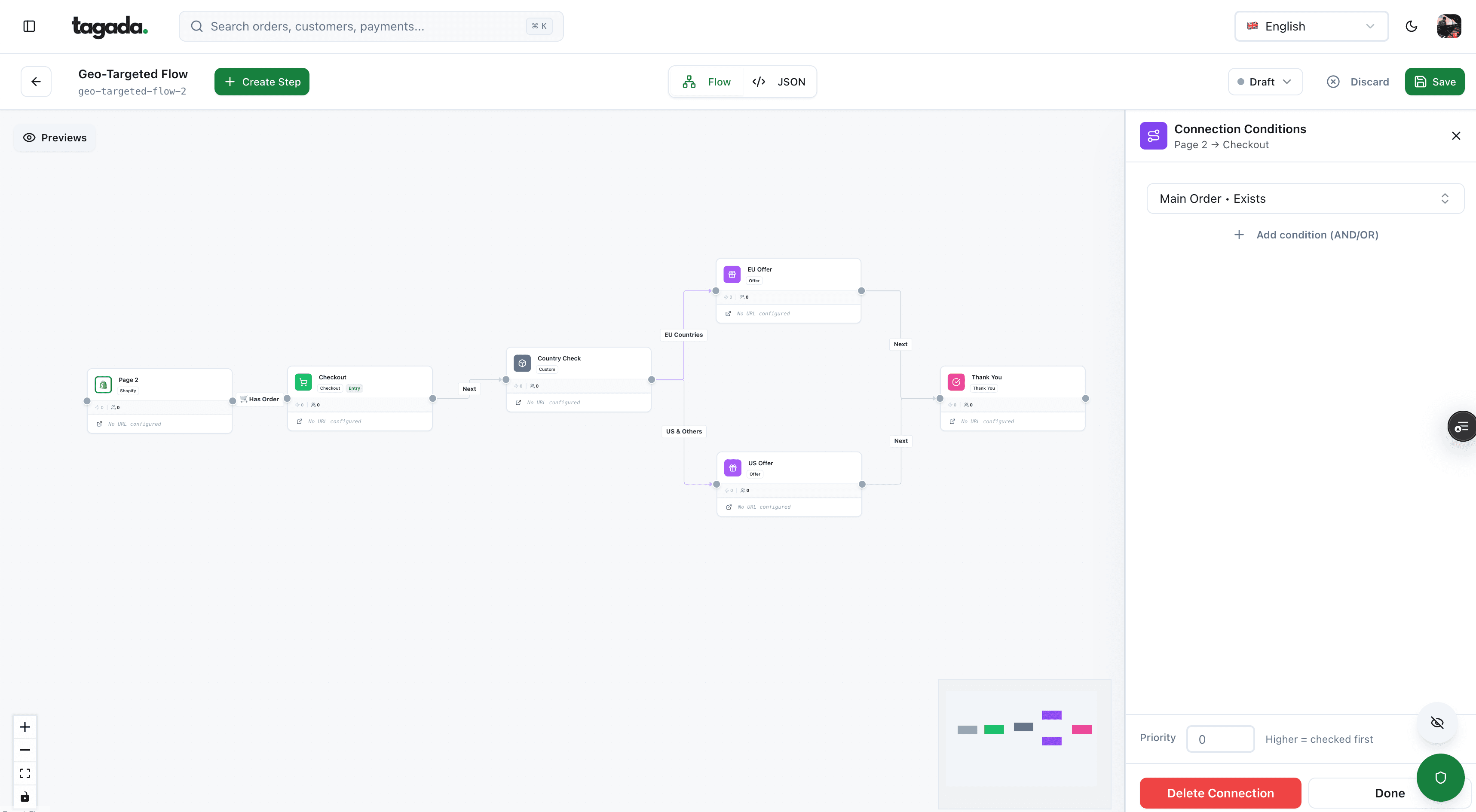
Inside Tagada
Build the funnel once, route every customer to the right offer
Checkout, upsells and subscriptions on one flow, with conditions per country, order or customer.
Charge at checkout or when the order ships?
Shipping changes when you should take the money. Visa's rules set the order of events for merchants:
Not submit a Deposit for a Transaction until one of the following occurs: The Transaction is completed. The merchandise or services are shipped or provided.
The exception is an advance payment the buyer agreed to.5Visa Core Rules and Visa Product and Service Rules, April 18, 2026 The usual way to follow the rule is to authorize at checkout, which holds the funds, and capture when the label is bought or the parcel leaves. The catch is that an authorization hold doesn't last long.
| Card brand | Online payment started by the customer | Online payment started by the merchant |
|---|---|---|
| Visa | 7 days | 5 days (exactly 4 days and 18 hours) |
| Mastercard | 7 days | 7 days |
| American Express | 7 days | 7 days |
| Discover | 7 days | 7 days |
Authorization validity windows at Stripe for card-not-present payments.6Stripe Docs, Place a hold on a payment method
If the authorization expires before you capture, the funds are released and the payment is canceled.6Stripe Docs, Place a hold on a payment method So the shipping integration has to tell the payment side that the order shipped, or someone has to capture by hand.
Fig. 2Authorize now, capture when it ships
- CheckoutCard authorized, funds held
- Label boughtTracking number written on the order
- CaptureFull amount, or only what shipped
- Day 7Uncaptured authorization expires and is canceled
the window is usually 7 days online
Three cases to plan for:
- Split shipments. You can capture less than the authorized amount, and a partial capture releases the rest. For most payments you get one capture only, so capture what ships first and charge the rest later with a saved payment method, or use multicapture where it's available.6Stripe Docs, Place a hold on a payment method
- Preorders and backorders. Past the authorization window, either take an advance payment the buyer clearly agrees to, or authorize again when stock arrives. Stripe offers extended holds on some online card payments.6Stripe Docs, Place a hold on a payment method
- Payment methods without a hold. ACH and iDEAL don't support separate authorization and capture at Stripe.6Stripe Docs, Place a hold on a payment method
How holds show on a customer's statement, and why some buyers think they were charged twice, is in our guide to pre-authorization holds.
Tracking numbers as chargeback evidence
When a customer tells their bank the parcel never came, the tracking data your integration stored becomes your defense. Under Visa dispute condition 13.1 (merchandise not received), the merchant can answer with proof that the cardholder received the goods at the agreed location or by the agreed date, and Visa is specific about what counts:
For merchandise that was delivered, proof of delivery that contains the full delivery address (tracking with partial address is not permitted).
Other rules in the same section that shipping data decides:5Visa Core Rules and Visa Product and Service Rules, April 18, 2026
- The dispute amount is limited to the part of the order that wasn't received. Tracking per parcel matters on split shipments.
- The merchant is responsible for goods held by customs in the merchant's country. Goods held by customs in the cardholder's country make the dispute invalid.
- A buyer who cancelled before the expected delivery date, out of buyer's remorse, can't use this reason.
- If no delivery date was given, the bank waits 15 days from the transaction date. The dispute must be filed within 120 days of processing or of the last expected delivery date, and never later than 540 days.
- For dispute responses processed from April 18, 2026, when the merchant sends proof of delivery, the bank must confirm it reviewed it with the cardholder and address it, for example a photo or a signature.
What to keep for every shipment, mapped to the evidence fields Stripe asks for:7Stripe Docs, Dispute reason code categories (Product not received)
| Keep this | Why | Stripe evidence field |
|---|---|---|
| The address the customer entered | Must match an address checked with AVS, or a business linked to the cardholder | shipping_address |
| Label or shipment receipt showing the full address | Proves where you sent it | shipping_documentation |
| Ship date | Shows you shipped on time | shipping_date |
| Carrier name | Several carriers per order are allowed | shipping_carrier |
| Tracking number | Stripe expands it into carrier delivery details in your evidence file | shipping_tracking_number |
| Signature, for high-value orders | Stripe suggests requiring one | customer_signature |
| Emails with the customer about the delivery | Shows whether they contacted you first | customer_communication |
PayPal has its own rules for Seller Protection. Proof of delivery is carrier documentation with an online, verifiable tracking number, the delivery date and a "delivered" status, and a recipient address that matches the Transaction Details page, showing at least the city and state or the zip code.16PayPal, Seller Protection Program That's looser than Visa's full-address rule, so store the full address anyway. The parcel must go to the address on the Transaction Details page; a parcel later redirected to another address loses eligibility, which is why PayPal advises against shipping services arranged by the buyer.16PayPal, Seller Protection Program For transactions processed before January 26, 2026 and over $750, a signature was required; PayPal now recommends it without requiring it.8PayPal Help Center, How do I prove that I've sent an item to the buyer? And when a buyer who paid by card disputes through their card issuer rather than PayPal, Seller Protection no longer covers "item not received" for transactions received after January 16, 2024.9PayPal Help Center, Does Seller Protection include Item Not Received chargebacks from buyers?
Practical rule
Never ship to an address the buyer gives you after checkout by email or chat. Change the order address, or cancel and let them order again. Your proof of delivery has to match the address on the payment.
How to write the response itself is in our chargeback rebuttal letter template. How to keep "not received" disputes from being filed at all is in our guide to chargeback prevention.
Shipping notifications and the FTC 30-day rule
In the US, the date you promise at checkout is a legal commitment. The FTC's Mail, Internet, or Telephone Order Merchandise Rule (16 CFR Part 435) applies to orders placed online:10FTC, Business Guide to the Mail, Internet, or Telephone Order Merchandise Rule1116 CFR Part 435, Mail, Internet, or Telephone Order Merchandise (sections 435.1 and 435.2)
The promise
You need a reasonable basis to ship within the time you state. With no time stated, that's 30 days from a complete order, or 50 days if the buyer applies for credit with you to pay.
The delay notice
If you can't ship on time, you must offer the buyer, without being asked, the choice to accept the delay or cancel for a prompt refund. The first notice gives a definite new date.
Silence
If the new date is 30 days or less past the original one, no answer counts as consent. Beyond that, the order is cancelled unless the buyer agrees or you ship within those 30 days.
Shipped means handed over
"Shipment" is the moment the goods are in the carrier's possession, not when the label is printed.
The FTC can seek civil penalties of up to $53,088 per violation (inflation update of January 2025).10FTC, Business Guide to the Mail, Internet, or Telephone Order Merchandise Rule Stripe's own advice for avoiding "not received" disputes points the same way: estimate shipping and delivery dates as accurately as you can, and tell the customer when a delay comes up.7Stripe Docs, Dispute reason code categories (Product not received)
So the integration should send three messages from real carrier events, not from the checkout: a shipping confirmation with the tracking link when the label is bought, a delay notice when a date slips, and a delivery confirmation. Our guide to payment confirmation emails covers the order and receipt emails that come before them.
Before you switch it on
- Break the rate call. Disable the carrier connection and check that checkout still shows a price.
- Change the address mid-checkout. The rate and the total must update before payment.
- Pay with a wallet. Apple Pay and Google Pay pass their own address; check it lands on the order and the label.
- Buy a label. The order should switch to shipped, store the tracking number, and trigger the payment capture if you authorize first.
- Ship part of an order. Check the capture amount and that each parcel has its own tracking number.
- Let an authorization age. Make sure an order waiting past day 7 is flagged, not silently canceled.
Run these with real addresses and real carrier accounts in test mode.
Where Tagada fits
How Tagada helps
The checkout and payment side of the order
Tagada isn't a shipping tool: it runs the checkout and the payments that your shipping integration hangs off. Its checkout supports one-click upsells, order bumps, A/B tests, Apple Pay and Google Pay, and it runs standalone or with Shopify, WooCommerce or a headless store. Payments route across Stripe, Adyen and TagadaPay with one logic, with a cascade on decline. See pricing for plans. Tagada follows Visa and Mastercard rules and the laws that apply to payments.
For the full order of events from cart to confirmation, see our checkout flow guide, and for the shipping-cost side of abandonment, how to reduce cart abandonment.
Frequently asked questions
What is an ecommerce shipping integration?
How do I integrate shipping into my website?
Does Shopify calculate shipping rates at checkout?
Should I charge the card at checkout or when the order ships?
Is a tracking number enough to win a 'not received' chargeback?
How long do I have to ship an online order in the US?
Sources
Checked October 14, 2026- Shopify Help Center, Third-party carrier-calculated shipping (read October 14, 2026)
- Shopify Help Center, Backup rates (read October 14, 2026)
- Stripe Docs, Dynamically customize shipping options (embedded form)
- Baymard Institute, Cart abandonment rate statistics (updated September 22, 2025)
- Visa Core Rules and Visa Product and Service Rules, April 18, 2026
- Stripe Docs, Place a hold on a payment method
- Stripe Docs, Dispute reason code categories (Product not received)
- PayPal Help Center, How do I prove that I've sent an item to the buyer?
- PayPal Help Center, Does Seller Protection include Item Not Received chargebacks from buyers?
- FTC, Business Guide to the Mail, Internet, or Telephone Order Merchandise Rule
- 16 CFR Part 435, Mail, Internet, or Telephone Order Merchandise (sections 435.1 and 435.2)
- WooCommerce Docs, Setting up shipping zones
- Shopify Help Center, Shipping labels
- ShipStation, Integrations
- EasyPost Docs, Shipments
- PayPal, Seller Protection Program
Tagada
Your checkout and payments, ready for whatever ships next
Funnels, one-click upsells, subscription billing and payment routing, on one customer record.
- 01Create your free account
- 02Connect your store or build a checkout
- 03Launch funnels, upsells and subscriptions