
Subscription Billing for Ecommerce: Plans, Renewals and the Rules
How ecommerce subscription billing works: plan models, billing cycles, what to show at checkout, renewal day, wallets, the customer portal and the rules.



Article summary
TL;DR
Subscription billing charges a saved payment method on a schedule: every delivery, every month, or a prepaid block of orders. A working setup has five parts: a plan matched to how fast customers use the product, a checkout that shows terms and records consent, renewals with retries, notices before charges change, and a portal to skip, pause or cancel.
- ROSCA requires clear terms before you collect billing details, express informed consent and a simple way to stop the charges.
- Visa requires a notice at least 7 days before a trial, introductory offer or promotion ends, and online cancellation for online sign-ups (rules of April 18, 2026).
- In California, since July 1, 2025, a customer who signed up online must be able to cancel online, and a price change needs 7 to 30 days' notice.
- The Shopify Subscriptions app works with five gateways: Shopify Payments, PayPal Express, Authorize.net, Adyen and Stripe (read November 3, 2026).
- An Apple Pay subscription can stop billing when the customer replaces their phone, unless the integration requests a merchant token.
 ChatGPT
 Claude
 Perplexity
 Grok
On this page
This page is the method, on any platform. For the payment side (stored credentials, network rules, choosing a processor), see subscription payment processing. For keeping subscribers, see subscription retention.
What a subscription billing system has to do
It does the same jobs whether it lives in a Shopify app, a billing tool or your CRM. Check each one before you pick a tool.
| Job | What it means in practice | What breaks without it |
|---|---|---|
| Plans and prices | Frequency, discount, prepaid blocks, trials | You sell one rigid plan |
| Checkout and consent | Terms shown before payment, consent recorded | Disputes you can't answer |
| Card vault | The saved card, its token, its updates | Renewals stop when the card changes |
| Renewal engine | Charges on the right day, with the stored credential | Late or duplicate charges |
| Retries | A schedule within network limits | Subscribers lost to a soft decline |
| Notices | Receipts, reminders before a change | Breaches of Visa and state rules |
| Customer portal | Skip, pause, swap, update card, cancel | Cancellations that were only "too much product" |
| Reporting | Active subscribers, renewals, churn by cause | You can't see where revenue leaks |
Platform app
A subscription app inside Shopify or WooCommerce. Fast to start, limited to the gateways the app supports.
Billing tool
A separate recurring billing product. Strong on invoices, weaker on physical deliveries and offers.
Commerce CRM
Checkout, subscriptions, portal and routing in one place. One customer record, more to set up.
Comparing tools by name: recurring billing software for ecommerce.
Pick a plan model
Start from how the customer uses the product. The plan model decides when you charge, what you ship and what you must tell the customer.
| Model | How it charges | Fits | Watch for |
|---|---|---|---|
| Pay per delivery ("subscribe and save") | Each shipment, at a discount | Consumables used at a steady rate | Discount ending later is a price change |
| Prepaid block | 3, 6 or 12 orders paid up front | Loyal customers, gifts | Refund rules if they cancel mid-block |
| Membership or club | A monthly or yearly fee for perks | Members-only prices, credits | Customers who forget they pay it |
| Trial, then subscription | Free or low first period, then full price | New products that need a try | Visa's 7-day notice before the trial ends |
| Fixed billing day | Everyone billed on the same date | Boxes shipped in one batch | First charge pro rata or free |
- Every 30 daysPay per delivery, 10% off each order
- 3 months prepaidOne charge, three shipments
- 7-day trialThen every 30 days at the full price
The full set of trial rules is on free trials and negative option billing. How subscription models fit a brand: subscription-based ecommerce.
Set billing cycles that match the product
Charge a few days before the customer runs out. A cycle that's too short builds stock at home, and stock at home becomes a cancellation.
- Match the cycle to use. A 30-day supply renews every 30 days; a 90-day bundle every 90.
- Offer two or three frequencies, so "too much product" becomes a frequency change, not a cancel.
- Decide the first charge. At checkout, at the end of a trial, or on a fixed day of the month.
- Keep renewal amounts predictable. Every change in price or frequency should be the customer's choice or come with notice.
Example
A customer subscribes on November 3 to a 30-day plan. They pay today, the next charge is December 3, and the portal shows that date. If they skip once, the next charge moves to January 2, and nothing else changes.
What to show and record at checkout
Show the terms next to the button, get a clear yes, and keep proof of both. The rules from the FTC's law, Visa and California point the same way.
- Before billing details, show the price, the frequency, the next charge date and how to cancel1Restore Online Shoppers' Confidence Act, 15 U.S.C. § 8403.
- Get an active yes: a box the customer ticks or a button that names the subscription1Restore Online Shoppers' Confidence Act, 15 U.S.C. § 84033California Business and Professions Code § 17602, for contracts entered into, amended or extended since July 1, 2025.
- Send a confirmation with the terms and a way to cancel online2Visa Core Rules and Visa Product and Service Rules, edition of April 18, 20263California Business and Professions Code § 17602, for contracts entered into, amended or extended since July 1, 2025.
- Record the evidence: the terms shown, the time of consent, the IP address and the confirmation sent.
- Before a trial or promotion ends, send a notice at least 7 days ahead, with the amount and how to cancel2Visa Core Rules and Visa Product and Service Rules, edition of April 18, 2026.
Built from ROSCA, the Visa Core Rules of April 18, 2026 and Cal. Bus. & Prof. Code § 17602.
Visa, notice before a recurring charge
At least 7 days before the charge, the merchant must notify the cardholder when a trial period, introductory offer or promotional period is going to end, with the amount, the date and how to cancel.
California adds a yearly reminder for some plans and 7 to 30 days' notice before a price change3California Business and Professions Code § 17602, for contracts entered into, amended or extended since July 1, 2025. Tagada follows Visa and Mastercard rules and the laws that apply to payments. Every rule for renewals, with the exact wording: free trials and negative option billing.
Renewal day: what happens to each charge
A renewal is a charge you start without the customer, on the card they saved. Most of the work is deciding what happens when it fails.
Fig. 1One renewal, from notice to outcome
- NoticeOnly when terms or price change
- ChargeStored card, merchant-initiated
- DeclinedPast due, retries start
- Recovered or endedPaid, or cancelled after the last try
the declined branch is where subscribers get lost
Retries follow network limits. Visa allows up to 20 attempts in 30 days for most declines and none after a Category 1 decline such as a lost or stolen card2Visa Core Rules and Visa Product and Service Rules, edition of April 18, 2026. Stripe's recommended default is 8 tries within 2 weeks6Stripe Docs, Automate payment retries, read October 14, 2026. Tagada's default schedule is five tries over 21 days7Tagada Docs, Subscriptions and Rebilling, read November 3, 2026.
| Decline | What to do |
|---|---|
| Insufficient funds, generic decline | Retry later, within the limits |
| Expired or replaced card | Card updater, then a card-update link |
| Lost, stolen, closed account | Never retry: ask for a new card |
| Stop payment order | Treat it as a cancellation |
The full recovery method: dunning and failed payment recovery and why subscription payments fail.
Subscriptions paid with Apple Pay and Google Pay
Wallets can pay renewals, but only if the first payment saved something you can charge again. Check this before you put an Apple Pay button on a subscription.
- Apple Pay with a merchant token (MPAN)Linked to the customer and card, not the phoneRequest merchant tokens for recurring payments
- Apple Pay with a device token (DPAN)Can stop working when the phone or card changesWatch renewals on these, ask for a card update
- One-time express payment, no saved methodNothing to charge at renewalDon't sell a subscription through it
Stripe explains that a device token "might no longer work" when the customer replaces the device, which "can cause failures for future merchant-initiated transactions"5Stripe Docs, Apple Pay merchant tokens, read November 3, 2026. On Shopify Payments, Apple Pay for subscriptions is limited to Visa and Mastercard cards4Shopify Help Center, Shopify Subscriptions considerations, read November 3, 2026. Button placement and setup: express checkout with Apple Pay and Google Pay.
Give customers control in a portal
Most cancellations are a request for a different order. A portal with the right buttons turns them into a skip, a pause or a smaller box.
Skip or move the date
For "I still have some left".
Pause until a date
For a trip or a break, with a reminder before it resumes.
Change frequency or quantity
For "too much product".
Swap or add a product
For "I want something else", or one extra item on the next order.
Update the card
For a card that expired. Not a cancellation.
Keep cancellation in the same place, one click from the account. How to build the cancel flow and the offers that stay legal: subscription retention and cancellation flows.
Who holds your subscribers' cards
The hardest thing to change later is where the saved cards live. If they sit with one processor, leaving that processor can mean asking every subscriber for their card again.
Cards stay with one processor
- CheckoutCard saved at the processor
- renews onProcessor AHolds the only tokenDeclined
Change processor, re-collect every card
Cards in a vault you control
- CheckoutCard saved in your vault
- renews onAny connected processorCharged with the same vaulted cardApproved
Renewals continue on another processor
Ask any tool three questions: which gateways it supports (the Shopify Subscriptions app lists five4Shopify Help Center, Shopify Subscriptions considerations, read November 3, 2026), whether you can export the cards to another processor, and what happens to running subscriptions if your processor account closes. The processor side: subscription payment processing.
Measure the subscription business
Look at renewals and churn by cause, not only new subscribers. Most leaks show up on renewal day.
| Metric | How to calculate it | What it tells you |
|---|---|---|
| Active subscribers | Active or trialing at the end of the period | The base you bill |
| Renewal success rate | Renewals paid on the first try ÷ renewals due | Card health and processor fit |
| Recovered renewals | Paid after a retry or card update ÷ declined | Your retries and messages |
| Churn by cause | Ended subscriptions: cancelled vs failed payment | Where to invest first |
| Skip and pause rate | Skips and pauses ÷ active subscribers | Cycles that don't match use |
| Disputes on renewals | Chargebacks on renewal charges | Terms or notices customers missed |
Formulas: MRR calculation and churn rate calculation.
By industry
| Industry | What changes | Guide |
|---|---|---|
| Supplements | Cycles follow the bottle (30, 60, 90 days); bundles on subscription | Subscription billing for supplement brands |
| Skincare | Routines with several products on different cycles | Subscription billing for skincare brands |
| Fitness | Product subscriptions next to coaching or app memberships | Subscription billing for fitness brands |
| Info products | Memberships and payment plans for courses, no shipping | Subscription billing for info product businesses |
| Online pharmacies | Refills that depend on a valid prescription | Subscription billing for online pharmacies |
| Telehealth | Memberships, consults and refills billed together | Subscription billing for telehealth companies |
How Tagada helps
Plans, renewals and the portal in one place
- Subscriptions with trials in days, weeks or months, a fixed billing day if you want one, and a status for each stage: trialing, active, past due, paused, cancelled7Tagada Docs, Subscriptions and Rebilling, read November 3, 2026. Subscriptions docs.
- Automatic retries after 24, 48, 96, 168 and 168 hours, then cancellation 21 days in; smart retry is available on request7Tagada Docs, Subscriptions and Rebilling, read November 3, 2026.
- A customer portal on
/accountof your checkout domain or in your own code: skip, pause with a resume date, change frequency or quantity, swap, add an item to the next order, update the card, cancel with retention offers8Tagada Docs, Customer Portal, read November 3, 2026. Customer portal docs. - Subscription emails for receipts, failed payments, cancellations and an upcoming-rebill notice sent 3 days before the next billing cycle9Tagada Docs, Emails, read November 3, 2026. That timing doesn't cover Visa's 7-day notice when a trial or promotion ends: plan that notice separately.
- Apple Pay and Google Pay renewals: on the native path, the wallet is stored as a network token and rebilled like a card10Tagada Docs, Apple Pay and Google Pay, read November 3, 2026.
- Your vault, any processor. "Your PCI-tokenized cards, your customer profiles, your subscription data, all portable." "Switch processors without re-onboarding customers. No vendor lock-in. Ever."
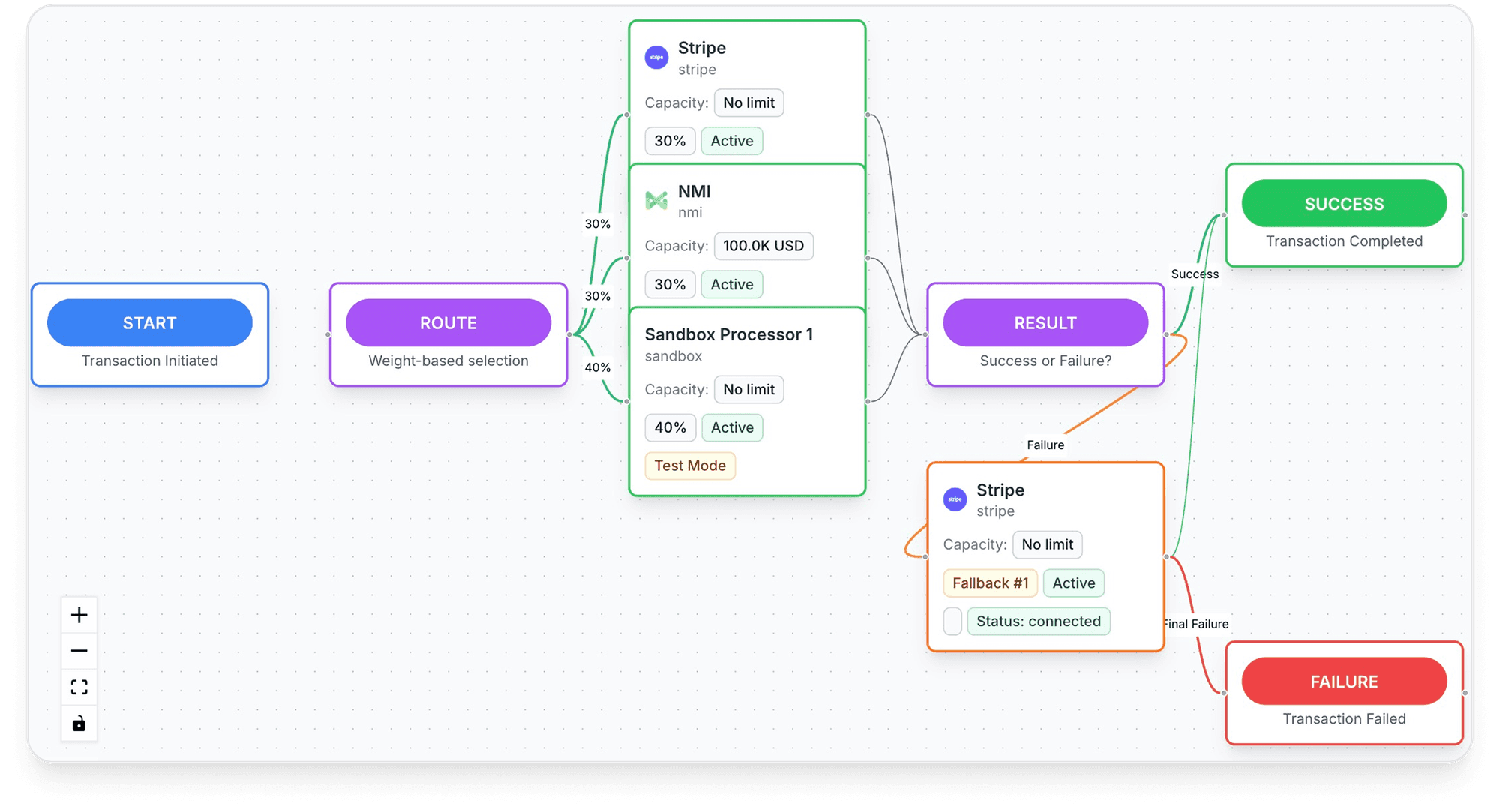
- Renewals routed across TagadaPay and processors such as Stripe, NMI and Airwallex, with one logic11Tagada Docs, Payment Processors, read November 3, 2026. A cascade covers a processor that times out or blocks the charge; a renewal the card's bank declines follows the retry schedule above.
- Payouts and reach on TagadaPay: "Daily payouts, 135+ currencies" and "180+ Countries supported."
It runs standalone, on Shopify, on WooCommerce or headless. Plans are on the pricing page. To take payments with TagadaPay, apply today: "Most merchants are live under 24 hours," according to TagadaPay.
Frequently asked questions
What is subscription billing?
What's the difference between subscription billing and recurring billing?
How do I set up recurring billing for my store?
Is subscribe and save the same as a subscription?
Can customers pay a subscription with Apple Pay?
Sources
Checked November 3, 2026- Restore Online Shoppers' Confidence Act, 15 U.S.C. § 8403
- Visa Core Rules and Visa Product and Service Rules, edition of April 18, 2026
- California Business and Professions Code § 17602, for contracts entered into, amended or extended since July 1, 2025
- Shopify Help Center, Shopify Subscriptions considerations, read November 3, 2026
- Stripe Docs, Apple Pay merchant tokens, read November 3, 2026
- Stripe Docs, Automate payment retries, read October 14, 2026
- Tagada Docs, Subscriptions and Rebilling, read November 3, 2026
- Tagada Docs, Customer Portal, read November 3, 2026
- Tagada Docs, Emails, read November 3, 2026
- Tagada Docs, Apple Pay and Google Pay, read November 3, 2026
- Tagada Docs, Payment Processors, read November 3, 2026
Tagada
Subscriptions that renew on any processor
Funnels, one-click upsells, subscription billing and payment routing, on one customer record.
- 01Create your free account
- 02Connect your store or build a checkout
- 03Launch funnels, upsells and subscriptions