
Dunning and Failed Payment Recovery: How the Process Works
Dunning recovers failed renewals: Visa retry limits, smart retries or a fixed schedule, card updates, email templates, grace periods and metrics.

 Your subscriptionnow
Article summary
TL;DR
Dunning is the process of collecting a payment that failed or is overdue. For a subscription, it means retrying the card on a schedule, emailing the customer a link to update their payment method, keeping or pausing access for a grace period, then pausing, canceling or writing off the subscription if nothing works.
- Dunning has two meanings: chasing unpaid B2B invoices, and recovering failed card renewals. This guide covers the second.
- Retries have limits: Visa forbids retrying the same card after a Category 1 decline and caps other declines at 20 attempts in 30 days.
- Smart retries and fixed schedules both live under that cap. A retry sent through a second processor counts against the same card.
- Expired and replaced cards are the failure you can prevent: account updaters, network tokens and a reusable wallet token keep renewals charging.
- Every dunning message needs the amount, a deadline and a one-click link to update the card.
- Decide in advance what happens at the end: pause, cancel, leave past due or write off. Canceling means collecting the card again.
- Measure failure rate and recovery rate on payment volume, by decline reason and by recovery method.
 ChatGPT
 Claude
 Perplexity
 Grok
On this page
Dunning is what you do between a failed payment and a lost customer. In a subscription business, most failed renewals come from customers who never decided to leave: the card expired, the account was short that day, the bank said no. A good dunning process gets those payments back without annoying anyone, and knows when to stop. This guide covers the whole process, from the retry rules to the emails and the end of the sequence. For supplement, skincare and other subscription brands, see By industry.
What is dunning?
Dunning is the process of collecting a payment that failed or is overdue, through a set sequence of retries and reminders. The word comes from the old English verb "to dun", to press someone for payment. It is used in two different contexts, and search results mix them up:
| B2B invoice dunning | Subscription (card) dunning | |
|---|---|---|
| What triggers it | An invoice passes its due date | A recurring charge is declined |
| Who pays | A business, by bank transfer or check | A consumer, by saved card or debit |
| Main tool | Reminder letters and calls | Automatic retries plus emails and SMS |
| Time frame | Weeks to months (net 30, 60, 90) | Days to a few weeks, before the next billing cycle |
| Typical end | Collections agency, legal action or write-off | Pause, cancel or write-off |
| Key metric | Days sales outstanding (DSO) | Recovery rate on failed renewals |
What this guide covers
Subscription dunning: recovering failed card renewals for an ecommerce brand. B2B invoice dunning gets a short section at the end.
In subscriptions, dunning fights involuntary churn: customers lost because a payment failed, not because they canceled. Why renewals fail in the first place (decline codes, expired cards, insufficient funds) is covered in subscription payment failures, and the short definition is in the glossary entry on dunning. This guide picks up once the payment has failed, or is about to. Churn as a whole, voluntary and involuntary, is covered in our guide to subscription churn.
The dunning process, step by step
A complete dunning process has five stages. The first one happens before anything fails.
Fig. 1The subscription dunning process
- Pre-dunningExpiring card and renewal reminders
- Payment failsFirst email with an update-card link
- Retries and remindersSpaced retries, escalating messages
- Grace period endsAccess or shipments on hold
- Final outcomeRecovered, paused, canceled or written off
Most of it runs automatically
- Pre-dunning. Warn the customer before a payment is likely to fail: card about to expire, trial ending, annual renewal coming up.
- Failure notice. As soon as the renewal is declined, tell the customer and give them a link to fix it.
- Retries and reminders. Retry the card on a schedule the card networks allow, and send reminders that get more specific over time.
- Grace period. Decide how long the customer keeps access, or keeps receiving orders, while the payment is open.
- Final outcome. If nothing works, apply the rule you chose in advance: pause, cancel, leave the balance open, or write it off.
Pre-dunning: stop failures before they happen
The cheapest failed payment is the one that never fails. Pre-dunning covers the messages and tools that run before the renewal date.
- Expiring card emails. Stripe, for example, can email the customer one month before the default card on file expires.2Stripe Docs, Automate customer emails
- Renewal reminders. A reminder a few days before the charge gives the customer time to switch cards or top up their account. Stripe lets you set how many days before the renewal it goes out.2Stripe Docs, Automate customer emails
- Automatic card updates. Card networks can pass new card details to your processor when a bank replaces a card. More on this, and on wallets, in the next section.
- Trial and promotion endings. For Visa cards this one isn't optional:
At least 7 days before a Recurring Transaction, notify the Cardholder via email or other agreed method of communication if any of the following: A trial period, introductory offer, or promotional period is going to end. The Merchant must include in the communication the Transaction amount and Transaction Date of subsequent Recurring Transactions and a link or other simple mechanism to enable the Cardholder to easily cancel Transactions online or via SMS/text message.
A customer who forgets a trial and gets charged doesn't become a dunning case. They become a dispute. The full set of Visa and legal rules for recurring billing is in our guide to negative option billing.
A renewal reminder is not the 7-day notice
Many billing tools send an upcoming-renewal email a few days before each charge. That's useful pre-dunning, but it doesn't meet the Visa rule above unless it goes out at least 7 days before the first charge after a trial, introductory offer or promotion, with the amount, the date and a cancel link. Check the timing your tool uses before relying on it.
Expired and replaced cards: account updater, network tokens and wallets
A card that expired or was replaced is the most preventable failure in dunning: the customer still wants the product, and the bank would approve a valid card. Three mechanisms keep a stored card working.
Fig. 2Three ways a stored card stays current
- Account updaterThe network passes the new number or expiry to your processor, if the issuer takes part
- Network tokenA token issued by the card network replaces the card number and follows the reissue
- Wallet merchant token (MPAN)An Apple Pay token tied to your business, not to one device
none of them covers every card
Account updaters. Stripe works with the card networks and "automatically attempts to update saved card details whenever a customer receives a new card", for example after an expiry or a card reported lost or stolen. It depends on the issuer: support is wide for cards issued in the United States, "international support varies from country to country", and "it isn't possible to identify cards that support automatic updates".7Stripe Docs, How cards work (automatic card updates) See the glossary entry on the card account updater.
Network tokens. A processor token only means something to that processor. A network token is issued by the card network itself and replaces the card number in the payment, so a reissued card can keep working under the same token. How Visa and Mastercard tokens work, and where they're required, is in our guide to saved payment methods.
Wallets. A subscription started with Apple Pay adds a trap. By default, Apple Pay creates a Device Primary Account Number (DPAN) tied to one device. "If a customer replaces their device or removes the card from it, the DPAN might no longer work." That doesn't affect one-time payments, "but it can cause failures for future merchant-initiated transactions". The fix is an Apple Pay Merchant Token (MPAN), linked to the customer, the card and your business instead of the device.11Stripe Docs, Apple Pay merchant tokens, read November 3, 2026
How the wallet payment was taken matters as much. A wallet charge on a one-time cart may leave nothing to charge later. In Tagada's documentation, an Apple Pay or Google Pay payment through Stripe's Express Checkout is kept for renewals only when the cart has a subscription item; on a one-time cart, "nothing is kept: the instrument settles that order only". And the wallet's cryptogram "is single-use": later charges are merchant-initiated and carry the stored credential and the network transaction ID from the first payment.12Tagada Docs, Wallets (Apple Pay, Google Pay), read November 3, 2026
- Turn on automatic card updates with every processor that bills renewals, and listen for the update events.
- Use network tokens where your processor supports them, so a reissue doesn't break the stored card.
- Request merchant tokens for Apple Pay on any checkout that sells a subscription.
- Never start a subscription on a payment that keeps nothing. A one-time wallet payment can't be charged again.
- Email before the expiry date when no update arrives, with a link that replaces the card in one step.
A checklist for cards that will expire before the next renewal.
When the new card does arrive through the customer, the update should do the rest. In Tagada's customer portal, for example, the card set as default "also becomes the card of every live subscription", and a past-due subscription can be charged again right away with retryPayment.15Tagada Docs, Customer portal, read November 3, 2026 Whatever the tool, check both: a customer with three subscriptions shouldn't have to update the card three times.
How often to retry a failed payment
Retries do most of the recovery work, because many declines are temporary: the money arrives the next day, the bank's system comes back up. But you can't retry as often as you like. Visa sorts every decline code into four categories, each with a retry limit:6Visa Core Rules and Visa Product and Service Rules, April 18, 2026
| Visa decline category | Example codes | Retry allowed |
|---|---|---|
| 1. Issuer will never approve | 04 pick up card, 14 invalid account number, 41 lost card, 43 stolen card, 46 closed account, R0 stop payment order | NoNever on the same card |
| 2. Issuer cannot approve at this time | 51 insufficient funds, 61 amount limit exceeded, 91 issuer unavailable, 96 system malfunction | YesUp to 20 attempts in 30 days |
| 3. Data quality, revalidate the payment information | 54 expired card, N7 CVV2 failure; in Europe, 1A additional authentication required | YesUp to 20 attempts in 30 days, after fixing the data |
| 4. Generic | All other codes | YesUp to 20 attempts in 30 days |
Visa also forbids changing data in the request to get a different answer on the retry: the acquirer, merchant country, MCC, POS fields and e-commerce indicator must stay as they were.6Visa Core Rules and Visa Product and Service Rules, April 18, 2026 A Category 1 decline needs a new card from the customer, so for those codes dunning is only messages. The difference between the two kinds of declines is in the glossary entry on the hard decline.
How a billing tool applies this. In Stripe Billing, Smart Retries picks the retry times with a model that uses signals such as the best time to pay, and you choose a number of tries within 1 week, 2 weeks, 3 weeks, 1 month or 2 months. The recommended default is 8 tries within 2 weeks. If you build a custom schedule instead, you get up to three retries, each a set number of days after the previous one.1Stripe Docs, Automate payment retries (Smart Retries)
Stripe doesn't execute retries after hard declines such as lost_card, stolen_card, pickup_card, incorrect_number, transaction_not_allowed or authentication_required. The scheduled attempts still count, but a charge only runs once the customer adds a new payment method.1Stripe Docs, Automate payment retries (Smart Retries)
Practical rule
Count attempts per payment, not per subscription, and keep the total under the network cap. Spread retries over days rather than hours: a card declined for insufficient funds at 9 a.m. is rarely approved at 10 a.m.
Bank debits follow their own, much tighter limits. Stripe only retries them for insufficient funds, and only if you turn it on:1Stripe Docs, Automate payment retries (Smart Retries)
| Bank debit | Retries for insufficient funds | Maximum period |
|---|---|---|
| ACH Direct Debit (US) | 2 | 40 days |
| SEPA Direct Debit (EU) | 2 | 30 days |
| Bacs Direct Debit (UK) | 2 | 30 days |
| Canadian pre-authorized debit | 1 | 30 days |
For monthly plans, keep the whole sequence shorter than the billing cycle. Recurly's documentation suggests limiting monthly dunning to 27 days to avoid overlapping the next bill in February.9Recurly Docs, Dunning campaigns For the decline codes behind each category, see how to improve your payment acceptance rate.
Smart retries or a fixed schedule
There are two ways to time retries. A fixed schedule waits a set delay after each failure. A smart retry picks each attempt's time from data: the decline code, past approvals, the day of the week. Both have to stay inside the same network cap.
Fig. 3A fixed retry schedule, attempt by attempt
- Day 0Renewal declined, status past_due
- Day 1Retry 1, after 24 hours
- Day 3Retry 2, after 48 hours
- Day 7Retry 3, after 96 hours
- Day 14Retry 4, after 168 hours
- Day 21Retry 5, then cancel
five retries, then the subscription is canceled
| Fixed schedule | Smart retries | |
|---|---|---|
| How attempts are timed | A set delay after each failure | A model picks each time from decline codes and payment data |
| Example | Tagada's default: 24, 48, 96, 168 and 168 hours, 5 retries, cancel at day 2113Tagada Docs, Subscriptions and rebilling, read November 3, 2026 | Stripe: a number of tries within a window, 8 tries in 2 weeks by default1Stripe Docs, Automate payment retries (Smart Retries) |
| Easy to align with emails | YesYou know the dates in advance | Harder: send messages on events, not dates |
| Easy to explain to support | Yes | Less: the next attempt date moves |
| Network cap | Must stay under 20 attempts in 30 days, none after a Category 1 decline6Visa Core Rules and Visa Product and Service Rules, April 18, 2026 | Same cap, the model doesn't lift it |
There is no published, independent test that settles which recovers more, and vendors measure recovery differently. Two points hold either way. A spaced schedule beats repeated attempts on the same day. And a smart retry is only as good as the rules around it: Tagada describes its smart retry, available on request, as using "failure codes (e.g. 'insufficient funds'), velocity limits, and even payroll-day heuristics to pick the optimal retry time".13Tagada Docs, Subscriptions and rebilling, read November 3, 2026 More on how these models work in the glossary entry on smart retries.
Manual retries count too. A support agent who clicks "retry now", or a script that charges every past-due subscription, sends real authorization requests on the same card. They belong to the same count. Some systems enforce it: TagadaPay's Payments API can refuse a "try now" request on a renewal cycle with the reason try_refused_by_law, for "scheme limits, minimum wait".14TagadaPay Payments API, Ask for a try now (renewal cycles), read November 3, 2026
Retrying on another processor
If you bill renewals through more than one processor, a failed renewal can be retried through another one: a cascade to the next processor on your list, a weighted split, or a backup processor. That's useful against processor-side failures, such as a processor that is down or times out. It is not a way to retry a decline from the issuer, and it doesn't change the card network rules.
- Processor timeout or technical errorNo answer from the issuer yetCheck the first attempt's status, then route to the backup
- Category 2, 3 or 4 declineA new authorization on the same card, inside 20 attempts in 30 daysRetry later on the same route, never through another acquirer; count it with every other attempt
- Category 1 decline (lost, stolen, closed)Never resubmit for the same card, whatever the acquirerNo retry anywhere: ask the customer for a new card
- Retry changes the acquirer, the MCC or the merchant countryVisa forbids changing request data to get approvalKeep the transaction data as it was
Source: Visa Core Rules and Visa Product and Service Rules, April 18, 2026.6Visa Core Rules and Visa Product and Service Rules, April 18, 2026
The rule is written for the card, not for the processor: a second acquirer doesn't reset the count. Keep one attempt counter per card, shared by every processor, and make sure your cascade excludes every issuer decline. Visa's rule on not changing request data also covers the acquiring identifier, so a renewal the issuer declined is retried on the route that sent it, not on another acquirer. How a cascade works and where it goes wrong is in the glossary entry on cascading payments, and declines in general in our guide to declined payments.
Dunning emails and SMS: what to send and when
Retries work without the customer. Messages are for everything retries can't fix: an expired or replaced card, a closed account, a payment that needs authentication. Stripe can send an email after each failed payment, with a link to a page where the customer updates their payment method and pays the open invoice.2Stripe Docs, Automate customer emails
The sequence below is a starting point for a monthly physical subscription. Adjust the days to your own retry schedule.
Fig. 4Dunning email and SMS sequence template
| Day | Channel | Trigger | Subject or message | What it must include |
|---|---|---|---|---|
| −30 | Card on file expires next month | "Your card expires soon" | Update-card link; renewal date | |
| −7 to −3 | Upcoming renewal; trial or promo ending (required by Visa at 7 days) | "Your next order ships on [date]" | Amount, date, update-card link, cancel link | |
| 0 | Renewal declined | "We couldn't process your payment" | Amount, that you'll retry, update-card link | |
| 2 | SMS (if opted in) | Still unpaid | "Your [brand] payment didn't go through. Update your card: [link]" | Brand name, short link |
| 5 | Still unpaid after retries | "Your [month] order is on hold" | What's on hold, new deadline, update-card link | |
| 10 | Email + SMS | Still unpaid | "Last chance to keep your subscription" | Final date, what happens next, link to pause instead |
| 14 | Final retry failed | "Your subscription is paused" | How to restart in one click, nothing else owed or the open balance |
Copy it, then change the days
What every message needs:
- Who you are and what failed. Brand name in the sender and subject, the amount, the order or plan.
- One action. A single link to a page where the card can be updated and the open invoice paid. No login if you can avoid it.
- A date. When the next retry runs, and when access or shipments stop.
- A plain reason, or none. "Your bank declined the payment" is enough. Never echo a fraud-related reason such as a lost or stolen card.
- An exit. A link to pause or cancel. A customer who wanted to leave and can't will dispute the charge instead.
What makes this sequence work:
- The first message arrives right after the decline and already contains the fix.
- The second message names the consequence (the order is on hold) and a date.
- The confirmation closes the loop, so the customer doesn't wonder whether it worked.
- Northline CoffeeDay 0We couldn't process your paymentYour $34.00 renewal was declined. We'll retry in 2 days, or update your card now.
- Northline CoffeeDay 5Your October bag is on holdUpdate your card by Oct 24 and we'll ship the same day.
- Northline CoffeeDay 6You're all setPayment received. Your order ships tomorrow.
Send texts only to customers who agreed to receive them, and keep the update link valid for the whole sequence. In Stripe, the hosted update link stops working when the subscription becomes canceled or unpaid, or when the current renewal period ends.2Stripe Docs, Automate customer emails
Three dunning email templates
Short, plain and with one link. Replace the brackets, keep the structure. These are illustrative texts, not tested benchmarks.
1. The failure notice (day 0)
Subject: We couldn't process your [brand] payment. Hi [first name], your [plan] renewal of [amount] didn't go through on [date]. Your bank declined it; nothing is wrong with your account with us. We'll try again on [next retry date]. To fix it now, update your card here: [update-card link]. It takes a minute, and your next order stays on schedule.
2. The reminder (day 5)
Subject: Your [month] order is on hold. Hi [first name], we still couldn't collect [amount] for your [plan]. Your order is on hold until the payment goes through. Update your card by [deadline] and we'll ship the same day: [update-card link]. Rather take a break? You can pause your subscription instead: [pause link].
3. The final notice (day 10)
Subject: Last chance to keep your [plan]. Hi [first name], this is our last try. If we can't collect [amount] by [final date], your subscription will be [paused or canceled] and nothing more will be charged. Update your card: [update-card link]. Pause instead: [pause link]. Questions? Reply to this email, a person reads it.
Whatever tool sends them, check what each template can contain before writing it. A failed-payment email without a card-update link is just a notice. In Tagada's email list, for example, the upcoming-renewal notice has a customer portal link variable, while the failed-payment template lists only the plan name and amount.16Tagada Docs, Emails, read November 3, 2026 The rest of the transactional emails around a payment are covered in payment confirmation email.
Grace period: what happens to access
The grace period is the time between the failed payment and the moment you cut access or stop shipping. There is no rule on its length: it's a business choice. What the network rules do fix is the retry window above, and your grace period shouldn't be longer than the time you're still trying to collect.
Billing tools model this with subscription statuses. Here is how Stripe defines them:3Stripe Docs, How subscriptions work (subscription statuses)
| Status | What it means | Access |
|---|---|---|
past_due | The latest renewal failed or wasn't attempted; Stripe may still retry | Your choice: the grace period |
unpaid | Retries are over, the subscription stays in place, invoices are created but not charged | Stripe says to revoke access |
paused | Invoices stop until the subscription resumes | NoAccess, no shipments |
canceled | Terminal: it can't be updated or reactivated | Ended |
How to set the grace period by product type:
- Physical subscriptions (boxes, refills). Don't ship an unpaid order. Hold it, say so in the message, and ship the day the payment clears.
- Digital access. Keep access during the retry window: the customer who logs in and sees a "payment failed" banner is the one most likely to fix it.
- Annual plans. The amount is larger and the card is older. Start pre-dunning earlier and allow a longer grace period. Stripe's automation recipes include a custom dunning flow for annual subscribers.10Stripe Docs, Revenue recovery
Fig. 5A subscriber in the grace period
- Status
- past_due since Oct 14
- Last decline
- 51 insufficient funds (Visa Category 2)
- Attempts on this card
- 3 of the 20 allowed in 30 days
- Next retry
- Oct 21
- Shipment
- October order on hold
- Messages sent
- Day 0 notice, day 5 reminder
Illustrative record.
what support should see at a glance
What to do when dunning ends: pause, cancel or write off
When the last retry fails, something has to happen to the subscription and to the unpaid balance. Pick the rule before you need it. Stripe offers four outcomes after the final retry:1Stripe Docs, Automate payment retries (Smart Retries)
Keeps the customer within reach
- Pause. No new invoices until it resumes. Stripe can resume it automatically once the open invoice is paid, and can even pause after the first failed renewal. Best for keeping a customer you expect back.
- Leave past due. Invoices keep coming and keep being charged on your retry settings. Only makes sense when you're sure the customer will pay.
Ends or freezes the relationship
- Cancel. The subscription ends for good. To come back, the customer must give their card again and start a new subscription. Simple, but every winback starts from zero.
- Mark unpaid. The subscription stays in place and keeps creating invoices, but nothing is charged. Access should be revoked until the balance is settled.
The pause option has conditions in Stripe: only eligible subscriptions on flexible billing mode can pause, and if Stripe can't pause after the final attempt, it cancels instead.4Stripe Docs, Pause subscriptions after payment failure Canceling, by default, also stops automatic collection of all outstanding invoices.3Stripe Docs, How subscriptions work (subscription statuses)
Writing off. The open balance doesn't disappear with the subscription. Most tools let you mark the invoice uncollectible or void it. Recurly, by default, marks the invoice as failed at the end of the dunning cycle and writes it off as bad debt.9Recurly Docs, Dunning campaigns For a single missed box, chasing the debt after the subscription ends usually costs more than it brings back.
Stopping dunning early. Sometimes you want to end the process before it runs its course: the customer opened a dispute, agreed a payment plan, or called support. In Chargebee, a manually stopped invoice is marked Not Paid, the subscription stays active, and dunning can't be restarted for that invoice. When retries simply run out, the status is "Exhausted" and the invoice follows your dunning settings.8Chargebee Docs, Difference between dunning status stopped and exhausted A customer who disputes a renewal is telling you they want out: stop dunning and handle the dispute. Subscription disputes are covered in our guide to chargeback prevention.
How to measure dunning recovery
A dunning process you don't measure drifts. Stripe's revenue recovery dashboard uses four core indicators, all calculated on subscription payment volume:5Stripe Docs, Revenue recovery analytics
| Metric | Stripe's definition | What it tells you |
|---|---|---|
| Failed payments | Subscription payments that failed on the first attempt | How much enters dunning |
| Failure rate | Share of subscription payment volume that failed on the first attempt | Whether pre-dunning works |
| Recovered payments | Payments recovered by retries, emails or other methods | What dunning brought back |
| Recovery rate | Share of failed volume recovered by any means | How well dunning works overall |
Two breakdowns make these numbers useful. Recovered volume by method splits retries, emails and other methods (API charges, third-party emails, in-app flows), so you see which part of the sequence earns its place. Failed volume by decline reason shows the top decline codes, which tells you whether to work on pre-dunning (expired cards) or on retry timing (insufficient funds).5Stripe Docs, Revenue recovery analytics
Don't read the current month
Payments that failed recently are still "in recovery". Stripe warns that the recovery rate for the current and previous month can look low until all retries have run.5Stripe Docs, Revenue recovery analytics Compare complete periods only.
There is no official benchmark for recovery rates. Card networks don't publish one, and billing vendors each count retries, first payments and trial conversions differently. Track your own rate over time, split by decline reason, plan length and first versus later renewals. To turn recovered payments into churn and revenue figures, see how to calculate churn rate.
Common dunning mistakes
- Retries on lost, stolen or closed cardsCategory 1 declines that Visa forbids retryingStop retrying that card; ask for a new one
- Several retries on the same dayRetries without spacing rarely change the answer and eat into the network capSpread attempts over days
- A cascade that retries every decline on the next processorIssuer declines resubmitted through another acquirer, attempts counted per processorCascade only on processor failures, count attempts per card
- Dunning emails with no link, or a login wallThe customer has to work to pay youOne link to a page that updates the card and pays the invoice
- Disputes from customers in dunningThey wanted to cancel and couldn't find howAdd a pause or cancel link to every message
- Sequence longer than the billing cycleTwo invoices in dunning at onceFinish before the next renewal; 27 days is Recurly's guidance for monthly plans
- Canceled customers who come backEach return means collecting the card againPause instead of canceling when you expect them back
Dunning for B2B invoices, in short
If you also sell on invoice, to retailers or wholesale buyers, dunning looks different. There's no card to retry. The process is a series of reminders that get firmer as the invoice ages: a friendly note before the due date, a reminder shortly after, a firmer notice citing the terms, a formal letter about late fees or a credit hold, and a final demand before an agency or a write-off. Pause reminders while a dispute about the invoice is open. The metric that matters is days sales outstanding (DSO): how long it takes, on average, to turn an invoice into cash.
By industry
| Industry | What changes | Guide |
|---|---|---|
| Supplements | 60- and 90-day supply plans leave time for a card to expire between two charges; the order on hold is a physical shipment | Failed payment recovery for supplement brands |
| Skincare | A routine on subscription: hold the next shipment, keep the customer, and time messages with the refill | Failed payment recovery for skincare brands |
| Fitness | Memberships and programs with no shipment: access is what goes on hold during the grace period | Failed payment recovery for fitness subscriptions |
| Info products | Memberships and course installments: the question is when to revoke access | Failed payment recovery for memberships and course plans |
| Online pharmacy | Refills tied to a ship date, and messages that must keep health details private | Failed payment recovery for online pharmacy refills |
| Telehealth | Renewals that cover care and shipments, with dunning messages that carry no health data | Failed payment recovery for telehealth subscriptions |
How Tagada helps
Subscriptions that keep charging
- A retry schedule out of the box: a declined renewal moves to
past_dueand retries after 24, 48, 96, 168 and 168 hours, then cancels; smart retry, based on failure codes and payroll days, is available on request (subscriptions and rebilling). - Network rules enforced: a "try now" on a renewal can be refused with
try_refused_by_law(scheme limits, minimum wait) (ask for a try now). - Charge right after a card update: trigger a rebill on an
activeorpast_duesubscription instead of waiting for the next retry, one by one or for every past-due subscription (manual rebill). - A customer portal that fixes the payment: the customer updates the card, retries the past-due payment with
retryPayment, and the new default card applies to every live subscription; pause and cancel are there too (customer portal). - Subscription emails:
subscription_past_duegoes out when a renewal is declined.subscription_rebill_upcominggoes out 3 days before the next billing cycle and carries a customer portal link (emails). That reminder is not the 7-day Visa notice before a trial or promotion ends: plan that one on its own. - Wallet renewals that work: Apple Pay and Google Pay on a cart with a subscription keep a payment method for renewals; later charges are merchant-initiated (wallets).
- TagadaPay underneath: "Your PCI-tokenized cards, your customer profiles, your subscription data, all portable." Switch processors without re-onboarding customers, so running subscriptions keep charging when you change processor.
- Onboarding in one KYC: most merchants are live on TagadaPay in under 24 hours. "If you sell something real, we will get you paid."
- 24/7 human support on Slack Connect: "The person who reviews your application has a name, and so does the one who picks up when something breaks."
It runs standalone, on Shopify, on WooCommerce or headless. Plans are on the pricing page. Tagada follows Visa and Mastercard rules and the laws that apply to payments.
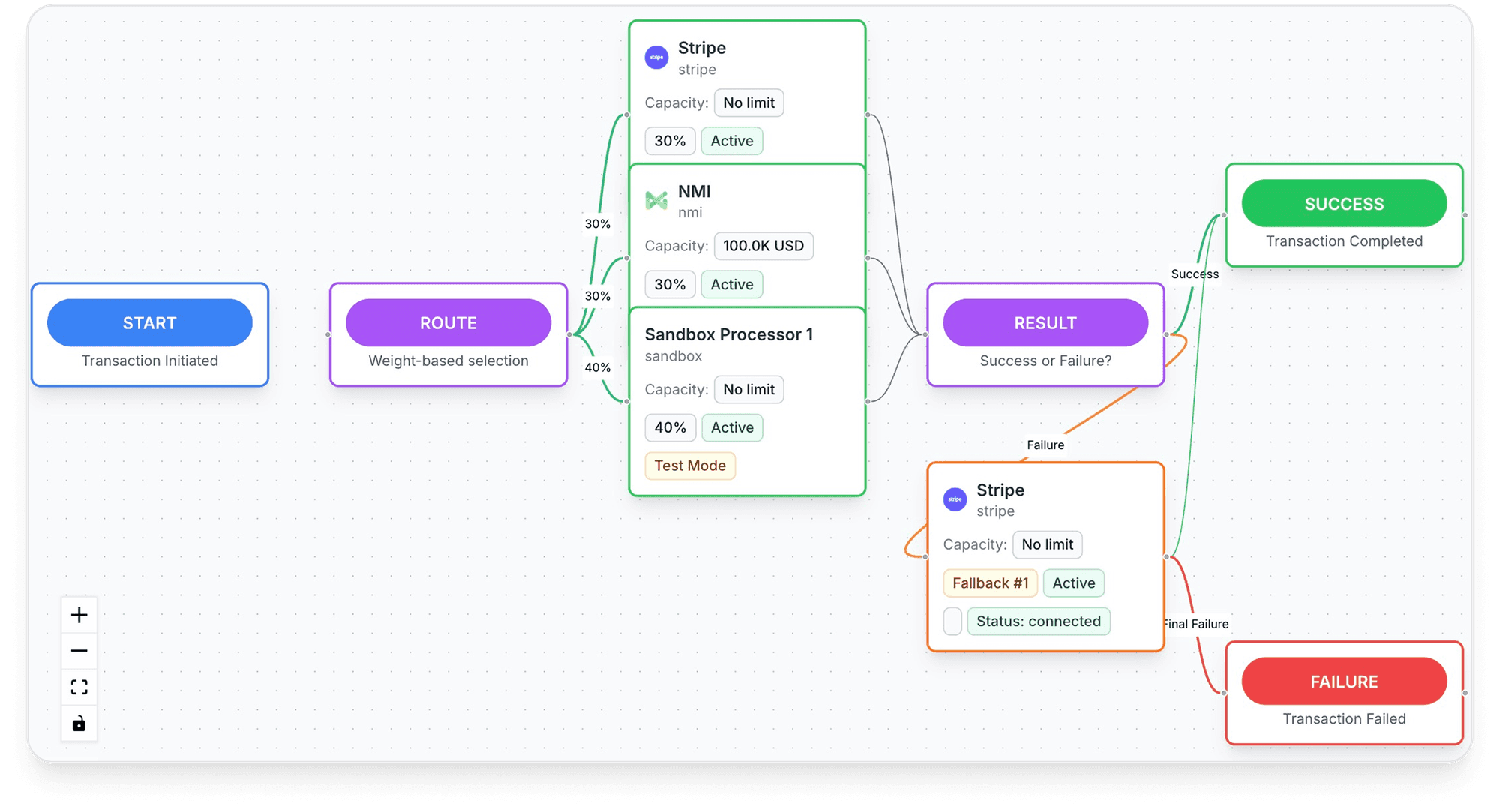
Whatever tool you use, the method doesn't change: warn before the renewal, retry within the network limits, send one clear link, and decide in advance how the sequence ends. If you're comparing tools, our guide to dunning management software lists what to check, and the payment side of renewals is in subscription payment processing.
Frequently asked questions
What does dunning mean?
What is a dunning letter or dunning email?
What does dunning stop mean?
How many times should you retry a failed subscription payment?
What is a dunning conversion rate?
Is dunning the same as debt collection?
Sources
Checked November 3, 2026- Stripe Docs, Automate payment retries (Smart Retries)
- Stripe Docs, Automate customer emails
- Stripe Docs, How subscriptions work (subscription statuses)
- Stripe Docs, Pause subscriptions after payment failure
- Stripe Docs, Revenue recovery analytics
- Visa Core Rules and Visa Product and Service Rules, April 18, 2026
- Stripe Docs, How cards work (automatic card updates)
- Chargebee Docs, Difference between dunning status stopped and exhausted
- Recurly Docs, Dunning campaigns
- Stripe Docs, Revenue recovery
- Stripe Docs, Apple Pay merchant tokens, read November 3, 2026
- Tagada Docs, Wallets (Apple Pay, Google Pay), read November 3, 2026
- Tagada Docs, Subscriptions and rebilling, read November 3, 2026
- TagadaPay Payments API, Ask for a try now (renewal cycles), read November 3, 2026
- Tagada Docs, Customer portal, read November 3, 2026
- Tagada Docs, Emails, read November 3, 2026
Tagada
Subscriptions that keep charging
Funnels, one-click upsells, subscription billing and payment routing, on one customer record.
- 01Create your free account
- 02Connect your store or build a checkout
- 03Launch funnels, upsells and subscriptions