
Shopify Checkout Alternative: What Shopify Allows and What an Outside Checkout Changes
What you can change in Shopify checkout in 2026, by plan, what an outside checkout changes for payments and upsells, and what Shopify's terms say.



Article summary
TL;DR
You have three ways to change Shopify checkout: customize it with Shopify's extensions (in-checkout UI only on Plus), swap the card processor inside it (one at a time, with a 0.2% to 2% Shopify fee), or send buyers to an outside checkout. The last one gives you several processors and your own offers, but Shopify's terms restrict processing orders outside its checkout. Read them first.
- Checkout UI extensions in the information, shipping and payment steps are "available only to stores on a Shopify Plus plan".
- Shopify Scripts stopped running on June 30, 2026, and script tags on non-Plus Thank you pages on August 26, 2026.
- Shopify allows "only one credit card payment provider activated at a time"; a third-party one costs 2% on Basic down to 0.2% on Plus.
- Shopify's terms, updated October 20, 2026, ask you not to "process orders outside Shopify's Checkout".
- Public apps must "Use Shopify checkout"; apps that bypass it are prohibited.
 ChatGPT
 Claude
 Perplexity
 Grok
On this page
This guide is about the checkout itself: what it runs, which offers it shows, which processors sit behind it. For the payment side (Shopify Payments eligibility, high-risk providers), see high-risk payment processing for Shopify stores.
Your three options
Pick by what you need, not by the tool. Most stores only need the first; high-risk stores and funnel-heavy brands look at the second and third.
| Option | What you can change | Processors | What it costs you on Shopify | Shopify's rules |
|---|---|---|---|---|
| Customize Shopify checkout | Branding, blocks, discounts, delivery and payment logic, Thank you page2Shopify.dev, Checkout technologies and plan availability, read November 2, 2026 | Shopify Payments, or one third-party card provider5Shopify Help Center, Configuring third-party payment providers, read November 2, 2026 | Your plan; Plus for in-checkout UI3Shopify.dev, Checkout UI extensions, read November 2, 2026 | Built for it |
| Change the processor inside Shopify checkout | Who processes the cards | One card provider at a time5Shopify Help Center, Configuring third-party payment providers, read November 2, 2026 | 0.2% to 2% per order on top of the provider6Shopify pricing, third-party payment provider fees, read November 2, 2026 | Provider must be supported by Shopify5Shopify Help Center, Configuring third-party payment providers, read November 2, 2026 |
| Send buyers to an outside checkout | The whole page, offers and payment flow | As many as the checkout supports | Ask Shopify how these orders are billed | Terms restrict orders outside Shopify's checkout7Shopify Terms of Service, section 1 (Account Terms), updated October 20, 2026 |
Fig. 1Three setups, from most native to most open
Extensions in checkout
Shopify's checkout with app blocks and Functions. Every in-checkout UI block needs Plus.
Another card provider
Same checkout, different processor. One at a time, and Shopify's fee on top.
Outside checkout
Your own checkout page and processors. Read Shopify's terms before you switch.
the further right, the more you control and the more you must check
What you can still change inside Shopify checkout
Less than before 2024, and mostly on Plus. Shopify now calls the toolkit "Shopify Extensions in Checkout", formerly checkout extensibility1Shopify.dev, Apps in checkout, read November 2, 2026.
| Tool | What it does | Plans2Shopify.dev, Checkout technologies and plan availability, read November 2, 2026 |
|---|---|---|
| Checkout UI extensions, in-checkout | Blocks in the information, shipping and payment steps: fields, upsells, messages | Plus only3Shopify.dev, Checkout UI extensions, read November 2, 2026 |
| Checkout UI extensions, Thank you and Order status | Blocks after payment: surveys, offers, tracking links | All plans except Starter |
| Post-purchase extensions | An offer page between payment and Thank you | All plans except Starter; beta, live use on request |
| Shopify Functions | Discount, delivery and payment method logic | All plans except Starter; some APIs in preview |
| Checkout branding (GraphQL Admin API) | Fonts, colors, layout beyond the editor | Plus |
| Web pixel extensions | Tracking events in checkout | All plans except Starter |
So a non-Plus store can't add its own block above the pay button. It can add one after payment, change discount and delivery logic with Functions, and track with pixels2Shopify.dev, Checkout technologies and plan availability, read November 2, 2026.
What Shopify retired
Every way to run your own code in checkout has an end date, and they have all passed.
Fig. 2The end of custom code in Shopify checkout
- August 28, 2025checkout.liquid and additional scripts end on Thank you and Order status pages
- April 15, 2026Shopify Scripts can no longer be edited or published
- June 30, 2026All Shopify Scripts stop running
- August 26, 2026Script tags end on those pages for non-Plus stores
anything left in Additional scripts stopped without an error
checkout.liquid "is now unsupported for the Information, Shipping, and Payment checkout steps"1Shopify.dev, Apps in checkout, read November 2, 2026. Shopify points Script users to Functions and public apps4Shopify developer changelog, Shopify Scripts will be deprecated on June 30, 2026, posted April 9, 2026.
Watch out
Tracking or upsell code that lived in checkout.liquid or Additional scripts doesn't throw an error when it stops. Orders keep coming in while ad platforms stop seeing them. List what ran there and move it to pixels and extensions.
Payments inside Shopify checkout
One card processor, chosen in Settings, Payments. "You can have only one credit card payment provider activated at a time," and only the store owner can add one5Shopify Help Center, Configuring third-party payment providers, read November 2, 2026.
Fig. 3Shopify's fee when cards don't go through Shopify Payments
per order, on top of your provider's own fees
Alternative payment apps work inside this frame. Their buyer flow "must redirect from Shopify's checkout to your app's payment flow, then back to Shopify's order confirmation page"8Shopify.dev, App Store requirements, sections 1.1.2 and 5.2, read November 2, 2026. The order stays a Shopify order.
Two limits matter for subscription brands. Shopify Subscriptions supports a short list of gateways9Shopify Help Center, Shopify Subscriptions considerations, read October 9, 2026, and there's no cascade to a second card processor when the first is down or times out5Shopify Help Center, Configuring third-party payment providers, read November 2, 2026. Which providers accept high-risk categories, and how to switch: high-risk payment processing for Shopify stores.
What Shopify's terms say about an outside checkout
Shopify restricts it, in two places. Its Terms of Service, updated October 20, 2026, say7Shopify Terms of Service, section 1 (Account Terms), updated October 20, 2026:
"You agree not to work around, bypass, or circumvent any of the technical limitations of the Services, including to process orders outside Shopify's Checkout."
Its App Store requirements say public apps must "Use Shopify checkout": "Apps that bypass checkout or payment processing, or register any transactions through the Shopify API in connection with such activity, are prohibited"8Shopify.dev, App Store requirements, sections 1.1.2 and 5.2, read November 2, 2026. Shopify adds that it "can't guarantee the safety or security of an order that's been placed through an offsite or third party checkout"8Shopify.dev, App Store requirements, sections 1.1.2 and 5.2, read November 2, 2026.
Watch out
Read both texts before you send any Shopify traffic to an outside checkout, and ask Shopify or your counsel how they apply to your setup. A store that leaves Shopify entirely and runs on a standalone platform is no longer under these terms.
What an outside checkout changes
It changes who controls the page, the processors and the offers. It doesn't change what card networks and processors require of you.
| Area | Shopify checkout | Outside checkout |
|---|---|---|
| Card processors | One at a time5Shopify Help Center, Configuring third-party payment providers, read November 2, 2026 | Several, with routing and cascade if the checkout supports it |
| Offers before payment | App blocks, Plus only in the steps3Shopify.dev, Checkout UI extensions, read November 2, 2026 | Order bumps on the page: order bumps |
| Offers after payment | Post-purchase extension, beta on request2Shopify.dev, Checkout technologies and plan availability, read November 2, 2026 | One-click upsells and downsells: one-click upsells |
| Page design and tests | Branding and editor; full control on Plus2Shopify.dev, Checkout technologies and plan availability, read November 2, 2026 | The whole page, A/B tests: custom ecommerce checkout |
| Shopify's terms | Built for it | Restricted7Shopify Terms of Service, section 1 (Account Terms), updated October 20, 2026 |
The cost side is not a simple saving. You add the checkout's own fees, and how Shopify bills orders taken outside its checkout depends on your setup. Compare on your own numbers, with your plan, before you decide. A single-page layout and its trade-offs: one-page checkout.
Before you move checkout
- Read Shopify's Terms of Service and App Store rules on outside checkouts, and get an answer for your setup7Shopify Terms of Service, section 1 (Account Terms), updated October 20, 20268Shopify.dev, App Store requirements, sections 1.1.2 and 5.2, read November 2, 2026.
- List what runs in checkout today: apps, Functions, pixels, post-purchase offers, subscription app.
- Check your subscriptions: which system renews them, and on which processor9Shopify Help Center, Shopify Subscriptions considerations, read October 9, 2026.
- Audit the theme: hardcoded buy buttons, redirects and leftover scripts can send buyers around any checkout.
- Rebuild tracking with server-side purchase events, then compare store orders with ad platform purchases for two weeks.
- Start with a share of traffic, place test orders and refunds, then widen.
Checks to run on a test store or a small share of traffic first.
By industry
| Industry | What changes | Guide |
|---|---|---|
| Supplements | One card processor and health-claim rules make a backup processor the main question | Shopify checkout for supplement brands |
| Skincare | Routine upsells and refill subscriptions push past what non-Plus checkout allows | Shopify checkout for skincare brands |
| Online pharmacy | Shopify Payments doesn't support prescription drugs, Shopify doesn't support storing health information under HIPAA, and a prescription step needs Plus | Shopify checkout for online pharmacies |
| Telehealth | Keep health data out of Shopify, and charge only after the clinician decides: a Shopify Payments authorization lasts 7 days | Shopify checkout for telehealth companies |
| Fitness | Equipment brands hit the installment and delivery limits; sports nutrition brands hit the processor and subscription ones | Shopify checkout for fitness brands |
| Info products | Access is granted by an app after payment; no bumps in checkout without Plus, and no native plan with a fixed number of installments | Shopify checkout for info product businesses |
How Tagada helps
A checkout layer for Shopify stores
Tagada runs on Shopify, standalone, on WooCommerce or headless. On Shopify, it works through a checkout script10Tagada Docs, Shopify Checkout Script, read November 2, 2026:
- One script in your theme. Once Shopify is connected, Tagada places a script in the active theme that hands the cart from your Buy now and Checkout buttons to a Tagada funnel checkout10Tagada Docs, Shopify Checkout Script, read November 2, 2026.
- A share of traffic, not all of it. The script's setting sends from 0 to 100% of checkouts to Tagada, so you can start small10Tagada Docs, Shopify Checkout Script, read November 2, 2026.
- A theme audit flags hardcoded redirects, commented-out buttons or legacy scripts that would bypass the setup10Tagada Docs, Shopify Checkout Script, read November 2, 2026.
- Removable. Removing the script returns the store to Shopify's native checkout10Tagada Docs, Shopify Checkout Script, read November 2, 2026.
- Checkout: one-click upsells, order bumps, A/B tests, Apple Pay and Google Pay.
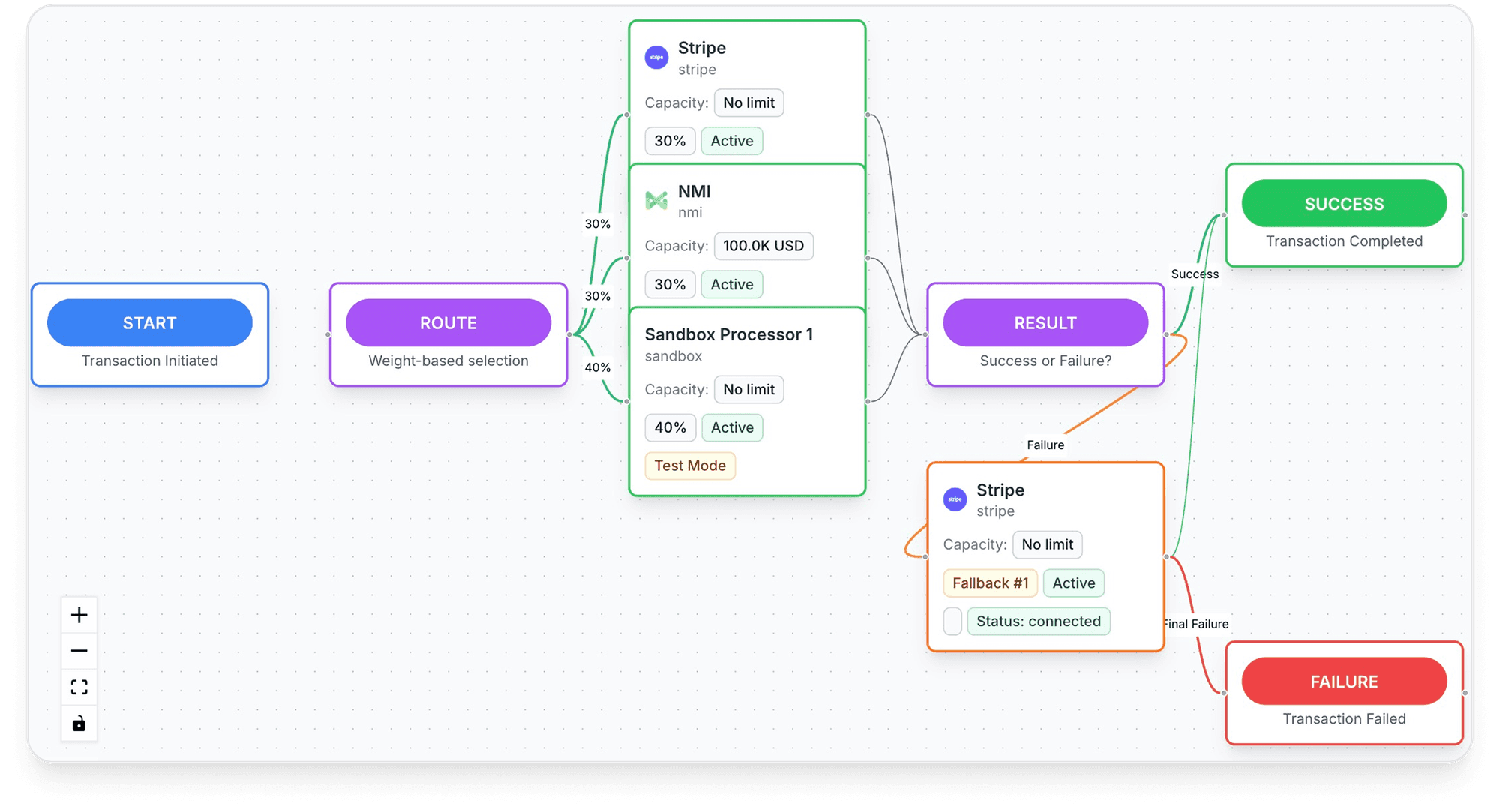
- Payments: routing across TagadaPay and processors such as Stripe, NMI and Airwallex with one logic, and cascade to another processor when one is down or times out.
- Already on Shopify? "Drop TagadaPay in." It also works with WooCommerce, ClickFunnels and BigCommerce.
- Routing scored in real time: "Every transaction is scored against your live MID network in real time", then sent to the processor most likely to approve it, with a retry on decline. TagadaPay reports a +18% approval uplift.
- TagadaPay underneath: onboarding is one KYC, and most merchants are live in under 24 hours. "If you sell something real, we will get you paid."
Setup steps are in the Shopify checkout script documentation. Plans are on the pricing page.
Frequently asked questions
Can you use a custom checkout on Shopify?
Is checkout extensibility only for Shopify Plus?
What replaced checkout.liquid and Shopify Scripts?
Can I use two payment processors in Shopify checkout?
Does Shopify charge a fee with a third-party payment provider?
Sources
Checked November 2, 2026- Shopify.dev, Apps in checkout, read November 2, 2026
- Shopify.dev, Checkout technologies and plan availability, read November 2, 2026
- Shopify.dev, Checkout UI extensions, read November 2, 2026
- Shopify developer changelog, Shopify Scripts will be deprecated on June 30, 2026, posted April 9, 2026
- Shopify Help Center, Configuring third-party payment providers, read November 2, 2026
- Shopify pricing, third-party payment provider fees, read November 2, 2026
- Shopify Terms of Service, section 1 (Account Terms), updated October 20, 2026
- Shopify.dev, App Store requirements, sections 1.1.2 and 5.2, read November 2, 2026
- Shopify Help Center, Shopify Subscriptions considerations, read October 9, 2026
- Tagada Docs, Shopify Checkout Script, read November 2, 2026
Tagada
Check what your Shopify store can run before you move checkout
Funnels, one-click upsells, subscription billing and payment routing, on one customer record.
- 01Create your free account
- 02Connect your store or build a checkout
- 03Launch funnels, upsells and subscriptions