
Custom Ecommerce Checkout: What It Must Do and How to Build It
What an ecommerce checkout must do, the four ways to build one (platform, hosted, embedded, headless), Shopify's limits, and how to choose.



Article summary
TL;DR
A custom ecommerce checkout is a payment page you control: its layout, its offers, its payment methods and where the payment goes. You can get there four ways: tune your platform's checkout, use a processor's hosted page, embed payment components, or build headless on an API. Pick the lightest option that does every job your store needs.
- Baymard's documented average cart abandonment rate is 70.22%, across 50 studies (updated September 2025).
- 18% of US shoppers who abandoned a checkout left because they had to create an account, 17% because it was too long.
- The average checkout had 11.3 form fields in 2024; Baymard says most sites need 8.
- On Shopify, apps that change the information, shipping and payment pages are available only on Shopify Plus.
- Strong Customer Authentication under PSD2 in the EEA, and similar rules in the UK, India, Japan and Australia, may require 3D Secure.
 ChatGPT
 Claude
 Perplexity
 Grok
On this page
This page is about choosing and building the checkout. For the word itself, see what a checkout is. For fixing an existing one, see ecommerce checkout optimization.
What a custom checkout has to do
Eight jobs, and the abandonment data tells you which ones cost the most when they fail. Most "custom checkout" projects start because the current tool can't do one of them.
| Job | What it means | Why it matters |
|---|---|---|
| Show the full cost early | Shipping, tax and fees visible before the payment step | 40% of abandoners cite extra costs1Baymard Institute, Cart abandonment rate statistics and reasons for abandonment, updated September 22, 2025 |
| Let guests pay | NoForced account; offer one after payment | 18% leave when an account is required1Baymard Institute, Cart abandonment rate statistics and reasons for abandonment, updated September 22, 2025 |
| Ask for little | About 8 fields, address autocomplete | The average is 11.32Baymard Institute, Checkout flow average form fields, June 26, 2024 |
| Offer wallets | Apple Pay and Google Pay above the card form | 9% leave for lack of payment methods1Baymard Institute, Cart abandonment rate statistics and reasons for abandonment, updated September 22, 2025 |
| Authenticate when needed | 3D Secure on risky or regulated payments | Required by SCA in some regions6Stripe Docs, 3D Secure authentication, read November 2, 2026 |
| Survive a failed payment | Retry soft declines within the rules; send the payment to a second processor when the first is down or times out | 10% leave after a declined card1Baymard Institute, Cart abandonment rate statistics and reasons for abandonment, updated September 22, 2025 |
| Raise the order value | Order bumps before payment, upsells after | Revenue from buyers you already paid to acquire |
| Report the sale | Conversion events to your ad platforms, from the server | Ads optimize on the sales they can see |
Fig. 1Why US shoppers abandon a checkout
most of these are checkout jobs, not product problems
Baymard also estimates that better checkout design could lift the conversion rate of an average large ecommerce site by 35.26%1Baymard Institute, Cart abandonment rate statistics and reasons for abandonment, updated September 22, 2025. Field by field and block by block: checkout page design and checkout as guest.
Four ways to build a checkout
They differ on one thing: who owns the page. The more you own, the more you can change, and the more you maintain.
| Option | Who owns the page | What you can change | Card data and PCI | Effort |
|---|---|---|---|---|
| Platform checkout (Shopify, WooCommerce) | The platform | Branding, settings, apps the platform allows | Handled by the platform | Low |
| Hosted payment page (Stripe Checkout, PayPal) | The processor | Logo, colors, fields the processor exposes | Handled by the processor | Low |
| Embedded components (Stripe Elements, a checkout SDK) | You, with the provider's payment fields | Layout, offers, flow | Card fields stay with the provider | Medium |
| Headless, on an API | You | Everything: cart, offers, steps, routing | Tokenize in the browser so card numbers skip your servers | High |
Stripe's own docs show the trade-off. Its Checkout Sessions API comes with tax, discounts, shipping and subscriptions built in; with the lower-level Payment Intents API, "you calculate the final amount and manage the entire checkout lifecycle in your own code"5Stripe Docs, Online payments (Checkout Sessions and Payment Intents), read November 2, 2026. Stripe says to choose that path only if you want to own every part of the checkout5Stripe Docs, Online payments (Checkout Sessions and Payment Intents), read November 2, 2026.
Watch out
A hosted page is the fastest start, but every offer, test or payment method you add later has to be something that provider supports. Check that before you build your funnel on it.
Headless in more depth, with PCI scope, 3DS and wallets on your own domain: headless commerce solutions and headless checkout.
When your platform's checkout is enough
Often. Stay on it until it blocks a job from the list above. On Shopify, one-page checkout is the default layout4Shopify Help Center, Checkout style and layout, read November 2, 2026, and the checkout editor covers logo, colors, fonts and layout4Shopify Help Center, Checkout style and layout, read November 2, 2026.
The limit comes with apps. Apps that customize the information, shipping and payment pages are "available only to Shopify Plus"3Shopify Help Center, Checkout apps, read November 2, 2026. On other plans, apps can work on the thank you and order status pages, and the free Checkout Blocks app runs with feature restrictions3Shopify Help Center, Checkout apps, read November 2, 2026.
Fig. 2Signs you have outgrown the platform checkout
- You want an offer on the payment pageOn Shopify, that needs a Plus checkout appUpgrade, or move checkout off the platform
- Payments get declined or the account is under reviewOne processor decides every saleA checkout that can route to a second processor
- Ads report fewer sales than you madeBrowser pixels miss conversionsServer-side conversion events from the checkout
- You only need branding and walletsThe platform already does itStay, and use the checkout editor
one of these is enough to look further
Your options on Shopify, side by side: Shopify checkout alternative.
The payment layer: wallets, 3D Secure, card data
The checkout is also where the payment is decided. Three things to get right before launch.
- Wallets first. Apple Pay and Google Pay skip the card form. Apple Pay only opens on domains registered for it, so register every domain that serves checkout.
- 3D Secure when it's needed. SCA under PSD2 may require it in the EEA, and similar rules apply in the UK, India, Japan and Australia; elsewhere it's optional and used to reduce fraud6Stripe Docs, 3D Secure authentication, read November 2, 2026.
- Card numbers off your servers. Tokenize in the browser and charge the token from your server. Your PCI scope stays small.
Fig. 3One card payment through a custom checkout
approved declined or closed routing step
- CheckoutCard or wallet
- tokenizedTokenCard number stays in the vault
- if needed3D SecureOnly if the issuer or the rules ask
- routes to
 Processor ATimeoutDeclined
- falls through
 Processor BApprovedApproved
the backup processor is the step most checkouts lack; it takes outages and timeouts, never a bank decline
Which methods to offer by market: payment methods for high-risk merchants. Running more than one processor, and what's allowed: multiple merchant accounts.
The revenue layer: bumps, upsells and tests
A custom checkout earns its cost here. Two offers sit on either side of the pay button, and you test both.
Fig. 4Where each offer sits
- CartProduct chosen
- CheckoutOrder bump: one tick, same charge
- PaymentCard or wallet, 3DS if needed
- Offer pageOne-click upsell: second charge
- Thank youConversion event fires
before payment it joins the order, after payment it's a second charge
- Order bump: a small add-on with a checkbox, above the pay button. See order bumps.
- One-click upsell: an offer after payment, charged to the stored card with the buyer's consent. See one-click upsells and how a one-click upsell charges the card.
- A/B tests: split traffic between two checkout versions and compare paid orders, not clicks. See one-page vs multi-step checkout.
Tracking: report every sale
Send the purchase event from the server when the payment succeeds, not only from a browser pixel. Ad blockers and browser privacy rules don't stop a server call, so your ad platforms see more of the sales they drove.
- Fire on the paid order, once, with the order value and currency.
- Tag each step (landing, checkout, offer, thank you) to see where buyers drop.
- Keep the click ID from the ad through checkout, so the sale is attributed.
Fig. 5One paid order, two ways to report it
the server event still counts when the pixel is blocked
How it works: server-side tracking.
How to build a custom checkout, step by step
- List the jobs your current checkout fails at, using the table at the top of this page.
- Pick the lightest build that does them: platform, hosted, embedded or headless.
- Set up payments: processors, wallets and their domains, 3D Secure rules, a backup route.
- Build the page: guest checkout, about 8 fields, full cost before payment.
- Add offers and tracking: one order bump, a post-payment upsell, server-side purchase events.
- Launch on a share of traffic, compare paid orders and decline rate with the old checkout, then switch.
Order of work for a store moving off a platform or hosted checkout.
Every step of the flow, and what the payment does at each: checkout flow.
By industry
| Industry | What changes | Guide |
|---|---|---|
| Supplements | Subscription terms above the pay button, declines on recurring orders, a backup processor | Checkout optimization for supplement brands |
| Skincare | A cart that sells the routine, a free shipping threshold, refills on subscription | Checkout optimization for skincare brands |
| Online pharmacy | Authorize at checkout, let the pharmacist review, then capture on approval or void on decline | Checkout optimization for online pharmacies |
| Telehealth | Tell the patient the card is charged only if a clinician approves; capture on approval, release the hold on decline | Checkout optimization for telehealth companies |
| Fitness | Freight and a delivery window before payment, installments on large orders, one accessory bump | Checkout optimization for fitness brands |
| Info products | One decision: the total price and the payment options (in full, plan, membership) with their exact terms | Checkout optimization for info product businesses |
Wallets for each: express checkout for supplement brands and express checkout for skincare brands.
How Tagada helps
One checkout, four ways to run it
- Three ways to make the checkout page: the native checkout with no code, your own HTML, or the Plugin SDK in React or JavaScript, which handles tokenization, 3DS and payment (funnel pages).
- Headless on your domain: the Headless SDK lets Tagada manage the cart, upsells and funnel behind your own design (choose your integration).
- Standalone, Shopify, WooCommerce or headless. On Shopify, a checkout script hands the cart from your Buy Now and Checkout buttons to a Tagada checkout (Shopify checkout script). On WooCommerce, you pick one of three plugins (WooCommerce plugins).
- Apple Pay and Google Pay, with Apple Pay domains registered from the dashboard (wallets).
- Native 3DS2, device intelligence and a rules engine.
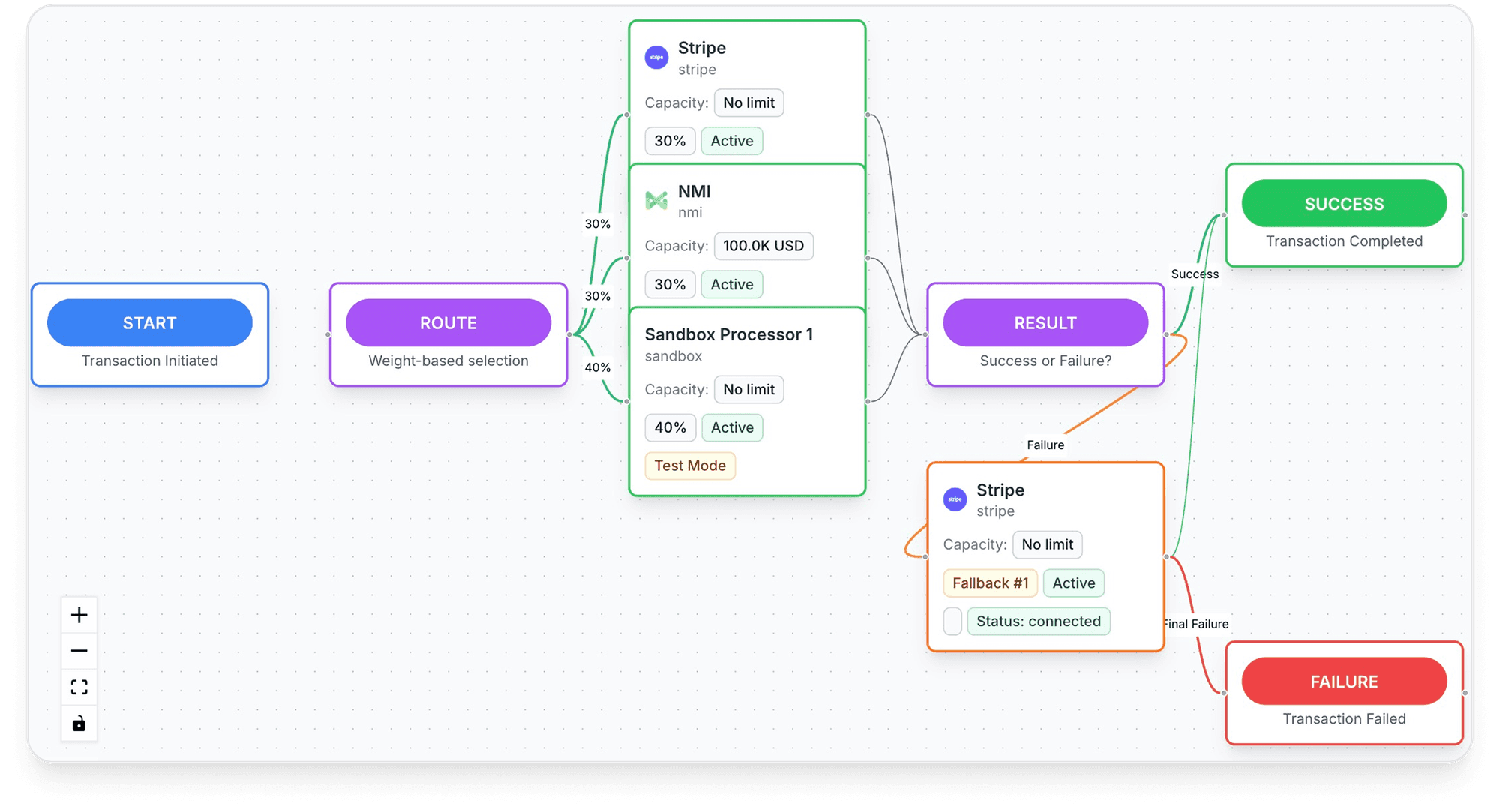
- Routing across TagadaPay and processors such as Stripe, NMI and Airwallex with one logic, with a cascade to another processor when one is down or times out.
- Order bumps, one-click upsells and A/B tests on the checkout, with pixels and scripts set per step (step config) and server-side tracking for Meta, Google and TikTok.
- Routing scored in real time: "Every transaction is scored against your live MID network in real time", then sent to the processor most likely to approve it, with a retry on decline. TagadaPay reports a +18% approval uplift.
- A vault you own: your PCI-tokenized cards, customer profiles and subscription data stay portable. Switch processors without re-onboarding customers. No vendor lock-in.
- TagadaPay underneath: onboarding is one KYC, and most merchants are live in under 24 hours. "If you sell something real, we will get you paid."
Plans are on the pricing page.
Frequently asked questions
What is the best ecommerce checkout solution?
Can I customize the Shopify checkout without Plus?
Hosted or embedded checkout: which is better?
Do I need PCI compliance for a custom checkout?
What should an ecommerce checkout have?
Sources
Checked November 2, 2026- Baymard Institute, Cart abandonment rate statistics and reasons for abandonment, updated September 22, 2025
- Baymard Institute, Checkout flow average form fields, June 26, 2024
- Shopify Help Center, Checkout apps, read November 2, 2026
- Shopify Help Center, Checkout style and layout, read November 2, 2026
- Stripe Docs, Online payments (Checkout Sessions and Payment Intents), read November 2, 2026
- Stripe Docs, 3D Secure authentication, read November 2, 2026
Tagada
Build the checkout, keep the payments flexible
Funnels, one-click upsells, subscription billing and payment routing, on one customer record.
- 01Create your free account
- 02Connect your store or build a checkout
- 03Launch funnels, upsells and subscriptions