
Order Bumps: What to Offer, Where to Put Them, How to Measure Them
How to run order bumps at checkout: what to offer, price and placement, the pre-checked box rules, cart-based targeting, Shopify limits, measurement.



Article summary
TL;DR
Run one order bump per checkout: a small add-on related to the cart, priced well below it, placed next to the order summary or above the pay button, and left unticked. Show different bumps for different carts, and judge each one on the extra profit per order and the refunds it brings, not on how many buyers tick it.
- The FTC lists "tricking a shopper into buying unwanted items by using a pre-checked box" as a dark pattern (September 2022).
- In the EU, a buyer charged through a pre-selected option is entitled to a refund of that payment (Directive 2011/83/EU, Article 22).
- A bump that starts a subscription needs the terms before billing details and express informed consent under ROSCA.
- On Shopify, apps that add offers to the payment page are available only on Shopify Plus.
- 20% of US shoppers who abandoned a checkout said delivery was too slow: faster shipping is a bump that answers a real worry.
 ChatGPT
 Claude
 Perplexity
 Grok
On this page
This page is about running bumps in your checkout. For the definition and the difference with other offers, see what an order bump is. Bumps are one part of a custom ecommerce checkout.
Where an order bump sits in the checkout
On the checkout page, before payment. The buyer ticks a box, the total updates, and the add-on is paid in the same charge as the main order.
Fig. 1A bump before payment, an upsell after
- CartCoffee grinder
- CheckoutBump: cleaning kit, one tick
- PaymentOne charge for both
- Offer pageUpsell: beans subscription
- Thank youOrder confirmed
the bump never needs a second charge
| Offer | When | How the buyer accepts | Charge |
|---|---|---|---|
| Order bump | On the checkout page, before payment | Ticks a box | Same charge as the order |
| One-click upsell | After payment, on an offer page | Clicks "Add to my order" | A second charge on the stored card |
| Cart drawer upsell | Before checkout, in the cart | Adds a product | Same charge as the order |
The two are not rivals: most funnels use a bump and an upsell. After-payment offers in detail: one-click upsells and how a one-click upsell charges the card. Cart offers: cart drawer upsells.
What to offer as an order bump
Something the buyer will want with what is already in the cart, that takes a second to decide. Six types cover most stores.
| Bump type | Example | Fits when | Why it works |
|---|---|---|---|
| Accessory or consumable | Cleaning kit with a grinder, case with a phone | The product needs it | Useful from day one |
| Smaller size or sample | Travel size, sample pack | First order | Low-risk way to try the range |
| Second unit at a lower price | Second bottle, spare filter | Consumables | The buyer already chose the product |
| Faster shipping | Express delivery | Any physical order | 20% of abandoners cite slow delivery5Baymard Institute, Cart abandonment rate statistics and reasons for abandonment, updated September 22, 2025 |
| Protection | Shipping protection, extended warranty | Higher-value orders | Covers a risk the buyer already sees |
| Gift wrap or note | Wrapping, message card | Seasonal orders | Turns the order into a gift |
Fig. 2Three checks before you publish a bump
Related
It goes with what is in the cart, so it needs no explanation beyond one line.
Small
It costs well below the main order, so the yes or no takes a second.
Chosen
The box starts unticked, and the price is in the bump line.
fail one, and it belongs after payment
Avoid bumps that compete with the main product, or that need a decision the buyer wasn't ready for (a bigger plan, a different model). Those belong after payment, as an upsell.
Price, copy and placement
- Price it well below the order. The bump should be a yes or no in a second.
- Show the price, and the saving if there is one, in the bump line itself.
- One sentence on why: "Add a cleaning kit for $9, keeps the burrs sharp."
- A small product photo next to the checkbox.
- Place it next to the order summary or just above the pay button, visible on a phone without scrolling past the card fields.
- One bump per checkout, two at most. More turns the checkout into a catalog, and 17% of abandoners already find checkouts too long5Baymard Institute, Cart abandonment rate statistics and reasons for abandonment, updated September 22, 2025.
Fig. 3A bump line, field by field
- Checkbox
- Unticked by default
- Headline
- Add a cleaning kit · $9.00
- Reason
- Keeps the burrs sharp, ships in the same box
- Total if ticked
- $98.00, one charge
Illustrative record.
price, reason, photo, unticked
Never pre-check the box
The buyer must choose the bump. A pre-checked add-on is the textbook case regulators point to, and the one buyers dispute.
Tricking a shopper into buying unwanted items by using a pre-checked box
| Rule | What it says | Applies to |
|---|---|---|
| FTC dark patterns report | Lists pre-checked add-ons, such as an extended warranty added unless the customer opts out, as dark patterns1FTC, Bringing Dark Patterns to Light, staff report, September 14, 2022 | US |
| Consumer Rights Directive, Article 22 | The trader needs express consent for any extra payment; consent inferred from a pre-selected default entitles the buyer to a refund2Directive 2011/83/EU on consumer rights, Article 22, read November 2, 2026 | EU |
| ROSCA | A bump that starts recurring charges needs all material terms before billing details, express informed consent and a simple way to cancel3Restore Online Shoppers' Confidence Act, 15 U.S.C. § 8403, read November 2, 2026 | US, online subscriptions |
Watch out
A bump the buyer didn't notice comes back as a refund request or a chargeback. A lower take rate with clean consent costs less.
Trials and subscriptions added at checkout: free trials and negative option billing.
Match the bump to the cart
One bump for every order wastes the slot. Set rules on what is in the cart, and show the add-on that fits it.
Fig. 4Which bump for which cart
- The grinderCleaning kitAccessory for that product
- A total under the free shipping thresholdFaster shippingSmall add-on the buyer can justify
- A total above a set amountShipping protectionCovers a bigger risk
- Three items or moreGift note, or no bumpThe cart is already full
the cart decides, not a fixed slot
Start with one rule per bestseller. Add more only when the data shows a cart type that ignores the default bump.
Order bumps on Shopify, WooCommerce and custom checkouts
Where your checkout lives decides what you can put on it.
| Checkout | Order bumps | What to know |
|---|---|---|
| Shopify, Plus plan | Through checkout apps on the information, shipping and payment pages | Plus only4Shopify Help Center, Checkout apps, read November 2, 2026 |
| Shopify, other plans | Not on the payment page; apps work on the thank you and order status pages, Checkout Blocks with restrictions4Shopify Help Center, Checkout apps, read November 2, 2026 | Move checkout off Shopify to sell a bump before payment |
| WooCommerce | Through a checkout or funnel plugin | Check that it works with your payment gateway |
| Hosted payment page | Only if the provider supports add-ons | Often not configurable |
| Custom or headless checkout | Yours to build, or from the checkout platform | Full control over rules and placement |
Shopify options side by side: Shopify checkout alternative.
Measure an order bump
Take rate tells you if the offer is relevant. Profit per order and refunds tell you if it's worth keeping.
| Metric | Formula | What it tells you |
|---|---|---|
| Take rate | Orders with the bump ÷ orders where it was shown | Is the offer relevant? |
| AOV lift | AOV with bump ÷ AOV of a holdout | What it adds per order |
| Profit per order | After product, shipping and payment costs | Does it make money? |
| Bump refunds | Bump refunds ÷ bumps sold | Did buyers really want it? |
| Checkout completion | Paid orders ÷ checkouts started | Does the bump slow buyers down? |
Published take-rate figures disagree widely and rarely state a method, so measure your own. More on the formula: order bump take rate and average order value.
- Pick one bump for your bestseller and write one line of copy.
- Split traffic: half the checkouts see the bump, half don't.
- Run until each side has enough paid orders to compare, a full week at least.
- Compare profit per order, completion and refunds, not take rate alone.
- Keep the winner, then test the price or the item, one change at a time.
A clean test needs a holdout: buyers who see no bump.
By industry
| Industry | What changes | Guide |
|---|---|---|
| Supplements | A second bottle, a travel size or a shaker; a bump that adds a subscription needs its own consent | Order bumps for supplement brands |
| Skincare | The next step of the routine or a travel mini; never a product that competes with the serum in the cart | Order bumps for skincare brands |
| Online pharmacy | A non-prescription product, a supply or faster shipping, never a prescription medication; decide what happens to the bump if the review is declined | Order bumps for online pharmacies |
| Telehealth | Non-medical only: faster shipping, a companion product or a follow-up visit, named so no health data leaks | Order bumps for telehealth companies |
| Fitness | The obvious next item: collars with a barbell, a shaker with protein powder, shipping protection on a large order | Order bumps for fitness brands |
| Info products | A resource the buyer can use right away (workbook, templates, recorded Q&A), well below the main price | Order bumps for info product businesses |
Bumps are one AOV lever among several: increase AOV for a supplement brand and for a skincare brand.
How Tagada helps
Order bumps, set by product and by cart
- Bumps on the checkout page, each one selling a product with its own price, title, description and image (order bumps).
- Triggers and cart rules: show a bump for every checkout or for a given product, and limit it by cart contents, cart total or item count.
- Slots: a primary bump, additional rows and a premium position.
- Per checkout step: pick which bumps run on each checkout of a funnel (step config).
- One charge: a ticked bump adds a line to the cart; a one-click upsell after payment creates its own order (upsells and offers).
- A/B tests on bumps, offers and checkout.
- A pre-check setting exists for each bump: leave it off.
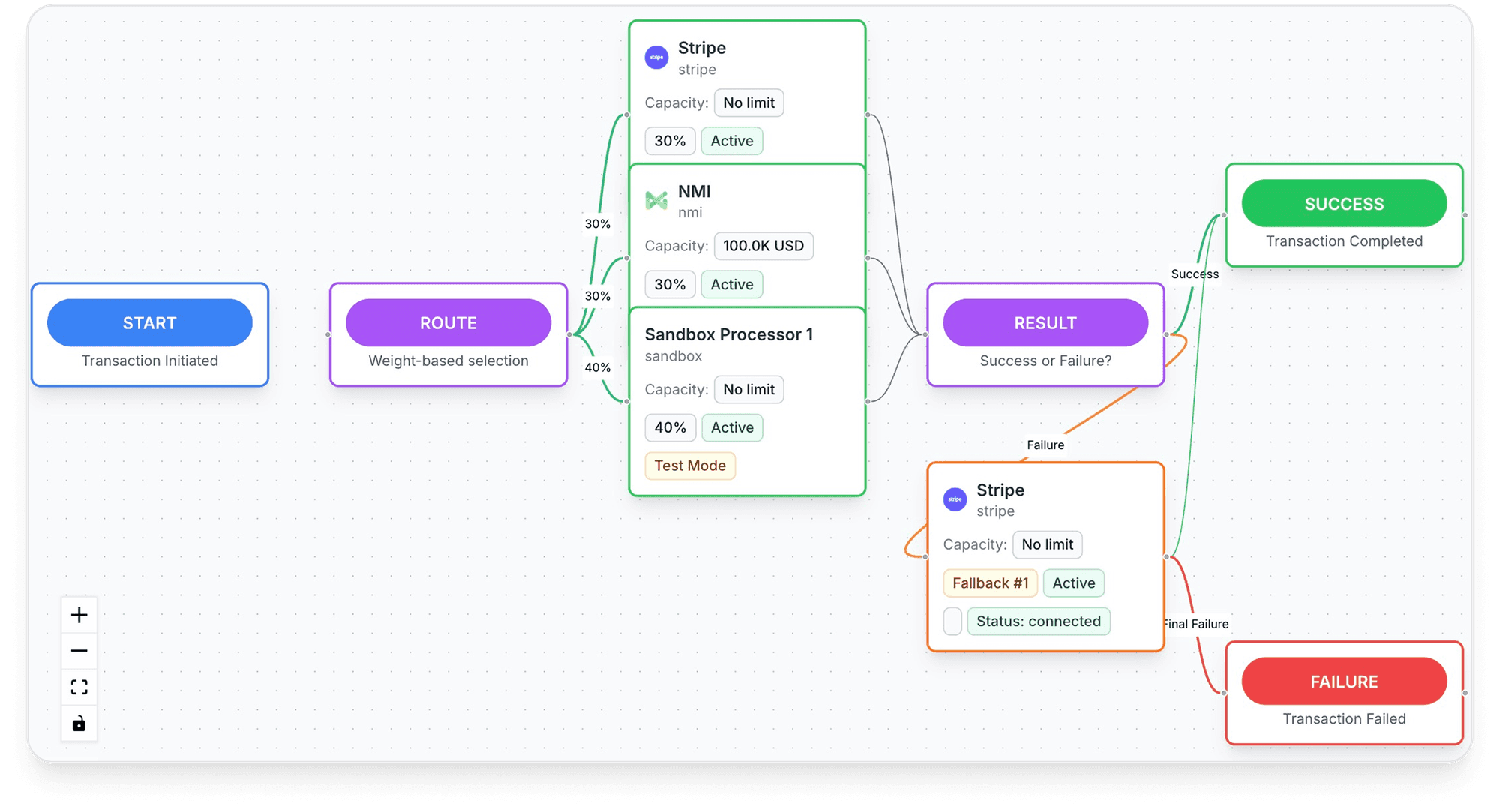
- Routing scored in real time: "Every transaction is scored against your live MID network in real time", then sent to the processor most likely to approve it, with a retry on decline. TagadaPay reports a +18% approval uplift.
- TagadaPay underneath: onboarding is one KYC, and most merchants are live in under 24 hours. "If you sell something real, we will get you paid."
It runs standalone, on Shopify, on WooCommerce or headless. Plans are on the pricing page.
Frequently asked questions
What is a good order bump?
How much should an order bump cost?
How many order bumps should I add to a checkout?
Can an order bump be pre-checked?
Can you add order bumps on Shopify?
Order bump vs upsell: which is better?
Sources
Checked November 2, 2026- FTC, Bringing Dark Patterns to Light, staff report, September 14, 2022
- Directive 2011/83/EU on consumer rights, Article 22, read November 2, 2026
- Restore Online Shoppers' Confidence Act, 15 U.S.C. § 8403, read November 2, 2026
- Shopify Help Center, Checkout apps, read November 2, 2026
- Baymard Institute, Cart abandonment rate statistics and reasons for abandonment, updated September 22, 2025
Tagada
Order bumps and upsells in one checkout
Funnels, one-click upsells, subscription billing and payment routing, on one customer record.
- 01Create your free account
- 02Connect your store or build a checkout
- 03Launch funnels, upsells and subscriptions