
Stripe Account Restricted or Blocked: What It Means and How to Fix It
Stripe account restricted or blocked: what Restricted soon, Restricted and Rejected mean, why Stripe restricts accounts, and how to lift it.

 Stripenow
Article summary
TL;DR
A restricted Stripe account is missing something Stripe asked for: a document, a business detail or a website fix. Payouts stop first, then payments if nothing arrives. Open the red Dashboard banner, submit the task, and allow 3 to 5 business days for review. If the reason starts with "rejected", it's a risk decision: appeal or plan a new processor.
- A red banner at the top of the Dashboard means requirements are outstanding; Stripe asks for "3-5 business days" to review documents.
- Stripe "typically disables payouts" if information isn't received by the deadline, and can then disable charges.
- For accounts on platforms, Stripe documents a 14-day due date, then payouts paused, then payments paused 14 days later.
- Stripe lists 17 website errors that block verification, from a missing refund policy to a site "still under construction".
- Reasons such as `rejected.fraud` or `rejected.terms_of_service` mean Stripe won't support the account as it stands.
 ChatGPT
 Claude
 Perplexity
 Grok
On this page
This guide covers Stripe's restrictions. If Stripe closed the account, read Stripe closed or banned your account. For every Stripe account state, see Stripe for high-risk businesses.
Restricted soon, restricted, rejected: what each label means
The label tells you how urgent it is. Stripe shows it in the Dashboard and by email, and it sends an email when "action is required"1Stripe Support, What is the verification status of my account?, read November 2, 2026.
Stripe publishes exact timing for accounts on platforms (Custom accounts). The due date is "14 days after the requirements take effect"; on that date "The Dashboard status will be Restricted. Payouts are paused at this time."
Then: "If there are still outstanding requirements 14 days later, they will no longer be able to accept payments"3Stripe Support, Verification requirements for platforms with Custom accounts: Due dates FAQ, read November 2, 2026. Your own notice sets your dates.
Fig. 1How a restriction escalates
- Restricted soonRequirement takes effect
- Day 14Due date; payouts paused
- Day 28Payments paused if still open
- Task submittedReview, then restored
payouts stop before payments
Why Stripe restricts an account
Most restrictions are verification, not punishment. Stripe needs to know who you are and what you sell before it enables charges and payouts, and it asks again as your volume grows2Stripe Docs, Handle verification with the API, read November 2, 2026. Its docs list the risk and compliance requests it can add2Stripe Docs, Handle verification with the API, read November 2, 2026:
| Stripe request | What Stripe wants | Typical cause |
|---|---|---|
identity_verification | A government ID and a selfie from the account owner | New owner, new representative |
business_model_verification | More about the nature of the business | Unclear product or funnel |
restricted_or_prohibited_industry_diligence | Business details or licenses for a restricted category | A product on Stripe's restricted list6Stripe, Prohibited and restricted businesses, last updated September 22, 2026, read November 2, 2026 |
url_inquiry | A URL that reflects what you sell | Store and Stripe profile don't match |
fulfillment_policy | Your fulfillment policy | Preorders, long shipping times |
customer_service_contact | Verified customer service contact | NoPhone or email on the site |
credit_review | Information about the business's finances | Volume jump, disputes, refunds |
product_description, statement_descriptor | An accurate description and card statement name | Vague description, generic descriptor |
Stripe also asks you to tell it about changes "immediately", including new products6Stripe, Prohibited and restricted businesses, last updated September 22, 2026, read November 2, 2026. A new line you didn't declare is a common trigger.
The website checks that block accounts
Stripe verifies your site against card network standards2Stripe Docs, Handle verification with the API, read November 2, 2026. These are the errors it returns, grouped:
- Missing pages: refund policy, return policy and process, cancellation policy, terms and conditions, customer service details2Stripe Docs, Handle verification with the API, read November 2, 2026.
- Missing disclosures: "applicable disclosures for products and services that are subject to legal or export restrictions"2Stripe Docs, Handle verification with the API, read November 2, 2026.
- Unreachable site: inaccessible, password-protected, geoblocked, empty, or "still under construction"2Stripe Docs, Handle verification with the API, read November 2, 2026.
- Mismatch: "The information on the website at the provided URL doesn't match the information on the Stripe account"2Stripe Docs, Handle verification with the API, read November 2, 2026.
- Incomplete: no business name, or no "clear description of goods and services offered"2Stripe Docs, Handle verification with the API, read November 2, 2026.
Watch out
If you block some countries, Stripe asks you to "temporarily remove the blocker until we can verify your website"2Stripe Docs, Handle verification with the API, read November 2, 2026. A geoblock aimed at bots can keep your account restricted.
How to lift a restriction
Answer exactly what Stripe asked, once, completely.
- Open the red banner or the Account status page under Settings, and select View task if it appears1Stripe Support, What is the verification status of my account?, read November 2, 20264Stripe Support, Settlement pauses FAQ, read November 2, 2026.
- Read the requirement. It names the document or detail; the error explains what failed, such as a name mismatch2Stripe Docs, Handle verification with the API, read November 2, 2026.
- Fix the source before you upload. Update the website or the business name first, then submit.
- Upload clean files. Color images, 10 MB or less, legal entity documents with all pages; don't resubmit a file that already failed2Stripe Docs, Handle verification with the API, read November 2, 2026.
- Wait for the review. Stripe asks for "3-5 business days" for documents1Stripe Support, What is the verification status of my account?, read November 2, 2026. Image checks take "anywhere from a few minutes to a few business days"2Stripe Docs, Handle verification with the API, read November 2, 2026.
- Watch your email and the Dashboard. A new task can follow if something else is needed2Stripe Docs, Handle verification with the API, read November 2, 2026.
Sources: Stripe Support and Stripe Docs, read November 2, 2026.
Submitting doesn't always lift a pause at once. For a settlement pause, Stripe says the pause may stay active while it reviews the information4Stripe Support, Settlement pauses FAQ, read November 2, 2026. If a task stays open for longer than its stated review time, contact Stripe support with the task reference. What to send for a risk review: Stripe account under review.
If the reason is "rejected"
Rejected is a decision, not a missing document. Stripe's docs list the reasons it uses2Stripe Docs, Handle verification with the API, read November 2, 2026:
| Reason | What Stripe means | What you can do |
|---|---|---|
rejected.incomplete_verification | Requirements not completed in time | Contact support and complete them |
rejected.terms_of_service | Suspected terms of service violation | Appeal if Stripe misread the business5Stripe Support, Why was my Stripe account closed?, read November 2, 2026 |
rejected.listed | On a third-party prohibited persons or companies list | Contact support |
rejected.fraud | Suspected fraud or illegal activity | Appeal with evidence, or move on |
rejected.other | Another reason | Ask Stripe which applies |
If you sell a product Stripe doesn't support, its FAQ asks you to remove it and send "a link to the page showing that you have removed them", by replying to Stripe's email or through support7Stripe Support, Prohibited and Restricted Businesses List FAQs, read November 2, 2026. If Stripe misread your business, the closure email links to a form that takes you to the Dashboard5Stripe Support, Why was my Stripe account closed?, read November 2, 2026.
Fig. 2Three routes after a restriction
Missing information
Submit the task. Payouts restart once Stripe has verified it.
Unsupported product
Remove it, send the link, and ask Stripe for a second look.
Risk decision
Appeal in the Dashboard, export your cards, and set up another processor.
pick the one that matches the reason
A risk action under the Unacceptable Risk Policy can also restrict charges and pause payouts, typically for 120 days from the first email8Stripe, Unacceptable Risk Policy, last updated July 29, 2026, read November 2, 2026. That path is covered in Stripe holding your funds.
Blocked by a platform, not by Stripe
If you get paid through a marketplace or a SaaS platform, the block may come from the platform. Platforms can pause payments or payouts on connected accounts; the account then shows a disabled_reason of platform_paused, and Express users see a notice telling them to "direct any questions to their platform"9Stripe Docs, Pause payments and payouts on connected accounts, read November 2, 2026.
On Express accounts, payouts can also pause for missing tax information. Stripe says they "should be unpaused within two business days" once the W-8 or W-9 and other requirements are submitted10Stripe Support (Express), What does it mean that my payouts are paused or my payments are blocked?, read November 2, 2026.
By industry
| Industry | What Stripe usually asks for | Guide |
|---|---|---|
| Supplements | Product and claims review, trial terms | Does Stripe allow supplements? |
| Skincare | Claims that read as drug claims | Does Stripe allow skincare products? |
| Fitness | Program terms and refund policy | Does Stripe allow fitness products? |
| Info products | Delivery proof and refund terms | Does Stripe allow info products and online courses? |
| Online pharmacy | Licenses and prescription checks | Does Stripe allow prescription drugs? |
| Telehealth | Licenses and case-by-case review | Does Stripe allow telehealth services? |
How Tagada helps
Get live elsewhere while Stripe reviews
- Onboarding: "One KYC. One signed package. We distribute it across our processor network and follow up so you don't have to."11TagadaPay, tagadapay.io, read November 2, 2026
- Acceptance: "If you sell something real, we will get you paid." "Enhanced review for regulated verticals", and a named reviewer: "The person who reviews your application has a name, and so does the one who picks up when something breaks."11TagadaPay, tagadapay.io, read November 2, 2026
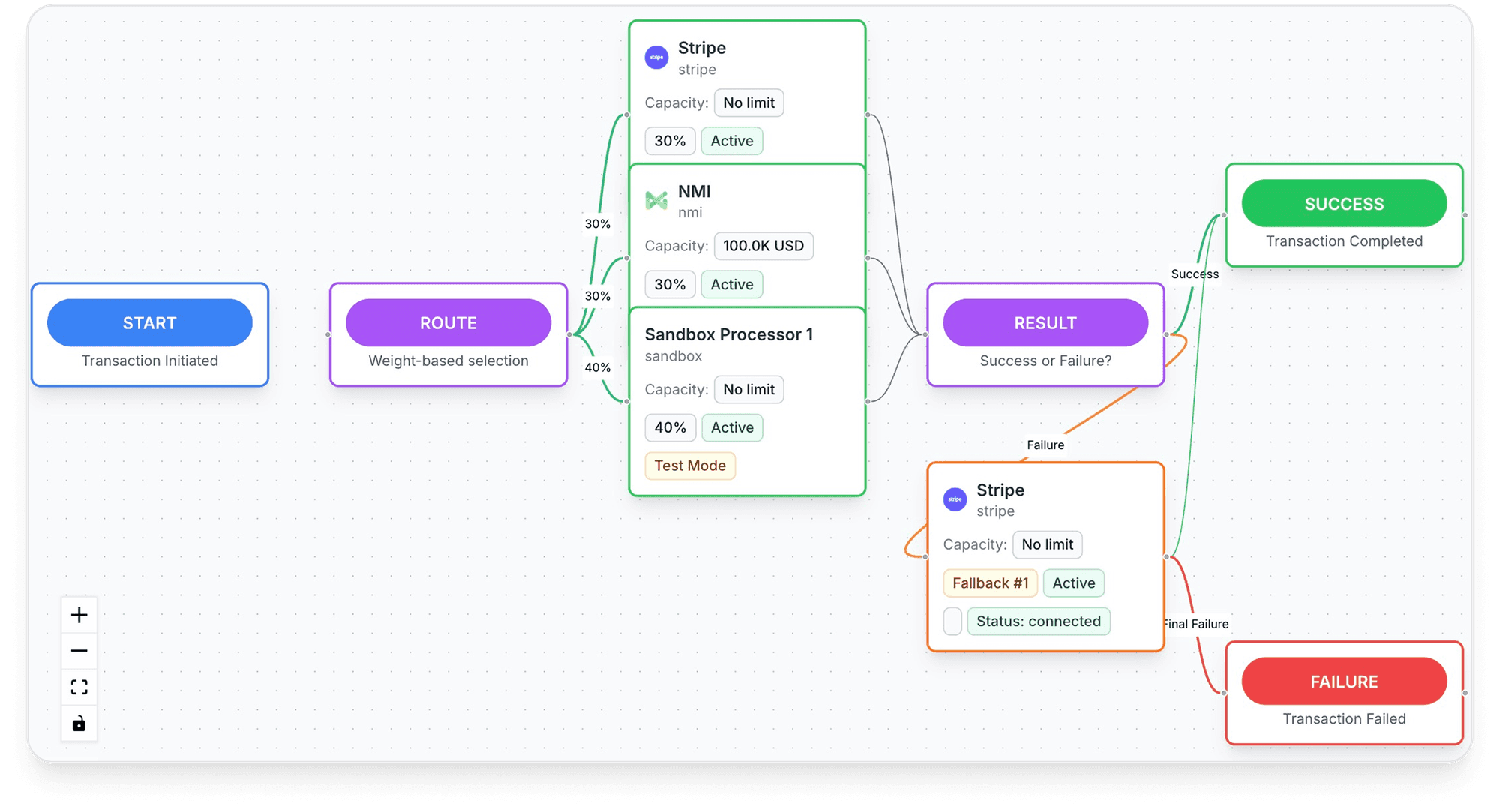
- Already on Stripe? "We orchestrate those too", with "Automatic cascade, weighted routing, sticky MID"11TagadaPay, tagadapay.io, read November 2, 2026. The cascade goes to another processor when one is down or times out.
- A vault you own: "Switch processors without re-onboarding customers. No vendor lock-in. Ever."11TagadaPay, tagadapay.io, read November 2, 2026
Tagada follows Visa and Mastercard rules and the laws that apply to payments.
Frequently asked questions
What does restricted mean on Stripe?
How long does it take to unrestrict a Stripe account?
Can I still get paid while my Stripe account is restricted?
What is "Restricted soon" on Stripe?
My Stripe account was rejected. Can I appeal?
Sources
Checked November 2, 2026- Stripe Support, What is the verification status of my account?, read November 2, 2026
- Stripe Docs, Handle verification with the API, read November 2, 2026
- Stripe Support, Verification requirements for platforms with Custom accounts: Due dates FAQ, read November 2, 2026
- Stripe Support, Settlement pauses FAQ, read November 2, 2026
- Stripe Support, Why was my Stripe account closed?, read November 2, 2026
- Stripe, Prohibited and restricted businesses, last updated September 22, 2026, read November 2, 2026
- Stripe Support, Prohibited and Restricted Businesses List FAQs, read November 2, 2026
- Stripe, Unacceptable Risk Policy, last updated July 29, 2026, read November 2, 2026
- Stripe Docs, Pause payments and payouts on connected accounts, read November 2, 2026
- Stripe Support (Express), What does it mean that my payouts are paused or my payments are blocked?, read November 2, 2026
- TagadaPay, tagadapay.io, read November 2, 2026
TagadaPay
Stripe account blocked? Keep a second processor ready
Tell us what you sell and how you sell it. Each application is underwritten, and approval is not guaranteed.
- 01Tell us what you sell and how
- 02Underwriting reviews your business
- 03Process through TagadaPay alongside your other processors