
How to Migrate Away From Shopify Payments
Leaving Shopify Payments: what happens to saved cards, Shop Pay and subscriptions, what you lose, the steps, and what happens to payouts and reserves.


Article summary
TL;DR
Shopify publishes no way to export saved cards, and its staff says they can't move to a new gateway. So most merchants stay on Shopify with a third-party provider. Turning Shopify Payments off ends Shop Pay, Shop Pay Installments and Shopify Protect, adds a Shopify fee of 0.2% to 2%, and Shop Pay subscribers must add a new payment method.
- Shopify staff, July 8, 2022: "there is currently no possible way of exporting that data to a new gateway".
- "Shop Pay is included as part of Shopify Payments", and Shop Pay Installments requires both.
- If Shop Pay is turned off, "subscription payments will fail", and subscriptions are canceled after several failed attempts.
- Shopify allows "only one credit card payment provider activated at a time"; a third-party one costs 2% on Basic down to 0.2% on Plus. Shopify Payments can stay on beside it for Shop Pay, local methods and failed-card recovery, at a 1.25% premium.
- After closure, the processor "may elect to continue to hold any funds deemed necessary, pending resolution".
 ChatGPT
 Claude
 Perplexity
 Grok
On this page
This page covers leaving Shopify Payments specifically. For the general method with any processor, see how to switch payment processors. More Shopify guides are in the Shopify hub.
What you keep and what you lose
Leaving Shopify Payments usually doesn't mean leaving Shopify. Your store, catalog and orders stay. What changes is everything that runs through Shopify Payments.
| Item | After you switch to a third-party provider |
|---|---|
| Store, products, orders, customer profiles | Stay in Shopify |
| Saved cards | Stay in Shopify's vault; no published export1Shopify Help Center, Shopify Subscriptions, read November 3, 20262Shopify Community, Major issues transferring customer payment data off Shopify Payments, Shopify staff replies of July 5 and 8, 2022; thread read November 3, 2026 |
| Shop Pay | Off if Shopify Payments is off: it is "included as part of Shopify Payments"5Shopify Help Center, Shop Pay, read November 3, 2026 |
| Shopify Payments beside the new provider | Possible for Shop Pay, local methods and failed-card recovery, at its rates "plus a 1.25% premium"; early access on Shopify Plus with a contract17Shopify Help Center, Using Shopify Payments with a third-party provider, read November 3, 2026 |
| Subscriptions paid with Shop Pay | Payments fail, then subscriptions are canceled6Shopify Help Center, Deactivating Shop Pay, read November 3, 2026 |
| Shop Pay Installments | Off: it requires "both Shopify Payments and Shop Pay activated"7Shopify Help Center, Shop Pay Installments eligibility, read November 3, 2026 |
| Shopify Protect (US) | Off: it covers only orders processed through Shop Pay, on a US Shopify Payments account8Shopify Help Center, Considerations for using Shopify Protect, read November 3, 2026 |
| Shopify POS | Must use the same gateway as your online store11Shopify Terms of Service, sections 1.8, 2.3.2, 4.5 and 9.3.3, last updated October 20, 2026 |
| Shopify fee per order | 2% Basic, 1% Grow, 0.6% Advanced, 0.2% Plus4Shopify pricing, third-party payment provider fees, read October 26, 2026 |
Check each line against your store before you start. Shop Pay is often a large share of mobile orders, and its loss shows up in conversion, not in a fee line.
Can you export cards from Shopify Payments?
Not through any procedure Shopify publishes. Its help center says "Customer payment information is stored securely by Shopify" and that you "can't access your customers' full credit card information after it's been entered"1Shopify Help Center, Shopify Subscriptions, read November 3, 2026.
Asked by a merchant in 2022, Shopify staff wrote that "we are not able to transfer payment details" and that "the best option is to have your customers resubmit their payment details after the migration"2Shopify Community, Major issues transferring customer payment data off Shopify Payments, Shopify staff replies of July 5 and 8, 2022; thread read November 3, 2026. The thread was still collecting the same question in February 2026, with no official update2Shopify Community, Major issues transferring customer payment data off Shopify Payments, Shopify staff replies of July 5 and 8, 2022; thread read November 3, 2026.
Fig. 1Leaving Stripe vs. leaving Shopify Payments
Stripe
Publishes a card export to a PCI DSS Level 1 processor, on request16Stripe Docs, Request a payment data export, read November 2, 2026. See migrate away from Stripe.
Shopify Payments
No published export. Cards stay in Shopify's vault and keep working inside Shopify.
What it means
Stay on Shopify with a new provider, or ask customers for their card again.
the card file is the difference
If a provider tells you it can import cards from Shopify Payments, ask for the method in writing before you plan around it. More on how vaults move: token vault migration.
What happens to your subscriptions
It depends on how each subscriber pays. There are two groups, and they don't behave the same way.
Card subscribers. Shopify staff wrote in 2022 that "existing subscription contracts created under Shopify Payments will be billable after the switch to Auth.net"10Shopify Community, Migrating subscription contracts from Shopify Payments to Authorize.net, Shopify staff replies of August 16, 2022 and May 1, 2023. In 2023, the same staff member said "new and previous subscription contracts will be automatically billed via Authorize.net as primary payment gateway"10Shopify Community, Migrating subscription contracts from Shopify Payments to Authorize.net, Shopify staff replies of August 16, 2022 and May 1, 2023. These are forum replies, not help center pages: get written confirmation from Shopify and your subscription app for your own gateway.
Shop Pay subscribers. Shopify's help center is explicit. Subscriptions created with Shop Pay "are designed to use Shop Pay for the entire duration of the subscription", and if Shop Pay is turned off, "subscription payments will fail"6Shopify Help Center, Deactivating Shop Pay, read November 3, 2026. "After multiple failed billing attempts, the subscriptions are canceled", and this "applies to all subscription apps that use Shop Pay as a payment method"6Shopify Help Center, Deactivating Shop Pay, read November 3, 2026.
The new gateway must also work with your subscription app. Shopify Subscriptions supports five9Shopify Help Center, Shopify Subscriptions app eligibility considerations, read November 3, 2026:
| Gateway | Note from Shopify |
|---|---|
| Shopify Payments | Automatic card updates; Shop Pay, Apple Pay, Google Pay, PayPal |
| PayPal Express | "Third-party transaction fees are charged if Shopify Payments isn't activated on your store." |
| Authorize.net | "Google Pay and Apple Pay aren't supported." |
| Adyen | "limited to organizations with an existing Adyen approval" |
| Stripe | "Available only to select merchants." |
Watch out
A renewal declined on Shopify Payments and charged again on the new gateway is still a reattempt for Visa: up to 20 attempts in 30 days, and none after a category 1 decline such as a lost card15Visa Core Rules and Visa Product and Service Rules, sections 1.7.2.1 and 7.3.6.3, edition October 24, 2026. Don't let two systems retry the same renewal.
Tagada follows Visa and Mastercard rules and the laws that apply to payments.
The migration, step by step
Open the new account first. Nothing in Shopify should change until a test payment and a refund have gone through on the new provider.
- Get approved by the new provider for your category, and check it supports your subscription app9Shopify Help Center, Shopify Subscriptions app eligibility considerations, read November 3, 2026.
- Export what you can: customers, orders and, from your subscription app, plans, prices and next charge dates.
- List your Shop Pay subscribers. They will need to add a new payment method if Shop Pay goes off6Shopify Help Center, Deactivating Shop Pay, read November 3, 2026.
- Write to them before the switch, with a link to update their payment details, and tell all subscribers if the statement name changes.
- Activate the provider in Settings, Payments. Only the store owner can add one, and only one card provider can be active3Shopify Help Center, Configuring third-party payment providers, read October 27, 2026.
- Move POS too, if you use it: it must use the same gateway as the online store11Shopify Terms of Service, sections 1.8, 2.3.2, 4.5 and 9.3.3, last updated October 20, 2026.
- Watch the first renewal cycle closely: failed renewals, wallet payments, refunds on old orders.
Sources: Shopify Help Center and Shopify Terms of Service, read November 3, 2026; Shopify Community staff replies, 2022 and 2023.
Your funds after you leave
Plan for money to stay behind for a while. Three rules apply.
- Held funds. Shopify can close the account "at any time, for any reason", and a processor "may elect to continue to hold any funds deemed necessary, pending resolution"12Shopify Payments Terms of Service (US), Part I sections D2 and D3, read November 3, 2026.
- Reserves. "Before a reserve expires, your account is reviewed to determine whether to keep, reduce, or raise the reserve." The terms arrive by email13Shopify Help Center, Reserves on Shopify Payments, read November 3, 2026.
- Disputes. On Shopify Payments, a chargeback "is deducted from your next available payout"14Shopify Help Center, Chargebacks, read November 3, 2026. Disputes on past orders keep coming after you switch.
How reserves work in general: rolling reserves. If payouts are already paused: Shopify Payments payouts on hold.
Leaving under pressure
If Shopify Payments closed the account, the same steps apply, faster: the switch is no longer your choice. Start with the reason in the email, then the subscribers. The full playbook: Shopify Payments closed your account. If the whole store was terminated, see Shopify closed your store.
Switch, or add a processor?
Inside Shopify checkout, you can't run two card providers side by side: "only one credit card payment provider activated at a time"3Shopify Help Center, Configuring third-party payment providers, read October 27, 2026. Shopify Payments can stay on beside the new provider, but only for Shop Pay, local payment methods and recovery of failed card transactions, at its standard rates "plus a 1.25% premium"17Shopify Help Center, Using Shopify Payments with a third-party provider, read November 3, 2026.
On Shopify Plus with a contract, that option is in early access, by request17Shopify Help Center, Using Shopify Payments with a third-party provider, read November 3, 2026. Keeping Shop Pay on this way also keeps Shop Pay subscriptions billing. Routing cards across several processors still means a separate checkout.
Fig. 2Two ways to leave Shopify Payments' single point of failure
Third-party provider
- Shopify checkout
- all cards toNew provider onlyApproved
One card provider again, a new one
Separate checkout
- Checkout outside Shopify
- routes toTwo or more processorsApproved
Several processors with routing
the second needs a separate checkout
Shopify's terms, updated October 20, 2026, say "You agree to use Shopify Checkout for any sales associated with your online store", and ask you not to work around its limits, "including to process orders outside Shopify's Checkout"11Shopify Terms of Service, sections 1.8, 2.3.2, 4.5 and 9.3.3, last updated October 20, 2026. Read them before you move checkout. What an outside checkout changes: Shopify checkout alternative.
By industry
| Industry | What changes | Guide |
|---|---|---|
| Supplements | Auto-ship subscribers are most of the value: sort card and Shop Pay subscribers before the switch | Switching processors for supplement brands |
| Skincare | Refill subscriptions and a recognizable descriptor keep disputes down during the move | Switching processors for skincare brands |
| Fitness | Keep the old account open until late equipment deliveries and disputes have cleared | Switching processors for fitness brands |
| Info products | Check who holds the cards first: a course platform's built-in payments may not export them | Switching processors for info product businesses |
| Online pharmacy | The new acquirer must register you with Mastercard, and with Visa unless you hold a recognized accreditation, before it processes | Switching processors for online pharmacies |
| Telehealth | Strip anything clinical from the export and run both processors for one billing cycle | Switching processors for telehealth companies |
How Tagada helps
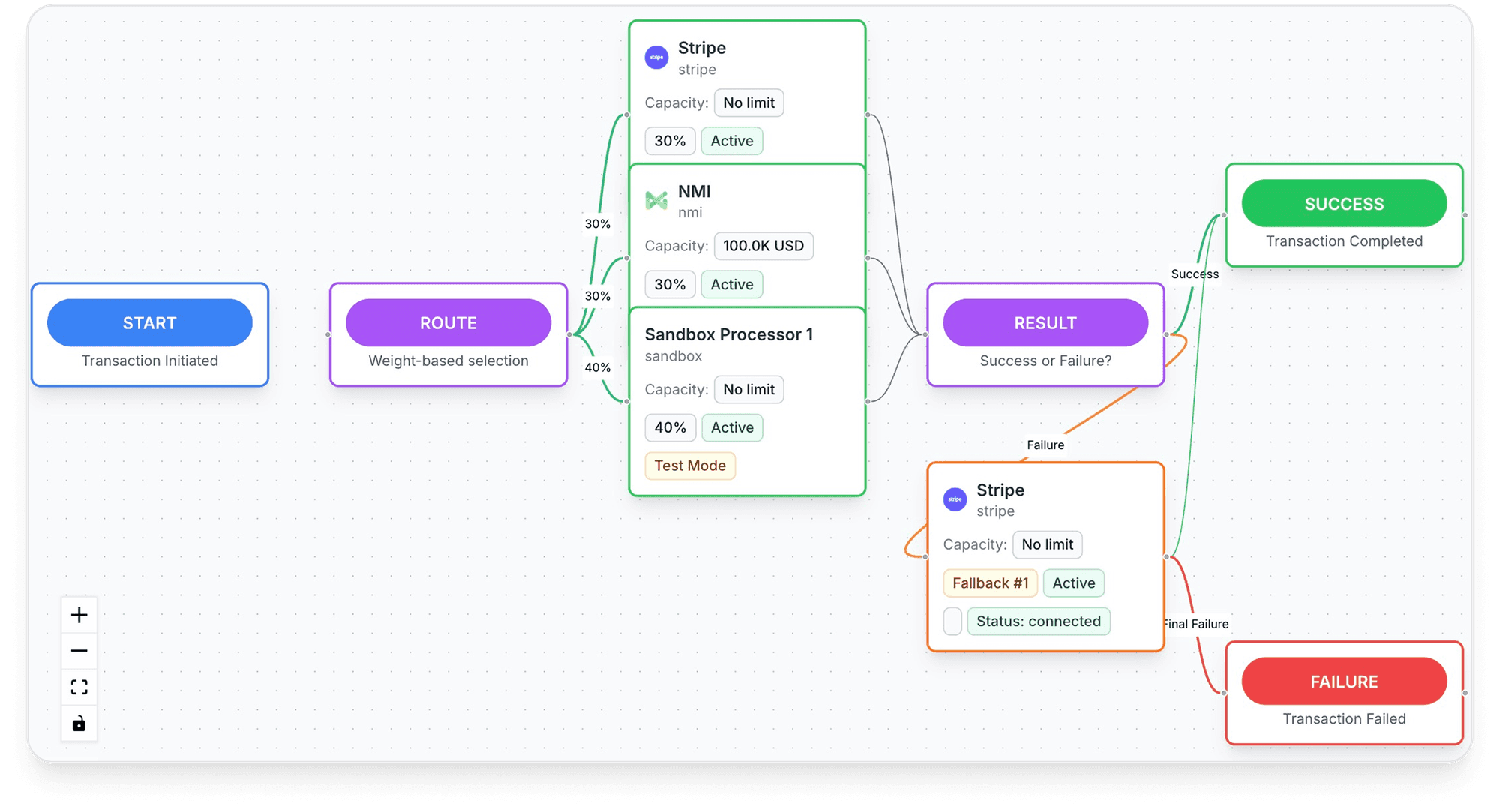
A vault you own, wherever you process
- A vault you own: "Your PCI-tokenized cards, your customer profiles, your subscription data, all portable."
- No lock-in next time: "Switch processors without re-onboarding customers. No vendor lock-in. Ever." and "Export your vault, cards, and customers anytime."
- Already on Shopify? "Already on Shopify, WooCommerce, ClickFunnels or BigCommerce? Drop TagadaPay in."
- Routing: "Route to the processor most likely to approve it, retry on decline. No engineering required."
- Onboarding: "One KYC. One signed package." TagadaPay says most merchants are live in under 24 hours.
Apply on TagadaPay; Tagada CRM plans are on the pricing page.
Frequently asked questions
Can I export my customers' credit cards from Shopify Payments?
What happens to my subscriptions if I leave Shopify Payments?
Do I lose Shop Pay if I switch to a third-party provider?
Can I use Shopify Payments and another processor at the same time?
What happens to my payouts after I leave Shopify Payments?
Sources
Checked November 3, 2026- Shopify Help Center, Shopify Subscriptions, read November 3, 2026
- Shopify Community, Major issues transferring customer payment data off Shopify Payments, Shopify staff replies of July 5 and 8, 2022; thread read November 3, 2026
- Shopify Help Center, Configuring third-party payment providers, read October 27, 2026
- Shopify pricing, third-party payment provider fees, read October 26, 2026
- Shopify Help Center, Shop Pay, read November 3, 2026
- Shopify Help Center, Deactivating Shop Pay, read November 3, 2026
- Shopify Help Center, Shop Pay Installments eligibility, read November 3, 2026
- Shopify Help Center, Considerations for using Shopify Protect, read November 3, 2026
- Shopify Help Center, Shopify Subscriptions app eligibility considerations, read November 3, 2026
- Shopify Community, Migrating subscription contracts from Shopify Payments to Authorize.net, Shopify staff replies of August 16, 2022 and May 1, 2023
- Shopify Terms of Service, sections 1.8, 2.3.2, 4.5 and 9.3.3, last updated October 20, 2026
- Shopify Payments Terms of Service (US), Part I sections D2 and D3, read November 3, 2026
- Shopify Help Center, Reserves on Shopify Payments, read November 3, 2026
- Shopify Help Center, Chargebacks, read November 3, 2026
- Visa Core Rules and Visa Product and Service Rules, sections 1.7.2.1 and 7.3.6.3, edition October 24, 2026
- Stripe Docs, Request a payment data export, read November 2, 2026
- Shopify Help Center, Using Shopify Payments with a third-party provider, read November 3, 2026
TagadaPay
Move once, and keep your cards portable next time
Tell us what you sell and how you sell it. Each application is underwritten, and approval is not guaranteed.
- 01Tell us what you sell and how
- 02Underwriting reviews your business
- 03Process through TagadaPay alongside your other processors