
How to Start an Ecommerce Business That Gets Paid
Start an ecommerce business in order: product, model, company and tax, store pages card networks require, payments, customer data, shipping, first 90 days.

Article summary
TL;DR
To start an ecommerce business, validate one product, pick a selling model, register the company and taxes, then build a store with the pages card networks require. Set up payments and customer data before launch, not after: a processor reviews your site before paying you, and the customer list you build from day one is what you'll sell to again.
- Validate demand before buying stock: a waitlist, a presale or a small first batch. Check early that payment processors accept your product.
- Your selling model shapes your payment risk. Dropshipping and preorders bring delivery disputes; subscriptions bring Visa's recurring rules.
- Visa requires an ecommerce site to show a customer service contact, your country at checkout, an address for correspondence and your multiple-shipment policy.
- Your processor reviews your site and your product, and the first payout takes time: at Stripe, typically 7 to 14 days after the first live payment.
- Collect emails and texts with the right consent from the first order. US marketing texts sent by autodialer need prior express written consent.
 ChatGPT
 Claude
 Perplexity
 Grok
On this page
Starting an ecommerce business takes about ten decisions, and most guides stop at the product and the store. This one follows the launch order and goes further on the two parts that are hard to fix later: how you get paid, and how you keep your customers.
If you sell supplements or skincare, the vertical guides cover the extra rules: start a supplement brand and start a skincare brand.
Fig. 1The launch order
- ProductOne offer, demand checked
- Company and taxEntity, EIN, sales tax
- StorePages card networks require
- PaymentsProcessor approved, payout timing known
- Customer dataConsent captured at checkout
- LaunchThen 90 days of close watch
payments and customer data come before launch, not after
Step 1: Pick a product and check demand
Start with one product or one small range, for one kind of buyer. A store with unrelated products reads as a reseller and converts worse. Write the promise in one sentence: who it's for, what it solves, why yours.
Then check demand before you spend on stock:
- A waitlist page with the product, a price and an email field. Count signups per visitor, not visitors.
- A presale that takes real payments. People who pay are the only proof that counts.
- A small first batch, or print-on-demand, to test before a volume order.
Check one more thing at this stage: whether payment processors accept your product. Some categories are restricted or prohibited by the main processors, and finding out after launch costs you the account.
Our guide to what Stripe prohibits shows how to read a processor's list. If you sell into a category processors call high-risk, read high-risk merchant accounts before you build.
Step 2: Choose your selling model
The model decides your margin, your cash needs, and also what can go wrong with payments. That last column is the one most guides skip.
| Model | How it works | Cash up front | Payment risk to plan for |
|---|---|---|---|
| Stock and ship | You buy inventory and ship from your place or a 3PL | High | Low, if delivery dates are clear |
| Dropshipping | A supplier ships each order | Low | Long or unclear delivery leads to "item not received" disputes |
| Print-on-demand | Made after the order, then shipped | Low | Production delays; charge when it ships |
| Private label | A manufacturer makes your branded product | Medium to high | Product claims your processor will review |
| Preorders | Customers pay before the product exists | Low | Visa wants the charge dated on or after shipment, outside a few categories |
| Subscription | Customers are billed on a schedule | Medium | Visa's recurring rules, renewals that fail, cancellation disputes |
| Marketplace (Amazon, Etsy) | You sell on someone else's store | Low to medium | The marketplace processes payments; you don't own the customer |
The preorder line comes from Visa's rules: for goods that are shipped, the transaction date must be on or after the date the goods ship, except for advance payments.
Visa allows an advance payment of the full purchase amount only in a few cases, such as travel and entertainment, custom goods, or a face-to-face sale where some items ship later.3Visa Core Rules and Visa Product and Service Rules, October 24, 2026 In practice: authorize at checkout, capture when you ship, and ask your processor how it handles preorders.
Subscriptions have their own guide: subscription-based ecommerce for the model, and subscription payment processing for the rules.
Step 3: Set up the company, taxes and licenses
Payment processors ask for a legal entity, a tax ID and a bank account in the business's name. Do this before you apply, not during.
- Pick a legal structure. Sole proprietorship, LLC or corporation. An LLC or corporation separates your personal assets from the business's debts; ask an accountant which fits your taxes.
- Register the business with your state, and check the name against existing businesses and trademarks.
- Get an EIN. The IRS issues it online, immediately if approved, and it's free: "You never have to pay a fee for an EIN."1IRS, Get an employer identification number, read November 2, 2026
- Register for sales tax where you must collect it. Since South Dakota v. Wayfair (June 21, 2018), a state can require a remote seller with no physical presence to collect its sales tax; South Dakota's law, upheld by the Court, applied to sellers with more than $100,000 of sales or 200 transactions into the state.2South Dakota v. Wayfair, Inc., 585 U.S. 162 (2018), June 21, 2018 Each state sets its own threshold.
- Open a business bank account. Payouts go there, and processors check that the name matches.
- Check local licenses and product rules. Food, cosmetics, supplements and anything with health claims have their own regulators.
US example. Other countries have equivalent steps; check your local registry and tax office.
Step 4: Build the store, with the pages card networks require
Pick a platform you can grow on: a hosted platform like Shopify, WooCommerce on your own hosting, or a headless setup with a separate checkout. What matters most at launch is the checkout: whether you can add offers, take wallets and use more than one processor later. Our ecommerce checkout guide compares the four ways to build one.
Then add the pages. Visa's rules list what an ecommerce site must show, and processors check them when they review your account:3Visa Core Rules and Visa Product and Service Rules, October 24, 2026
| Page or element | What Visa requires | Where |
|---|---|---|
| Customer service contact | An email address or a phone number | Site or app |
| Your country | The country of your business, clearly and prominently. A link to another page doesn't count | On the checkout screen or in the checkout pages |
| Address for correspondence | Where customers can write to you. In the US, a business run from a home doesn't have to show the home street address | Site or app |
| Multiple shipments | Your policy when an order ships in several parts | Site or app |
| Return, refund and cancellation policy | If you restrict returns or cancellations: disclosed before final checkout, with a "click to accept" button, checkbox or other acknowledgement | Checkout pages |
Sources: Visa Product and Service Rules, sections 5.8.4.1 (p. 445) and 5.4.2.5 (p. 391).3Visa Core Rules and Visa Product and Service Rules, October 24, 2026 Add terms of sale, a privacy policy, shipping times and real product photos. A processor reviewing a new account looks for the same things a buyer does.
Step 5: Set up payments before you launch
You have two ways to take cards. Most new stores start with the first and add the second as volume grows.
| Payment facilitator (Stripe, PayPal, Shopify Payments) | Dedicated merchant account | |
|---|---|---|
| Sign-up | Online, often the same day | Application, documents, underwriting |
| Whose account | Theirs: you're a sub-merchant | Yours, with an acquiring bank |
| Review | Light at sign-up, ongoing as you sell | Upfront, before you process |
| Risk of holds or closure | Higher for new or restricted products | Set by your contract |
| Fits | Most new stores, low volumes | Higher volumes, restricted categories, more control |
The differences, and how to get approved without a processing history, are in merchant accounts for startups and payment gateway vs payment processor.
Four things to settle before the first order:
Payout timing
At Stripe, after the first live payment, the initial payout is typically scheduled to complete within 7 to 14 days, depending on industry, country and risk level. Plan your cash for it.
Your descriptor
The name on the customer's statement. Make it match your store, or customers dispute charges they don't recognize.
Card data off your servers
Use hosted payment fields or a hosted page, so card numbers never touch your site. It keeps your PCI scope small.
The methods your buyers use
Cards, Apple Pay and Google Pay first. Then the local methods of your main markets.
The payout figure is from Stripe's documentation.4Stripe Docs, Payouts, read November 2, 2026 On descriptors and PCI, see the glossary entries for billing descriptor and PCI compliance. On methods, see alternative payment methods.
Keep a second processor in mind
One processor is enough to launch. But a single account is a single point of failure: a review, a hold or a closure stops all sales at once. Choose a checkout that can add a second processor later without rebuilding. What happens when an account is closed is covered in account closed.
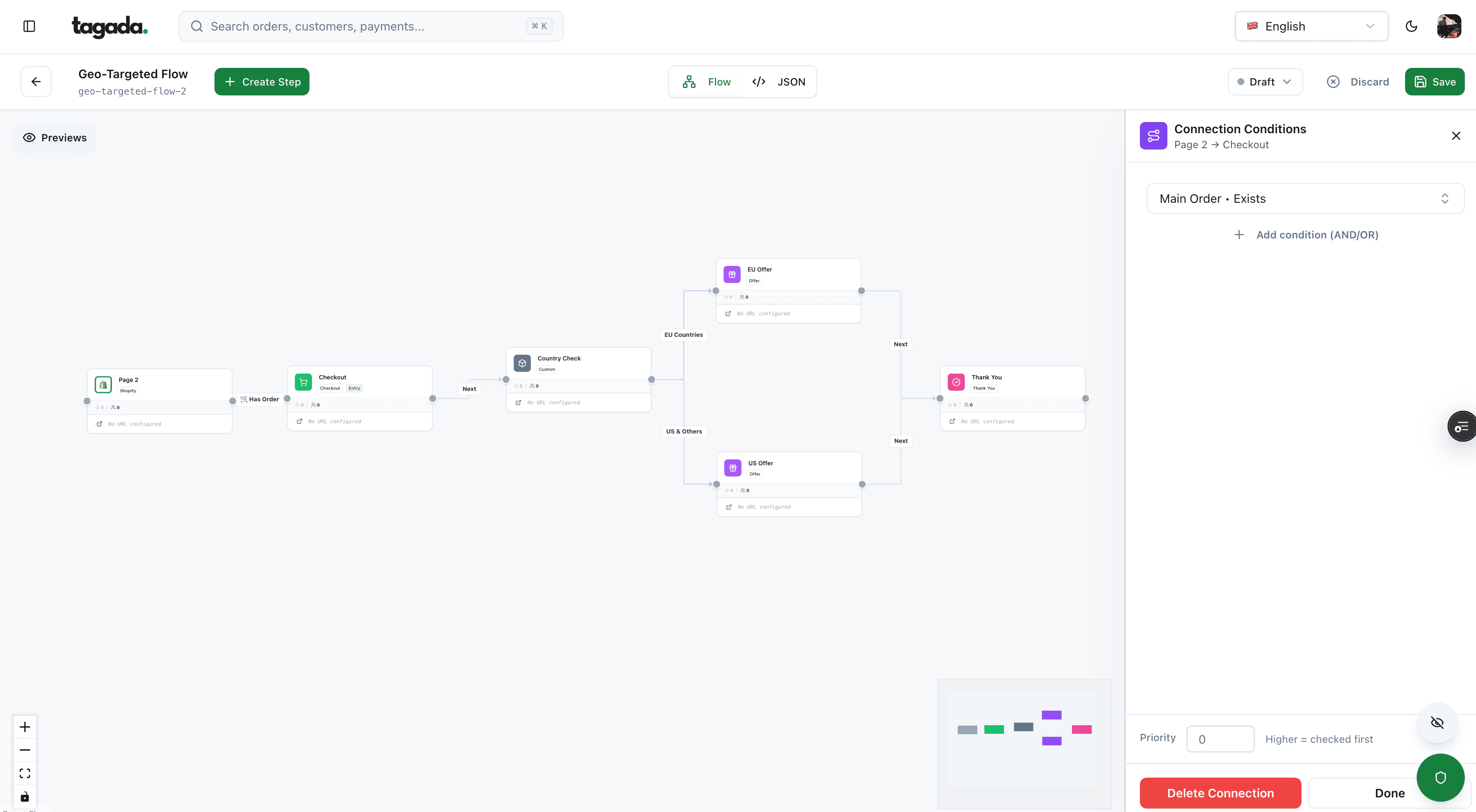
Inside Tagada
Build the funnel once, route every customer to the right offer
Checkout, upsells and subscriptions on one flow, with conditions per country, order or customer.
Step 6: Set up customer data and your CRM from the first order
Your first customers are the cheapest ones you'll ever sell to again. Capture their data properly from the first order, because consent you didn't collect can't be added later.
Fig. 2What a customer record should hold from day one
- Subscribed to marketing, Oct 12, checkbox at checkout
- Phone
- Transactional texts only, no marketing consent
- Orders
- 1 order, $64, starter kit
- Payment
- Visa, card saved with consent for future orders
- Source
- Instagram ad, server-side event sent
- Next step
- Reorder reminder at day 25
Illustrative record.
consent is part of the record
The consent rules that matter at launch, in the US:
- Email. CAN-SPAM doesn't require prior consent, but every marketing email must not mislead, must identify itself as an ad, include a postal address and a working opt-out honored within 10 business days.5FTC, CAN-SPAM Act: A Compliance Guide for Business
- Text messages. Marketing texts sent with an autodialer need prior express written consent, which can't be a condition of purchase.6eCFR, 47 CFR 64.1200, Delivery restrictions (TCPA rules) Use a separate, unticked box.
- Saved cards. Saving a card for later orders needs the customer's agreement, and a subscription needs its terms shown when they agree. See saved payment method.
In the EU, marketing emails and texts generally need prior consent. What to store and how to segment it is in what is a CRM database and how to segment customers. Send purchase events from your server too: a browser tag that's blocked or lost on a redirect makes your ads optimize on sales they can't see. See server-side tracking.
Step 7: Plan fulfillment, shipping and returns
Shipping is both a cost and a dispute risk. In Baymard Institute's survey of US shoppers who abandoned a cart for a reason other than browsing, 40% cited extra costs such as shipping, and 20% slow delivery.7Baymard Institute, Cart abandonment rate statistics (last updated September 22, 2025, read November 2, 2026)
- Show the shipping cost in the cart, or a free shipping threshold. Nothing new should appear at the last step.
- Show a delivery date, not just a speed label. Late or missing parcels become "not received" disputes.
- Charge when you ship for anything that doesn't leave the same day, following Visa's transaction date rule.3Visa Core Rules and Visa Product and Service Rules, October 24, 2026
- Write a returns policy you can keep. Who pays the return label, how long, how refunds are paid.
- Start in-house, move to a 3PL when packing takes more time than selling.
Step 8: Launch and market the store
Pick one or two channels and do them well before adding more: paid social, search, creators, email, a marketplace. A soft launch to your waitlist tests the checkout, the payment flow and the confirmation emails with real buyers before you pay for traffic.
Our ecommerce marketing strategies guide covers the channels; building a funnel covers the path from ad to order, upsell and follow-up.
Step 9: Watch the first 90 days
New accounts get more scrutiny from processors, and early problems are cheaper to fix. Watch these signals every week.
- Many visits, few checkouts startedThe offer or the product page doesn't convinceFix the page and the price before buying more traffic
- Checkouts started, few paidCosts shown late, forced account, missing method or declinesRead your processor's decline log, then the checkout
- Declines on good customersNew account, risk rules or issuer cautionTurn on 3D Secure where it helps, offer wallets, retry soft declines only
- First disputes arriveDelivery, descriptor or expectationsAnswer every one, fix the cause, refund before the customer calls the bank
- Payout delayed or reserve appliedThe processor is reviewing your riskAnswer quickly with invoices, tracking and policies
Each line has its own guide: reduce cart abandonment, declined payments, chargebacks and rolling reserves.
Where Tagada fits
How Tagada helps
Checkout, CRM and payments from the first order
Tagada gives a new brand the checkout, the funnels, one-click upsells and order bumps, subscriptions with retries, and the customer data behind them, in one system. TagadaPay handles the payments: one KYC, one signed package distributed across its processor network, and most merchants are live in under 24 hours. Your cards, customers and subscription data stay portable, so you can switch processors without re-onboarding customers. Already on Shopify or WooCommerce? Drop TagadaPay in. Pricing is on the pricing page. Tagada follows Visa and Mastercard rules and the laws that apply to payments.
Whatever you use, the order holds: a product people pay for, a company that's ready to be reviewed, a site that meets the card rules, payments approved before traffic, and a customer list you're allowed to email.
Frequently asked questions
How much money do I need to start an ecommerce business?
Do I need a business license to sell online?
Can I start an ecommerce business without a merchant account?
What pages does an ecommerce website need?
When do I get paid after my first sale?
Should I sell on a marketplace or my own store?
Sources
Checked November 2, 2026- IRS, Get an employer identification number, read November 2, 2026
- South Dakota v. Wayfair, Inc., 585 U.S. 162 (2018), June 21, 2018
- Visa Core Rules and Visa Product and Service Rules, October 24, 2026
- Stripe Docs, Payouts, read November 2, 2026
- FTC, CAN-SPAM Act: A Compliance Guide for Business
- eCFR, 47 CFR 64.1200, Delivery restrictions (TCPA rules)
- Baymard Institute, Cart abandonment rate statistics (last updated September 22, 2025, read November 2, 2026)
Tagada
Launch with a checkout and payments you won't have to rebuild
Funnels, one-click upsells, subscription billing and payment routing, on one customer record.
- 01Create your free account
- 02Connect your store or build a checkout
- 03Launch funnels, upsells and subscriptions